
 数据结构
数据结构 计算机网络
计算机网络 关系型数据库管理系统
 操作系统
操作系统 Java
Java MS Excel
 iOS
iOS HTML
HTML CSS
CSS Android
 Python
 C语言编程
C语言编程 C++
C++ C#
C# MongoDB
 MySQL
MySQL Javascript
 PHP
PHP 物理学
物理学 化学
化学 生物学
生物学 数学
数学 英语
英语 经济学
经济学 心理学
心理学 社会学
社会学 时尚学
时尚学 法学
法学如何使用 window.location 将用户重定向到不同的URL?
您可能遇到过这样的情况:您点击某个 URL 来访问页面 X,但您实际上被定向到另一个页面 Y。这是由于页面重定向。
使用客户端的 JavaScript 来进行页面重定向非常简单。只需在 head 部分添加一行即可将您的网站访问者重定向到新页面。
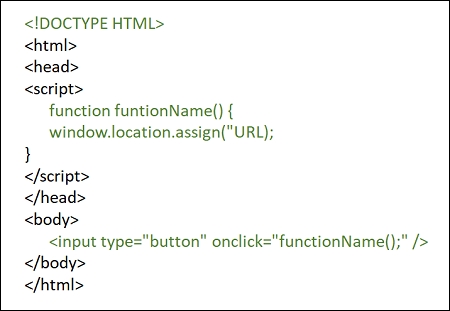
示例
您可以尝试运行以下代码来了解如何使用 window.location 来重定向 HTML 页面。在此,我们将重定向到主页
<html>
   <head>
      <script>
         <!--
            function Redirect() {
               window.location.assign("https://tutorialspoint.com");
            }
         //-->
      </script>
   </head>
   <body>
      <p>Click the following button, you will be redirected to home page.</p>
      <input type="button" value="Redirect Me" onclick="Redirect();" />
   </body>
</html>

更新时间: 2020 年 1 月 13 日
925 次浏览

广告