
 数据结构
数据结构 网络
网络 RDBMS
RDBMS 操作系统
操作系统 Java
Java MS Excel
 iOS
iOS HTML
HTML CSS
CSS Android
 Python
 C 编程
C 编程 C++
C++ C#
C# MongoDB
 MySQL
MySQL Javascript
 PHP
PHP 物理学
物理学 化学
化学 生物学
生物学 数学
数学 英语
英语 经济学
经济学 心理学
心理学 社会学
社会学 服装设计
服装设计 法律研究
法律研究HTML DOM Area 对象
HTML DOM Area 对象与 HTML 中的图像映射相关联。Area 基本上表示图像映射内的可点击区域。
image 对象帮助我们创建和访问对象内的 <area> 元素。我们可以更改映射内的可点击区域或根据用户输入更改图像映射的形状等。它还可以用于操作 area 元素内的链接。
属性
以下是 Area 对象的属性:
| 值 | 描述 |
|---|---|
| alt | 设置或返回 alt 属性值。 |
| coords | 设置或返回区域的 coords 属性。 |
| hash | 设置或返回 href 属性值的锚部分。 |
| host | 设置或返回 href 属性的主机名和端口部分。 |
| hostname | 设置或返回 href 属性的主机名部分。 |
| href | 设置或返回区域的 href 属性的值。 |
| noHref | 设置或返回区域的 nohref 属性的值。在 HTML5 中已弃用。 |
| origin | 返回 href 属性的协议、主机名和端口部分。 |
| password | 设置或返回 href 属性的密码部分。 |
| pathname | 设置或返回 href 属性的文件路径部分。 |
| port | 设置或返回 href 属性的端口部分。 |
示例
让我们来看一个 area 对象的示例:
<!DOCTYPE html>
<html>
<body>
<img
src="https://upload.wikimedia.org/wikipedia/commons/thumb/f/fb/New7Wonders.jpg/276pxNew7Wonders.jpg" width="400" height="400" usemap="#7Wonders">
<map id="WonderWorld" name="7Wonders">
</map>
<p>Click the button to create an AREA element with a link to "Maya City", which is one of the New Seven Wonders of the World.</p>
<button onclick="myWonder()">CLICK IT</button>
<p id="SAMPLE"></p>
<script>
   function myWonder() {
      var x = document.createElement("AREA");
      x.setAttribute("href", "https://en.wikipedia.org/wiki/Maya_city");
      x.setAttribute("shape", "circle");
      x.setAttribute("coords", "124,58,16");
      document.getElementById("WonderWorld").appendChild(x);
      document.getElementById("SAMPLE").innerHTML = "The AREA element was created, and
      you can now click on Maya City.";
   }
</script>
</body>
</html>
输出
这将产生以下输出:
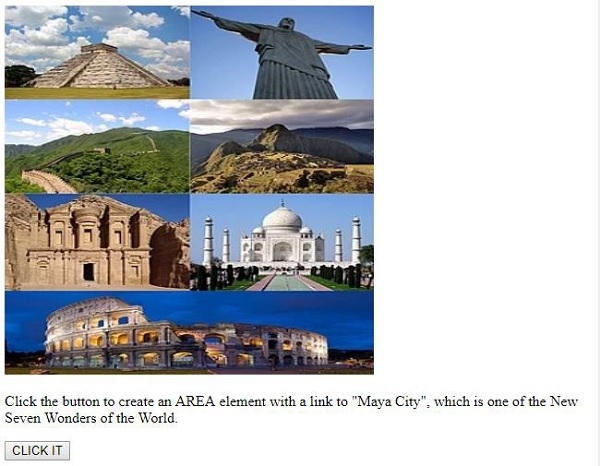
点击“CLICK IT”按钮后:

现在,当您点击“玛雅城”时,它将带您到其维基百科页面。
在上面的示例中:
我们使用 标签包含了一个图像,并指定了其宽度、高度和 id。
<img data-fr-src="https://upload.wikimedia.org/wikipedia/commons/thumb/f/fb/New7Wonders.jpg/276pxNew7Wonders.jpg" width="400" height="300" usemap="#7Wonders">
然后我们创建了一个空映射,稍后我们将在此处添加图像、区域和其他内容:
<map id="WonderWorld" name="7Wonders"></map>
然后我们创建了一个名为“CLICK IT”的按钮,它将执行 myWonder() 函数。
<button onclick="myWonder()">CLICK IT</button>
myWonder() 函数首先创建一个 元素并将其分配给变量 x。为其设置各种属性,如 href、shape 和 cords。最后,我们将与变量 x 关联的 元素作为子节点附加到图像映射,并显示创建的区域元素,现在您可以使用 innerHTML 点击 id 为“Sample”的段落内的“玛雅城”:
function myWonder() {
   var x = document.createElement("AREA");
   x.setAttribute("href", "https://en.wikipedia.org/wiki/Maya_city ");
   x.setAttribute("shape", "circle");
   x.setAttribute("coords", "124,58,16");
   document.getElementById("WonderWorld").appendChild(x);
   document.getElementById("SAMPLE").innerHTML = "The AREA element was created, and
   you can now click on Maya City.";
}

更新于: 2019年8月6日
86 次浏览

广告