
 数据结构
数据结构 网络
网络 RDBMS
RDBMS 操作系统
操作系统 Java
Java MS Excel
 iOS
iOS HTML
HTML CSS
CSS Android
 Python
 C 编程
C 编程 C++
C++ C#
C# MongoDB
 MySQL
MySQL Javascript
 PHP
PHP 物理
物理 化学
化学 生物
生物 数学
数学 英语
英语 经济学
经济学 心理学
心理学 社会学
社会学 时尚研究
时尚研究 法学
法学HTML DOM embed 对象
HTML DOM embed 对象与 HTML <embed> 元素相关联。<embed> 元素可用于嵌入各种外部应用程序,如音频、视频等。
特性
以下为 HTML DOM embed对象的特性:
| 特性 | 说明 |
|---|---|
| 高度 | 设置或返回嵌入元素高度属性值。 |
| 源 | 设置或返回嵌入元素中 src 属性值。 |
| 类型 | 设置或返回嵌入元素中 type 属性值。 |
| 宽度 | 设置或返回嵌入元素中 width 属性值。 |
语法
语法如下:
创建嵌入对象:
var e = document.createElement("EMBED");示例
我们来看一个 embed 对象的示例:
<!DOCTYPE html>
<html>
<body>
<p>Embed a pdf into this page by clicking the below button</p>
<button onclick="embedObj()">Embed pdf</button>
<br><br>
<script>
   function embedObj() {
      var e = document.createElement("EMBED");
      e.setAttribute("src", "Text-converted.pdf");
      e.width="400px";
      e.height="200px";
      e.style.border="2px solid blue";
      document.body.appendChild(e);
   }
</script>
</body>
</html>
输出
将产生以下输出:

点击创建按钮:
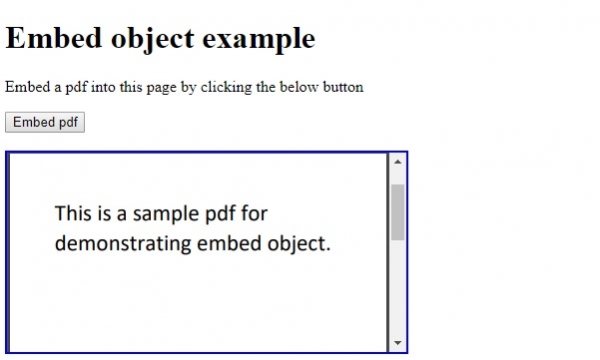
在以上示例中:
我们首先创建了按钮“嵌入 pdf”,当用户点击时,它将执行 embedObj() 函数:
<button onclick="embedObj()">Embed pdf</button>
embedObj 函数使用文档正文的 createElement() 方法创建了一个 <embed> 元素,并将其赋值给变量 e。然后,我们设置 <embed> 元素高度、宽度、src 和边框属性。最后,使用 appendChild() 方法将 <embed> 元素追加为文档正文子对象:
function embedObj() {
   var e = document.createElement("EMBED");
   e.setAttribute("src", "Text-converted.pdf");
   e.width="400px";
   e.height="200px";
   e.style.border="2px solid blue";
   document.body.appendChild(e);
}

更新于: 08-Aug-2019
243 次浏览

广告