
 数据结构
数据结构 网络
网络 RDBMS
RDBMS 操作系统
操作系统 Java
Java MS Excel
 iOS
iOS HTML
HTML CSS
CSS Android
 Python
 C 编程
C 编程 C++
C++ C#
C# MongoDB
 MySQL
MySQL Javascript
 PHP
PHP 物理
物理 化学
化学 生物
生物 数学
数学 英语
英语 经济学
经济学 心理学
心理学 社会科学
社会科学 时装研究
时装研究 法律研究
法律研究HTML DOM MenuItem 对象
HTML 中的 HTML DOM MenuItem 对象表示 <menuitem> 元素。
注意 − <menuitem> 元素仅受 Mozilla Firefox 浏览器支持。
语法
以下是语法 −
创建 <menuitem> 元素
var menuItemObject = document.createElement(“MENUITEM”)
属性
此处,menuItemobject 可具有以下属性 −
| 属性 | 描述 |
|---|---|
| checked | 设置/返回(true/false)表示是否应选中菜单项 |
| command | 设置/返回 command 属性的值 |
| default | 设置/返回 menuItem 是否应为默认值 |
| disabled | 设置/返回 menuItem 是否应禁用 |
| icon | 设置/返回表示 menuItem 的图像 |
| label | 设置/返回 menuItem 的 label 属性的值 |
| radiogroup | 设置/返回 menuItem 的 radiogroup 属性的值 |
| type | 设置/返回 menuItem 的 type 属性的值 |
示例
我们来看一个 HTML DOM MenuItem 元素的示例 −
<!DOCTYPE html>
<html>
<head>
<title>Menu Object</title>
<style>
   form {
      width:70%;
      margin: 0 auto;
   text-align: center;
   }
   * {
      padding: 2px;
      margin:5px;
   }
   input[type="button"] {
      border-radius: 10px;
   }
</style>
</head>
<body>
<form contextmenu="MENU">
<fieldset>
<legend>Menu-Object</legend>
<label for="urlSelect">Current URL:</label>
<input type="url" size="30" id="urlSelect" value="https://www.example.com/aboutUs">
<div id="divDisplay"></div>
</fieldset>
<menu type="context"
id="MENU">
<menuitem label="Get URL"
onclick="contextFunction(1);">
</menuitem>
<menuitem label="Get Hostname"
onclick="contextFunction(2);">
</menuitem>
</menu>
</form>
<script>
   var divDisplay = document.getElementById("divDisplay");
   var urlSelect = document.getElementById("urlSelect");
   function gethref(){
      divDisplay.textContent = 'URL Path: '+location.href;
   }
   function getHostname(){
      divDisplay.textContent = 'Hostname: '+location.hostname;
   }
   function contextFunction(role){
      if(role === 1)
         this.gethref();
      else
         this.getHostname();
   }
</script>
</body>
</html>
输出
这将产生以下输出 −
右键单击表单 −
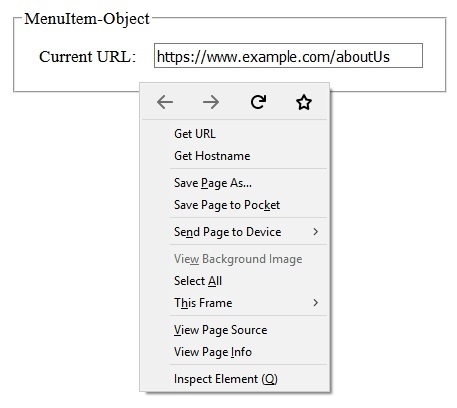
点击上下文菜单中的“获取网址”菜单项后−
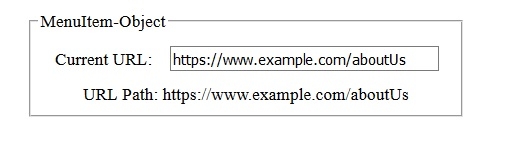
点击上下文菜单中的“获取主机名”菜单项后−
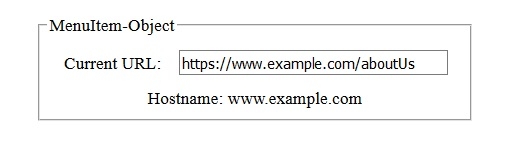

更新于:31-Jul-2019
76 次浏览

广告