
 数据结构
数据结构 网络
网络 关系型数据库管理系统 (RDBMS)
 操作系统
操作系统 Java
Java MS Excel
 iOS
iOS HTML
HTML CSS
CSS Android
 Python
 C 编程
C 编程 C++
C++ C#
C# MongoDB
 MySQL
MySQL Javascript
 PHP
PHP 物理
物理 化学
化学 生物
生物 数学
数学 英语
英语 经济学
经济学 心理学
心理学 社会学
社会学 时尚研究
时尚研究 法律研究
法律研究HTML DOM 下划线对象
HTML DOM 下划线对象在 HTML 中表示 <u> 元素。
创建一个 <u> 元素
var uObject = document.createElement(“U”)
让我们看看一个 下划线 元素示例 -
示例
<!DOCTYPE html>
<html>
<head>
<title>HTML DOM Underline</title>
<style>
   form {
      width:70%;
      margin: 0 auto;
      text-align: center;
   }
   * {
      padding: 2px;
      margin:5px;
   }
   input[type="button"] {
      border-radius: 10px;
   }
</style>
</head>
<body>
   <form>
      <fieldset>
         <legend>HTML-DOM-Underline</legend>
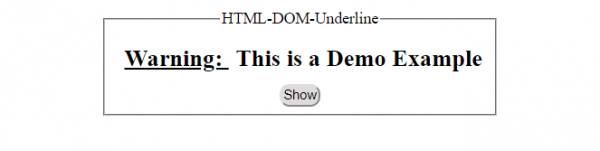
         <h2 ><u id="Underline">Warning: </u>This is a Demo Example</h2>
         <input type="button" value="Show" onclick="getBetterDisp()">
      </fieldset>
   </form>
<script>
   var uObject = document.getElementById("Underline");
   function getBetterDisp() {
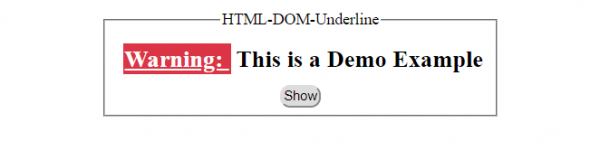
      uObject.style.backgroundColor = '#DC3545';
      uObject.style.color = '#FFF';
   }
</script>
</body>
</html>
输出
点击 显示 按钮前 -
点击 显示 按钮后 -

更新于: 2019 年 10 月 30 日
145 次浏览

广告