
 数据结构
数据结构 网络
网络 RDBMS
RDBMS 操作系统
操作系统 Java
Java MS Excel
 iOS
iOS HTML
HTML CSS
CSS Android
 Python
 C 编程
C 编程 C++
C++ C#
C# MongoDB
 MySQL
MySQL Javascript
 PHP
PHP 物理
物理 化学
化学 生物
生物 数学
数学 英语
英语 经济
经济 心理学
心理学 社会科学
社会科学 时尚
时尚 法律
法律PHP 中的 imagearc() 函数
imagearc() 函数用于绘制弧
语法
imagearc( $img, $cx, $cy, $width, $height, $start, $end, $color )
参数
$img:使用 imagecreatetruecolor() 创建图像。
$cx:圆心的 x 坐标。
$cy:圆心的 y 坐标。
$width:弧的宽度。
$height:弧的高度。
$start:以度为单位的弧的起始角度。
$end:以度为单位的弧的结束角度。
$color:设置图像颜色。
返回值
imagearc() 函数在成功时返回 TRUE,在失败时返回 FALSE。
示例
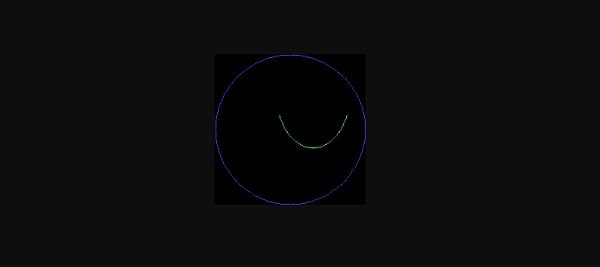
以下是一个示例
<?php
   $img = imagecreatetruecolor(200, 200);
   $one = imagecolorallocate($img, 100, 50, 255);
   $two = imagecolorallocate($img, 30, 255, 150);
   imagearc($img, 100, 100, 200, 200, 0, 360, $one);
   imagearc($img, 130, 50, 100, 150, 25, 155, $two);
   header("Content-type: image/png");
   imagepng($img);
   imagedestroy($img);
?>
输出
以下为输出
示例
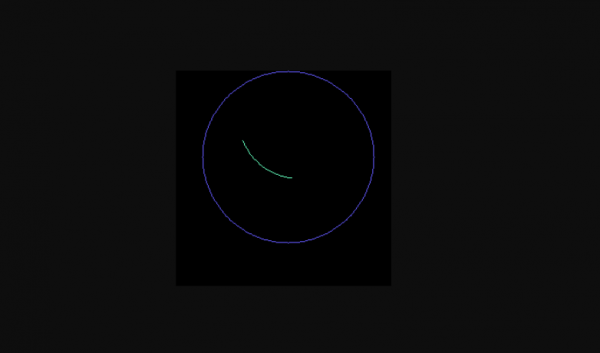
让我们看另一个示例,其中弧的坐标和角度不同
<?php
$img = imagecreatetruecolor(250, 250);
$one = imagecolorallocate($img, 100, 90, 255);
$two = imagecolorallocate($img, 100, 255, 190);
imagearc($img, 130, 100, 200, 200, 0, 360, $one);
imagearc($img, 140, 50, 140, 150, 95, 155, $two);
header("Content-type: image/png");
imagepng($img);
imagedestroy($img);
?>
输出
以下为输出

更新时间: 2019 年 12 月 31 日
276 次浏览

广告