
 数据结构
数据结构 网络
网络 关系型数据库管理系统 (RDBMS)
 操作系统
操作系统 Java
Java MS Excel
 iOS
iOS HTML
HTML CSS
CSS Android
 Python
 C 编程
C 编程 C++
C++ C#
C# MongoDB
 MySQL
MySQL Javascript
 PHP
PHP 物理学
物理学 化学
化学 生物学
生物学 数学
数学 英语
英语 经济学
经济学 心理学
心理学 社会学
社会学 服装设计
服装设计 法学
法学在 MATLAB 中增加和减少图像亮度
在图像中,亮度是由我们的眼睛根据图像不同区域反射的光量来解释的一个属性。亮度与图像中的光强度有关,即如果图像光线充足,则看起来更亮。如果图像光线较弱,则看起来更暗。
因此,亮度会影响图像的视觉质量。但是,我们有各种工具,如 MATLAB,可以调整图像的亮度并增强其视觉质量。
在数字图像中,亮度由图像的像素值控制。因此,如果我们想要调整图像的亮度,我们需要更改图像不同颜色通道的像素值。
如果我们必须增加图像的亮度,我们需要增加图像像素的强度值。
另一方面,如果我们需要降低图像的亮度,我们需要降低图像像素的强度值。
MATLAB 是一个强大的数字图像处理工具。它提供了多种方法来有效地增加和减少图像的亮度。阅读本文以了解使用 MATLAB 增加和减少图像亮度的方法。
通过缩放像素值
在 MATLAB 中,缩放像素值是增加和减少图像亮度的最简单方法。
在这种方法中,我们定义一个缩放因子来调整图像像素的强度值。
下面解释了使用缩放像素值方法增加和减少图像亮度所涉及的步骤:
步骤 1 - 使用“imread”函数读取输入图像。
步骤 2 - 指定一个缩放因子来更改图像的亮度。
步骤 3 - 将输入图像与缩放因子相乘以调整图像的亮度。
步骤 4 - 将像素值剪辑到有效范围,即 [0, 255]。
步骤 5 - 将修改后的图像转换为适当的格式,并使用“imshow”函数显示。
示例
现在让我们了解使用 MATLAB 更改图像亮度的这五个步骤的实现。
% MATLAB code to change brightness of image using scaling factor
% Read the input image
img = imread('https://tutorialspoint.com/assets/questions/media/14304-1687425236.jpg');

% Specify a scaling factor
S1 = 1.5;	% Increase brightness
S2 = 0.7;	% Decrease brightness

% Scale the input image to adjust the brightness
brightened_img = img * S1;
darker_img = img * S2;

% Adjust pixel values to the valid range
brightened_img = max(0, min(brightened_img, 255));
darker_img = max(0, min(darker_img, 255));

% Convert to uint8 format to display
brightened_img = uint8(brightened_img);
darker_img = uint8(darker_img);

% Display the input, brightened, and darker images
figure;
subplot(1, 3, 1);
imshow(img);
title('Input Image');

subplot(1, 3, 2);
imshow(brightened_img);
title('Brightened Image');

subplot(1, 3, 3);
imshow(darker_img);
title('Darker Image');
输出
使用我们的输入图像,我们得到了以下输出:

通过加减常数
在这种方法中,我们分别向给定图像添加和减去一个常数值以增加和减少图像的亮度。
这是在 MATLAB 中更改图像亮度的一种直接方法。
下面解释了通过向图像添加和减去常数来增加和减少图像亮度的分步过程:
步骤 1 - 使用“imread”函数读取输入图像。
步骤 2 - 向输入图像添加常数“X”以增加其亮度。或者从输入图像中减去常数“X”以降低其亮度。
步骤 3 - 将生成的图像转换为合适的格式,如“uint8”进行显示。
步骤 4 - 使用“imshow”函数显示调整后的图像。
示例
让我们通过 MATLAB 中的一个示例程序来了解这种方法。
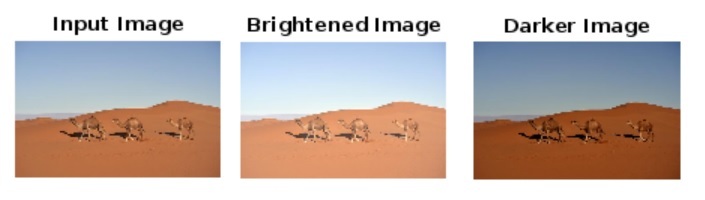
% MATLAB code to change brightness of image by adding and subtracting a constant
% Read the input image
img = imread('https://tutorialspoint.com/assets/questions/media/14304-1687425269.jpg');

% Adjust the brightness of the image
brightened_img  = img + 40;	% Increase brightness
darker_img = img - 40;	% Decrease brightness

% Convert to uint8 format to display
brightened_img = uint8(brightened_img);
darker_img = uint8(darker_img);

% Display the input, brightened, and darker images
figure;
subplot(1, 3, 1);
imshow(img);
title('Input Image');

subplot(1, 3, 2);
imshow(brightened_img);
title('Brightened Image');

subplot(1, 3, 3);
imshow(darker_img);
title('Darker Image');
输出
使用我们的输入图像,我们得到了以下输出:
使用伽马校正
在 MATLAB 中,还有另一种增加和减少图像亮度的方法,称为“伽马校正”。此方法使用幂律变换更改图像像素的强度值。
下面描述了使用伽马校正方法增加和减少图像亮度的分步过程:
步骤 1 - 使用“imread”函数读取输入图像。
步骤 2 - 定义一个伽马因子来更改图像的亮度。
步骤 3 - 使用指定的伽马因子和“imadjust”函数调整图像的亮度。
步骤 4 - 使用“imshow”函数显示亮度调整后的图像。
示例
以下示例演示了此方法在增加和减少图像亮度方面的实际实现。
% MATLAB code to change brightness of image using gamma correction
% Read the input image
img = imread('https://tutorialspoint.com/assets/questions/media/14304-1687425323.jpg');

% Define a gamma factor to adjust the brightness
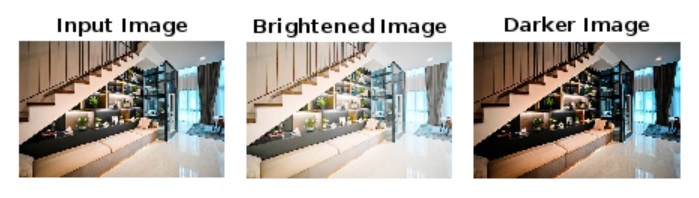
g1 = 0.4;		% Increase brightness
g2 = 1.7;		% Decrease brightness

% Adjust the brightness of the image
brightened_img  = imadjust(img, [], [], g1);
darker_img  = imadjust(img, [], [], g2);

% Display the input, brightened, and darker images
figure;
subplot(1, 3, 1);
imshow(img);
title('Input Image');

subplot(1, 3, 2);
imshow(brightened_img);
title('Brightened Image');

subplot(1, 3, 3);
imshow(darker_img);
title('Darker Image');
输出
使用此输入图像,我们得到了以下输出:
结论
总之,图像中的亮度是与图像中光强度相关的属性。如果图像光线充足,则认为它更亮。如果光线较弱,则称其为较暗。因此,增加和减少图像的亮度分别使其更亮和更暗。
MATLAB 提供了多种有效的方法来增加和减少图像的亮度。在本教程中,我解释了所有常用方法,以使用 MATLAB 调整图像的亮度。

443 次查看
