
 数据结构
数据结构 网络
网络 关系型数据库管理系统 (RDBMS)
 操作系统
操作系统 Java
Java MS Excel
 iOS
iOS HTML
HTML CSS
CSS Android
 Python
 C 语言编程
 C++
C++ C#
C# MongoDB
 MySQL
MySQL Javascript
 PHP
PHP 物理学
物理学 化学
化学 生物学
生物学 数学
数学 英语
英语 经济学
经济学 心理学
心理学 社会学
社会学 时尚研究
时尚研究 法律研究
法律研究进程间通信 (IPC) 使用消息队列
当我们已经拥有共享内存时,为什么还需要消息队列?这可能出于多种原因,让我们尝试将其分解成多个要点以简化理解:
如我们所知,一旦一个进程接收了消息,其他任何进程都将无法再访问该消息。而在共享内存中,多个进程可以访问数据。
如果我们希望使用较小的消息格式进行通信。
当多个进程同时通信时,需要使用同步机制来保护共享内存数据。
如果使用共享内存进行读写操作的频率很高,那么实现该功能将非常复杂。在这种情况下,不值得使用它。
如果并非所有进程都需要访问共享内存,而只有少数几个进程需要访问,那么使用消息队列来实现会更好。
如果我们希望使用不同的数据包进行通信,例如进程 A 向进程 B 发送消息类型 1,向进程 C 发送消息类型 10,向进程 D 发送消息类型 20。在这种情况下,使用消息队列来实现更简单。为了简化给定的消息类型 1、10、20,它可以是 0 或正数或负数,如下所述。
当然,消息队列的顺序是 FIFO(先进先出)。第一个插入队列的消息将是第一个被检索到的消息。
使用共享内存或消息队列取决于应用程序的需求以及如何有效地利用它们。
使用消息队列进行通信可以通过以下方式实现:
一个进程写入共享内存,另一个进程从共享内存读取。我们知道,多个进程也可以进行读取。

一个进程使用不同的数据包写入共享内存,多个进程从中读取,即根据消息类型。
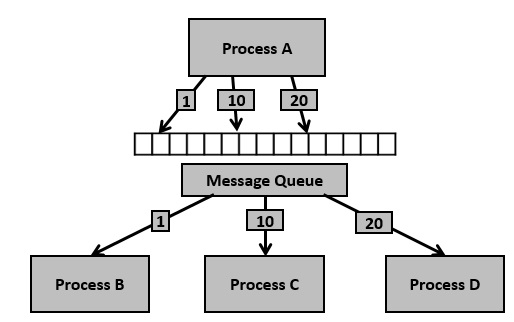
在了解了消息队列的一些信息之后,现在是时候检查支持消息队列的系统调用(System V)了。
要使用消息队列进行通信,请执行以下步骤:
**步骤 1** - 创建消息队列或连接到已存在的队列 (msgget())
**步骤 2** - 向消息队列写入数据 (msgsnd())
**步骤 3** - 从消息队列读取数据 (msgrcv())
**步骤 4** - 对消息队列执行控制操作 (msgctl())
这里我们将创建两个进程。一个可以写入,另一个可以读取。让我们看看读取器和写入器进程是如何使用共享内存工作的。
示例代码
#include <stdio.h>
#include <sys/ipc.h>
#include <sys/msg.h>
// structure for message queue
struct msg_buffer {
   long msg_type;
   char msg[100];
} message;
main() {
   key_t my_key;
   int msg_id;
   my_key = ftok("progfile", 65); //create unique key
   msg_id = msgget(my_key, 0666 | IPC_CREAT); //create message queue and return id
   message.msg_type = 1;
   printf("Write Message : ");
   fgets(message.msg, 100, stdin);
   msgsnd(msg_id, &message, sizeof(message), 0); //send message
   printf("Sent message is : %s \n", message.msg);
}
示例代码
#include <stdio.h>
#include <sys/ipc.h>
#include <sys/msg.h>
// Define message queue structure
struct msg_buffer {
   long msg_type;
   char msg[100];
} message;
main() {
   key_t my_key;
   int msg_id;
   my_key = ftok("progfile", 65); //create unique key
   msg_id = msgget(my_key, 0666 | IPC_CREAT); //create message queue and return id
   msgrcv(msg_id, &message, sizeof(message), 1, 0); //used to receive message
   // display the message
   printf("Received Message is : %s \n", message.msg);
   msgctl(msg_id, IPC_RMID, NULL); //destroy the message queue
   return 0;
}
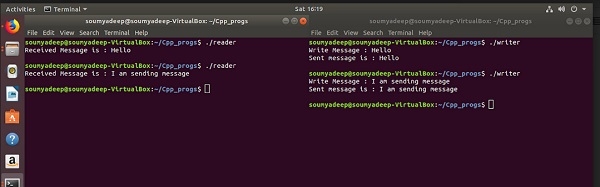
输出

3K+ 浏览量
