
 数据结构
数据结构 网络
网络 关系数据库管理系统 (RDBMS)
 操作系统
操作系统 Java
Java MS Excel
 iOS
iOS HTML
HTML CSS
CSS Android
 Python
 C语言编程
C语言编程 C++
C++ C#
C# MongoDB
 MySQL
MySQL Javascript
 PHP
PHP 物理学
物理学 化学
化学 生物学
生物学 数学
数学 英语
英语 经济学
经济学 心理学
心理学 社会学
社会学 服装学
服装学 法学
法学Java程序打开命令提示符并插入命令
本文使用多种方法来选择通过Java代码插入到打开的命令窗口中的命令。命令窗口使用“cmd”打开。这里,使用Java代码指定了执行相同操作的方法。命令窗口首先使用Java程序打开。它作为子进程打开。如果Java程序在现有的cmd窗口中运行,则另一个窗口将作为新进程打开。此外,不同类型的命令通过Java代码插入并在此打开的命令窗口中执行。
这些程序可能无法在在线编程环境中运行。本文的输出部分详细介绍了如何使用javac和java命令运行这些程序。
算法
步骤1 - 使用Java代码打开CMD窗口。
步骤2 - 选择要执行的命令。选择的命令用文本字符串表示。
步骤3 - 通过Java程序在打开的CMD窗口中执行选择的命令。
步骤4 - 查看结果。
多种方法
对于这些程序,命令的选择使用两种不同的方法。
使用更改cmd窗口属性的命令。
使用可执行命令
让我们逐一查看程序及其输出。
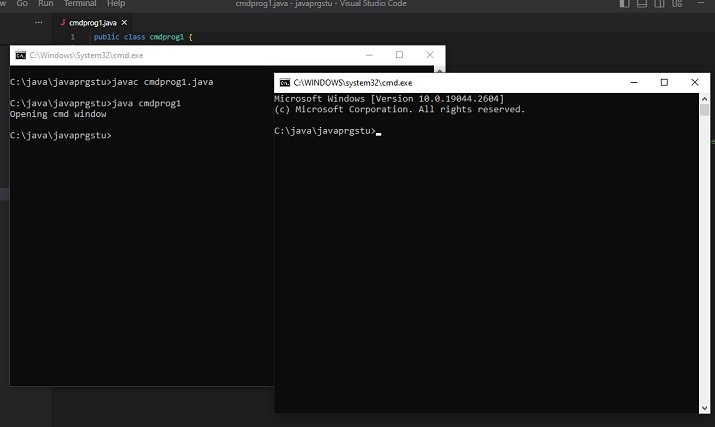
首先,给出启动新的CMD窗口的Java代码。
Java代码(启动新的CMD窗口)
public class cmdprog1 {
   public static void main(String[] args) {
      System.out.println("Opening cmd window");
      try{

         // cmd is a command that opens the command window
         //CMD /C is used to run commands and then terminate the existing window while CMD /K will run the command and then it returns you to the given prompt. Runtime.getRuntime().exec(new String[] {"cmd", "/K", "Start"});
         // the following line can also be used.....
         //Runtime.getRuntime().exec(new String[] {"cmd", "/C", "Start"});
      }
      catch (Exception e){
         System.out.println("Error: " + e);
      }
   }
}
输出
C:\java\javaprgstu>javac cmdprog1.java
C:\java\javaprgstu>java cmdprog1
Opening cmd window
C:\java\javaprgstu>
方法1:使用更改cmd窗口属性的命令。
在这种方法中,使用了两个不同的示例。
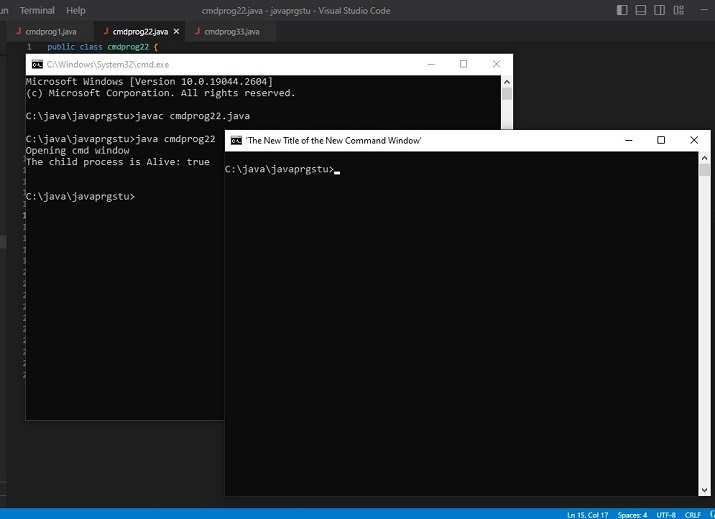
示例1:打开时更改CMD窗口的标题。
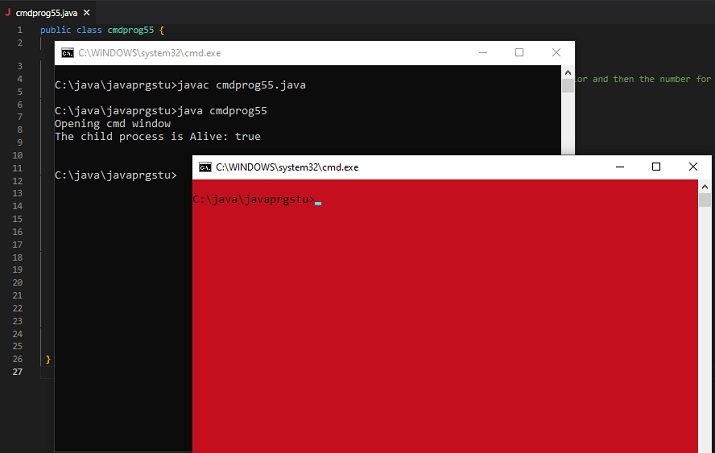
示例2:打开时更改CMD窗口的背景和前景颜色。
示例1:打开时更改CMD窗口的标题。
程序
public class cmdprog22 {
   public static void main(String[] args) {
      String command_to_playwith =" title 'The New Title of the New Command Window' ";
      System.out.println("Opening cmd window");
      try {
         String command = "cmd /c" + " start" + command_to_playwith;
         //Starting the new child process
         Process childprocess11 = Runtime.getRuntime().exec(command);
         System.out.println("The child process is Alive: " + childprocess11.isAlive());
         System.out.println();
      }
      catch (Exception e){
         System.out.println("Error: " + e);
      }
   }
}
输出
C:\java\javaprgstu>javac cmdprog22.java
C:\java\javaprgstu>java cmdprog22
Opening cmd window
The child process is Alive: true
示例2:打开时更改CMD窗口的背景和前景颜色。
public class cmdprog55 {
   public static void main(String[] args) {

      //the following command will change the color of the cmd window. First the number for bg color and then the number for fg color is added.
      // 4 means red color and 0 means black color
      String command_to_playwith =" COLOR 40";
      System.out.println("Opening cmd window");
      try {
         String command = "cmd /c" + " start" + command_to_playwith;

         // starting the child process ....
         Process childprocess11 = Runtime.getRuntime().exec(command);
         System.out.println("The child process is Alive: " + childprocess11.isAlive());
         System.out.println();
      }
      catch (Exception e){
         System.out.println("Error: " + e);
      }
   }
}
输出(方法1:示例2)
C:\java\javaprgstu>javac cmdprog55.java
C:\java\javaprgstu>java cmdprog55
Opening cmd window
The child process is Alive: true
方法2:使用可执行命令
新的cmd窗口作为子进程打开。插入的命令结果将仅在新的cmd窗口中显示。在这种方法中,使用了三个不同的示例。
示例1 在打开的CMD窗口中显示消息。
示例2 显示txt文件的内容。
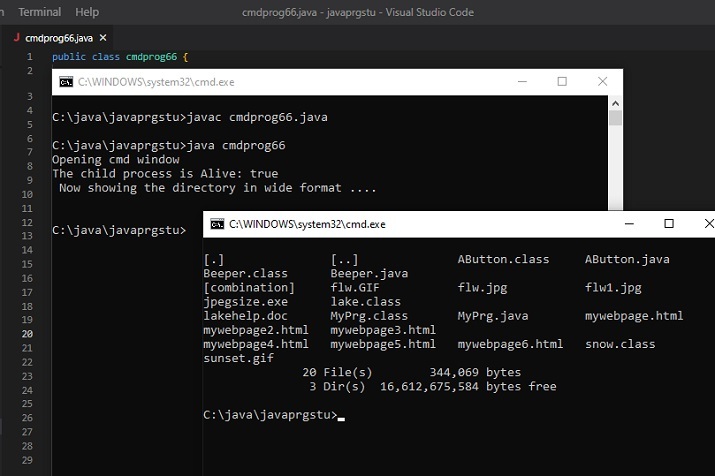
示例3 以宽格式显示文件夹内容。
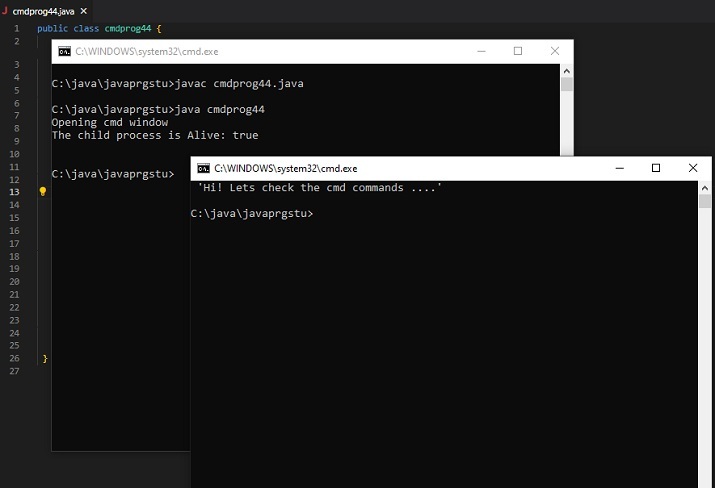
示例1:在打开的CMD窗口中显示消息。
public class cmdprog44 {
   public static void main(String[] args) {

      // The following command will display the message specified.
      String command_to_playwith =" ECHO 'Hi! Lets check the cmd commands ....'";
      System.out.println("Opening cmd window");
      try {
         String command = "cmd /c" + " start" + command_to_playwith;
         // starting the child process....
         Process childprocess11 = Runtime.getRuntime().exec(command);
         System.out.println("The child process is Alive: " + childprocess11.isAlive());
         System.out.println();
      }
      catch (Exception e){
         System.out.println("Error: " + e);
      }
   }
}
System.out.println("Opening cmd window");
   try {
      String command = "cmd /c" + " start" + command_to_playwith;
      // starting the child process ....
      Process childprocess11 = Runtime.getRuntime().exec(command);
      System.out.println("The child process is Alive: " + childprocess11.isAlive());
      System.out.println();
   }
   catch (Exception e){
      System.out.println("Error: " + e);
   }
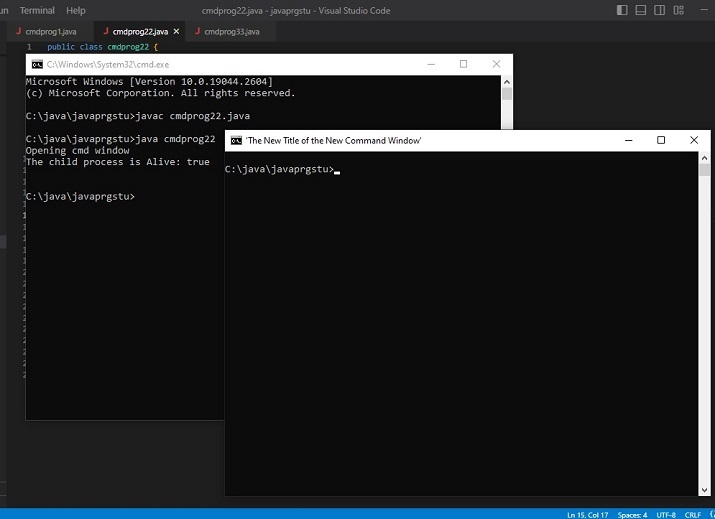
输出(方法2:示例1)
C:\java\javaprgstu>javac cmdprog44.java
C:\java\javaprgstu>java cmdprog44
Opening cmd window
The child process is Alive: true
示例2:显示txt文件的内容。
public class cmdprog33 {
   public static void main(String[] args) {

      //The following command is the command that is needed to see the contents of the given text file
      String command_to_playwith =" TYPE testfile.txt";
      System.out.println("Opening cmd window");
      try {
         String command = "cmd /c" + " start" + command_to_playwith;

         //Starting the new child process
         Process childprocess11 = Runtime.getRuntime().exec(command);
         System.out.println("The child process is Alive: " + childprocess11.isAlive());
         System.out.println(" Now showing the content of testfile.txt ....\n");
      }
      catch (Exception e){
         System.out.println("Error: " + e);
      }
   }
}
输出
C:\java\javaprgstu>javac cmdprog33.java
C:\java\javaprgstu>java cmdprog33
Opening cmd window
The child process is Alive: true
Now showing the content of testfile.txt ...
示例3:以宽格式显示文件夹内容。
public class cmdprog66 {
   public static void main(String[] args) {

      // The following command will display the specified directory in wide format
      String command_to_playwith =" dir .\applettest /W";
      System.out.println("Opening cmd window");
      try {
         String command = "cmd /c" + " start" + command_to_playwith;

         //Starting the new child process
         Process childprocess11 = Runtime.getRuntime().exec(command);
         System.out.println("The child process is Alive: " + childprocess11.isAlive());
         System.out.println(" Now showing the directory in wide format ....\n");
      }
      catch (Exception e){
         System.out.println("Error: " + e);
      }
   }
}
输出
C:\java\javaprgstu>javac cmdprog66.java
C:\java\javaprgstu>java cmdprog66
Opening cmd window
The child process is Alive: true
Now showing the directory in wide format ...
结论
在本文中,我们探讨了通过Java程序打开后插入到cmd窗口中的不同命令。命令的选择基于不同的类别。第一组命令更改命令窗口的属性,而第二组命令用于在显示打开的命令窗口后在其中显示结果。在这两种情况下,新的cmd窗口都作为子进程打开。

更新于:2024年6月24日
6K+ 次浏览

广告