
 数据结构
数据结构 网络
网络 RDBMS
RDBMS 操作系统
操作系统 Java
Java MS Excel
 iOS
iOS HTML
HTML CSS
CSS Android
 Python
 C 编程
C 编程 C++
C++ C#
C# MongoDB
 MySQL
MySQL Javascript
 PHP
PHP 物理学
物理学 化学
化学 生物学
生物学 数学
数学 英语
英语 经济学
经济学 心理学
心理学 社会学
社会学 时尚学
时尚学 法律学
法律学Arduino 中的链表
伊万·塞德尔的 LinkedList 库帮助在 Arduino 中实现这种数据结构。链表包含一组节点,其中每个节点包含一些数据以及对列表中下一个节点的链接(引用)。
要安装此库,请转到库管理器,然后搜索LinkedList。
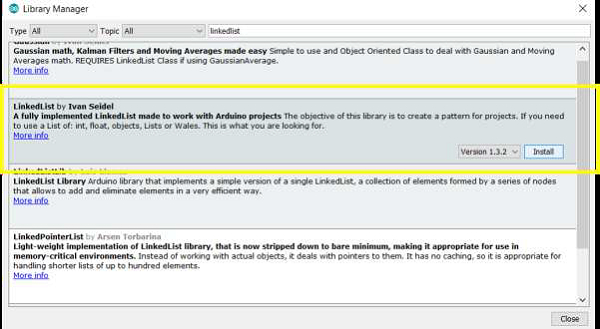
安装完成后,转到:文件→示例→LinkedList并打开 SimpleIntegerList 示例。
大部分代码不言自明。我们包含库并创建对象,并指定整数作为数据类型。
#include <LinkedList.h>
LinkedList<int> myList = LinkedList<int>();
在设置中,我们使用.add()函数用一些整数填充列表。
void setup()
{
   Serial.begin(9600);
   Serial.println("Hello!");

   // Add some stuff to the list
   int k = -240,
      l = 123,
      m = -2,
      n = 222;
   myList.add(n);
   myList.add(0);
   myList.add(l);
   myList.add(17);
   myList.add(k);
   myList.add(m);
}在循环中,我们使用.size()函数打印列表的大小,并使用.get()函数获取每个连续元素。如果该元素的值小于 0,我们将其打印出来。
void loop() {
   int listSize = myList.size();

   Serial.print("There are ");
   Serial.print(listSize);
   Serial.print(" integers in the list. The negative ones are: ");

   // Print Negative numbers
   for (int h = 0; h < listSize; h++) {

      // Get value from list
      int val = myList.get(h);

      // If the value is negative, print it
      if (val < 0) {
         Serial.print(" ");
         Serial.print(val);
      }
   }

   while (true); // nothing else to do, loop forever
}
输出
在串口监视器上运行时,输出如下 −
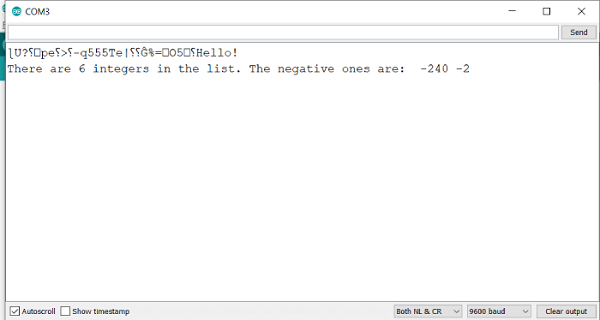
如你所见,这很简单。建议你查阅此库中附带的其他示例。

更新为: 2021-07-26
2 千次观看

广告