
 数据结构
数据结构 网络
网络 关系数据库管理系统
 操作系统
操作系统 Java
Java MS Excel
 iOS
iOS HTML
HTML CSS
CSS Android
 Python
 C 语言编程
 C++
C++ C#
C# MongoDB
 MySQL
MySQL Javascript
 PHP
PHP 物理学
物理学 化学
化学 生物学
生物学 数学
数学 英语
英语 经济学
经济学 心理学
心理学 社会学
社会学 时尚研究
时尚研究 法律研究
法律研究Android 中的 Realm 数据库
简介
Android 中有几种用于存储和检索数据的数据库,例如 SQLite、Room DB、Realm 数据库等等。Realm 数据库也是一种著名的数据存储服务,它使用 SQLite 在我们的 Android 应用程序中存储数据。在本文中,我们将探讨如何在 Android 中使用 Realm 数据库。
实现
我们将创建一个简单的应用程序,其中我们将显示两个文本输入字段。用户可以从这些字段中输入姓名和年龄。然后,我们还将添加一个按钮,我们将使用它来将数据保存到我们的数据库。单击该按钮后,我们将首先验证文本输入字段是否为空。如果文本输入字段不为空,则我们将文本输入字段中的数据添加到我们的 Realm 数据库中。
步骤 1:在 Android Studio 中创建一个新项目
导航到 Android Studio,如下面的屏幕所示。在下面的屏幕中,单击“新建项目”以创建一个新的 Android Studio 项目。
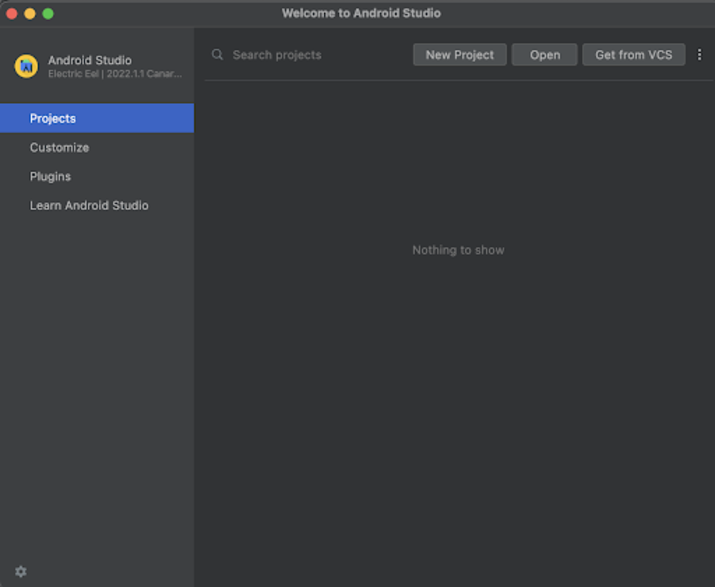
单击“新建项目”后,您将看到下面的屏幕。
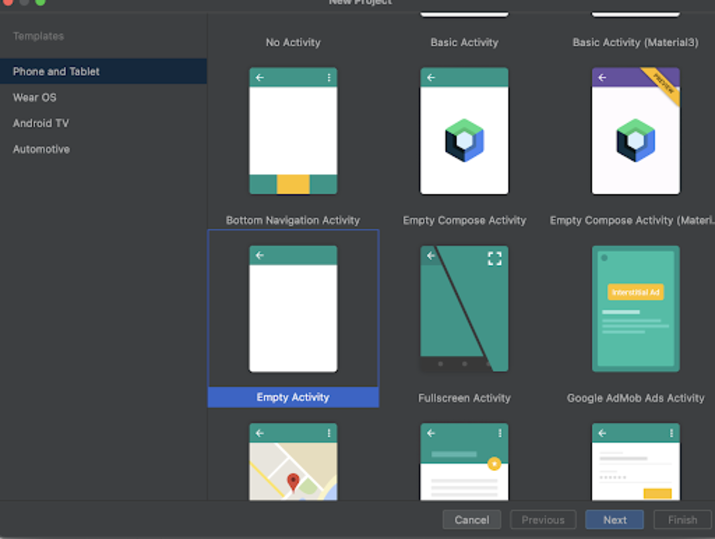
在此屏幕中,我们只需选择“空活动”并单击“下一步”。单击“下一步”后,您将看到下面的屏幕。
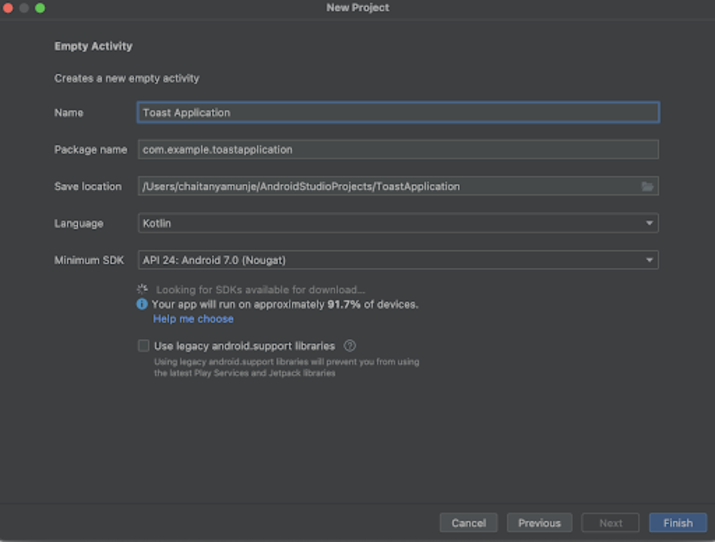
在此屏幕中,我们只需指定项目名称。然后包名将自动生成。
注意:确保将语言选择为 Java。
指定所有详细信息后,单击“完成”以创建一个新的 Android Studio 项目。
创建项目后,我们将看到两个打开的文件,即 activity_main.xml 和 MainActivity.java 文件。
步骤 2:在项目级 build.gradle 文件中添加依赖项
导航到 build.gradle(项目级)文件。在此文件中,在 dependencies 部分添加以下依赖项。
classpath "io.realm:realm-gradle-plugin:10.3.1"
步骤 3:在模块级 build.gradle 文件中添加插件
导航到 build.gradle(模块级)文件。在此文件中,在文件顶部添加以下代码。
apply plugin: 'realm-android'
然后在同一文件中,在 android 部分下方添加以下代码。
realm {
   syncEnabled = true
}
添加上述依赖项后,只需同步您的项目以安装它。
步骤 4:创建一个新的 Java 类来初始化 Realm 数据库
导航到 app>java>您的应用程序包名>右键单击它>新建>Java 类,并将其命名为 RealmDatabase,并向其中添加以下代码。代码中添加了注释以详细了解。
package com.example.java_test_application;
import android.app.Application;
import io.realm.Realm;
public class RealmDatabase extends Application {
   @Override
   public void onCreate() {
      super.onCreate();
      // on below line we are initializing our real m database.
      Realm.init(this);
      // on below line we are creating a variable for realm configuration and initializing it.
      RealmConfiguration config = new RealmConfiguration.Builder()
         // below line is to allow write
         // data to database on ui thread.
         .allowWritesOnUiThread(true)
         // below line is to delete realm
         // if migration is needed.
         .deleteRealmIfMigrationNeeded()
         // at last we are calling a build method to generate the configurations.
         .build();
      // on below line we are setting the default
      // configuration to our realm database.
      Realm.setDefaultConfiguration(config);
   }
}
说明:在上面的代码中,我们正在初始化 Realm 数据库并在 onCreate 方法中为其设置默认配置。
步骤 5:在 AndroidManifest.xml 文件中定义此 RealmDatabase 类
导航到 app>AndroidManifest.xml 文件,并在 application 标签中添加以下行。
android:name=".RealmDatabase"
步骤 6:使用 activity_main.xml
导航到 activity_main.xml。如果此文件不可见。要打开此文件。在左侧窗格中导航到 app>res>layout>activity_main.xml 以打开此文件。打开此文件后。向其中添加以下代码。代码中添加了注释以详细了解。
<?xml version="1.0" encoding="utf-8"?>
<RelativeLayout xmlns:android="http://schemas.android.com/apk/res/android"
   xmlns:tools="http://schemas.android.com/tools"
   android:layout_width="match_parent"
   android:layout_height="match_parent"
   android:orientation="vertical"
   tools:context=".MainActivity">

   <!-- on below line creating a text view for displaying the heading of our application -->
   <TextView
       android:id="@+id/idTVHeading"
       android:layout_width="match_parent"
       android:layout_height="wrap_content"
       android:layout_marginStart="10dp"
       android:layout_marginTop="100dp"
       android:layout_marginEnd="10dp"
       android:gravity="center"
       android:padding="4dp"
       android:text="Realm Database in Android"
       android:textAlignment="center"
       android:textColor="@color/black"
       android:textSize="20sp"
       android:textStyle="bold" />

   <!-- on below line creating edit text for name -->
   <EditText
       android:id="@+id/idEdtName"
       android:layout_width="match_parent"
       android:layout_height="wrap_content"
       android:layout_below="@id/idTVHeading"
       android:layout_margin="10dp"
       android:hint="Enter Name" />

   <!-- on below line creating edit text for age -->
   <EditText
       android:id="@+id/idEdtAge"
       android:layout_width="match_parent"
       android:layout_height="wrap_content"
       android:layout_below="@id/idEdtName"
       android:layout_margin="10dp"
       android:hint="Enter Age" />

   <!-- on below line creating a button for adding data -->
   <Button
       android:id="@+id/idBtnAddData"
       android:layout_width="match_parent"
       android:layout_height="wrap_content"
       android:layout_below="@id/idEdtAge"
       android:layout_margin="10dp"
       android:padding="4dp"
       android:text="Add Data to Database"
       android:textAllCaps="false" />
</RelativeLayout>
说明:在上面的代码中,我们创建了一个根布局作为相对布局。在此布局中,我们创建了一个 TextView,用于显示应用程序的标题。然后,我们创建了两个 EditText 字段,用于接收用户的姓名和年龄输入。之后,我们创建了一个按钮,用于将数据添加到我们的 Realm 数据库。
步骤 7:为我们的数据创建模型类
导航到 app>java>您的应用程序包名>右键单击它>新建 Java 类,并将其命名为 DataObject,并向其中添加以下代码。代码中添加了注释以详细了解。
package com.example.java_test_application;
import io.realm.RealmObject;
import io.realm.annotations.PrimaryKey;
public class DataObject extends RealmObject{
   // on below line creating a long variable for id of each item of db which will be unique.
   @PrimaryKey
   private long id;
   // on below line creatig a variable for name and age.
   private String name;
   private String age;
   // on below line we are creating getter and setter methods for name and age variables.
   public String getName() {
       return name;
   }
   public void setName(String name) {
       this.name = name;
   }
   public String getAge() {
       return age;
   }
   public void setAge(String age) {
       this.age = age;
   }
   // on below line we are
   // creating an empty constructor for Data Object class..
   public DataObject() {
   }
}
说明:在上面的代码中,我们创建了三个变量,第一个是每个数据库条目的 ID,然后创建了姓名和年龄的变量。之后,我们创建了一个空构造函数,最后为姓名和年龄变量创建了 getter 和 setter 方法。
步骤 8:使用 MainActivity.java 文件
导航到 MainActivity.java。如果此文件不可见。要打开此文件。在左侧窗格中导航到 app>res>layout>MainActivity.java 以打开此文件。打开此文件后。向其中添加以下代码。代码中添加了注释以详细了解。
package com.example.java_test_application;
import android.os.Bundle;
import android.view.View;
import android.widget.Button;
import android.widget.EditText;
import android.widget.StackView;
import android.widget.Toast;
import androidx.appcompat.app.AppCompatActivity;
import java.util.ArrayList;
import java.util.List;
import io.realm.gradle.Realm;
public class MainActivity extends AppCompatActivity {
   // creating variables for edit text on below line.
   private EditText nameEdt, ageEdt;
   // creating variable for button on below line.
   private Button addDataBtn;
   // on below line creating a variable for realm.
   private Realm realm;
   @Override
   protected void onCreate(Bundle savedInstanceState) {
       super.onCreate(savedInstanceState);
       setContentView(R.layout.activity_main);
       // initializing variables for edit text on below line.
       nameEdt = findViewById(R.id.idEdtName);
       ageEdt = findViewById(R.id.idEdtAge);
       // initializing variables for button on below line.
       addDataBtn = findViewById(R.id.idBtnAddData);
       // on below line initializing the variable for realm.
       realm = Realm.getDefaultInstance();
       // adding click listener for button on below line.
       addDataBtn.setOnClickListener(new View.OnClickListener() {
           @Override
           public void onClick(View v) {
               // on below line validating if name and age is empty or not.
               if (nameEdt.getText().toString().isEmpty() && ageEdt.getText().toString().isEmpty()) {
                   // if both name and age is empty we are displaying a toast message on below line.
                   Toast.makeText(getApplicationContext(), "Please enter your name and age", Toast.LENGTH_SHORT).show();
               } else {
                   // name and age is not empty in thus case we are adding data to our database.
                   addDataToDB(nameEdt.getText().toString(), ageEdt.getText().toString());
                   // on below line displaying toast message as data has been added to database..
                   Toast.makeText(MainActivity.this, "Data has been added to database..", Toast.LENGTH_SHORT).show();
               }
           }
       });
   }
   private void addDataToDB(String name, String age) {
       // on below line creating and initializing our data object class
       DataObject dataObject = new DataObject();
       // on below line we are getting id for the course which we are storing.
       Number id = realm.where(DataObject.class).max("id");
       // on below line we are
       // creating a variable for our id.
       long nextId;
       // validating if id is null or not.
       if (id == null) {
           // if id is null
           // we are passing it as 1.
           nextId = 1;
       } else {
           // if id is not null then
           // we are incrementing it by 1
           nextId = id.intValue() + 1;
       }
       // on below line setting data for our modal class
       dataObject.setName(name);
       dataObject.setAge(age);
       // on below line we are calling a method to execute a transaction.
       realm.executeTransaction(new Realm.Transaction() {
           @Override
           public void execute(Realm realm) {
               // inside on execute method we are calling a method
               // to copy to real m database from our modal class.
               realm.copyToRealm(modal);
           }
       });
   }
}
说明:在上面的代码中,首先我们为 EditText、Button 和 Realm 数据库创建变量。现在我们将看到 onCreate 方法。这是每个 Android 应用程序的默认方法。当应用程序视图创建时,将调用此方法。在此方法中,我们设置内容视图,即名为 activity_main.xml 的布局文件,以从该文件中设置 UI。在 onCreate 方法中,我们使用我们在 activity_main.xml 文件中给出的 ID 初始化按钮和 EditText 变量。此外,我们还初始化 Realm 数据库的变量。之后,我们为“添加数据”按钮添加了一个点击监听器。在点击监听器方法中,我们首先验证文本输入字段是否为空。我们检查姓名和年龄 EditText 是否为空。如果两者都为空,则显示一条吐司消息。在 else 条件中,我们只是调用 addDatatoDB 方法,该方法用于将数据添加到我们的 Realm 数据库。
在 addDatatoDB 方法中,我们首先为 DataObject 创建和初始化变量。之后,我们创建一个数字,它将为我们提供 ID。然后,我们将 EditText 中的数据(如姓名和年龄)设置为我们的对象类变量。然后,我们调用一个 execute transition 方法,该方法用于将数据从应用程序添加到数据库。最后,在按钮的点击方法中,我们显示一条吐司消息,表示数据已添加到我们的数据库。
添加上述代码后,现在我们只需单击顶部的绿色图标即可在移动设备上运行我们的应用程序。
注意:确保您已连接到您的真实设备或模拟器。
输出
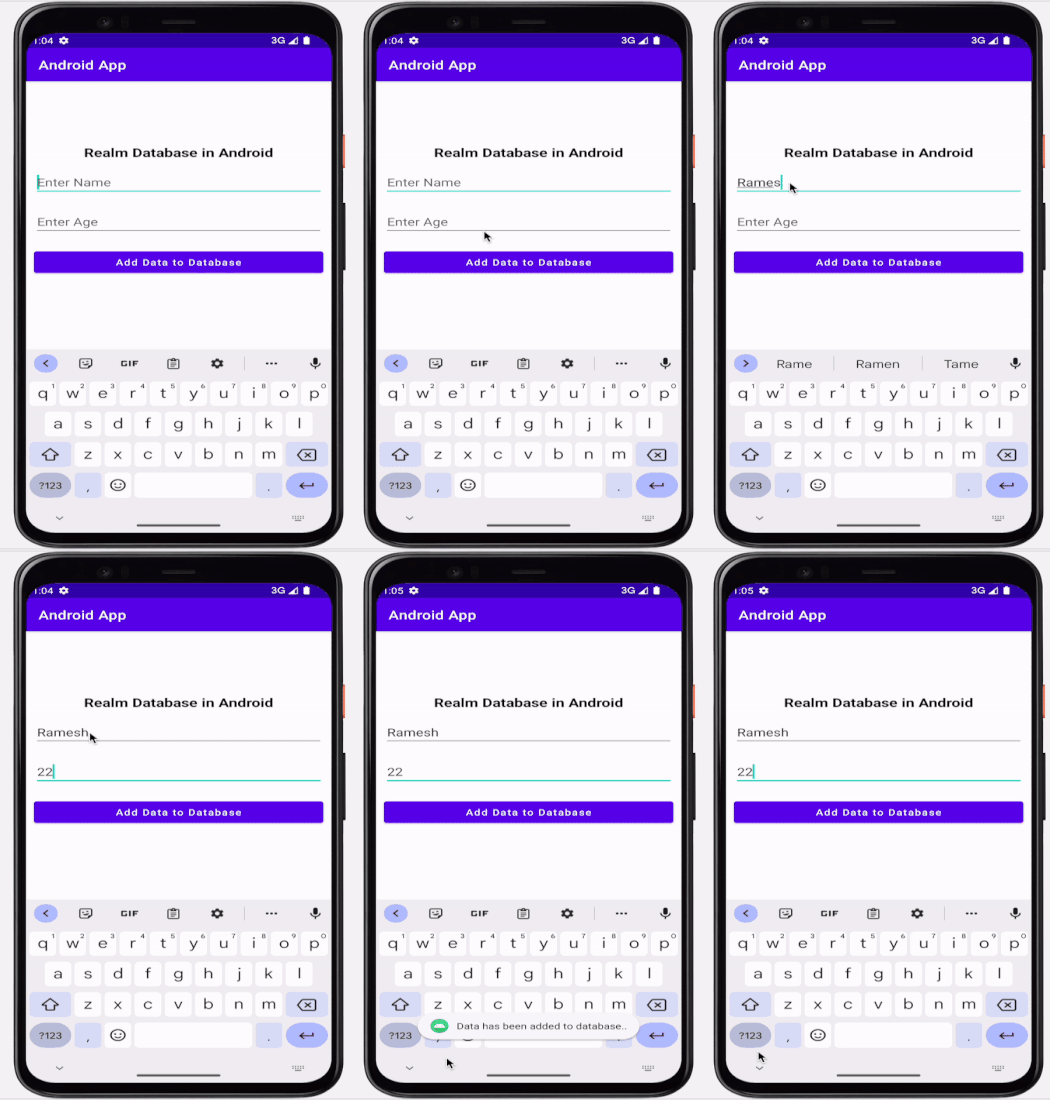
结论
在本文中,我们了解了什么是 Realm 数据库以及如何使用它在 Android 应用程序中存储数据。

3K+ 次查看
