
 数据结构
数据结构 网络
网络 关系数据库管理系统
 操作系统
操作系统 Java
Java MS Excel
 iOS
iOS HTML
HTML CSS
CSS Android
 Python
 C 编程
C 编程 C++
C++ C#
C# MongoDB
 MySQL
MySQL Javascript
 PHP
PHP 物理学
物理学 化学
化学 生物学
生物学 数学
数学 英语
英语 经济学
经济学 心理学
心理学 社会科学
社会科学 时尚研究
时尚研究 法律研究
法律研究使用 CSS 设定下边框样式
要设定底边框的样式,请使用 border-bottom-style 属性。可以设置边框值的选项包括点线、双线、虚线、实线等。
示例
你可以尝试运行以下代码来自定义底边框
<!DOCTYPE html>
<html>
   <head>
      <style>
         p.dotted {border-bottom-style: dotted;}
         p.double {border-bottom-style: double;}
         p.dashed {border-bottom-style: dashed;}
         p.solid {border-bottom-style: solid;}
         p.inset {border-bottom-style: inset;}
         p.outset {border-bottom-style: outset;}
      </style>
   </head>
   <body>
      <p class = "dotted">Dotted bottom border.</p>
      <p class = "double">Double bottom border.</p>
      <p class = "dashed">Dashed bottom border.</p>
      <p class = "solid">Solid bottom border.</p>
      <p class = "inset">Inset bottom border.</p>
      <p class = "outset">Outset bottom border.</p>
   </body>
</html>
输出
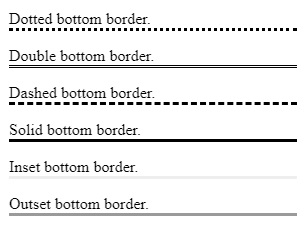

更新时间:21-Jun-2020
134 次浏览

广告