
 数据结构
数据结构 网络
网络 RDBMS
RDBMS 操作系统
操作系统 Java
Java Microsoft Excel
 iOS
iOS HTML
HTML CSS
CSS 安卓
安卓 Python
 C 编程
C 编程 C++
C++ C#
C# MongoDB
 MySQL
MySQL Javascript
 PHP
PHP 物理学
物理学 化学
化学 生物学
生物学 数学
数学 英语
英语 经济学
经济学 心理学
心理学 社会学
社会学 时装研究
时装研究 法律研究
法律研究Springboot + JSP + Spring Security:配置数据源失败。如何配置 MySQL 中的数据源?
若要在 Springboot 中配置数据源,可以将数据源定义到 **application.properties** 中。
Springboot 中的 application.properties 如下所示 −
spring.datasource.username=yourUserName
spring.datasource.password=yourPassword
spring.datasource.url=yourDatabaseUrl
spring.datasource.driver-class-name=yourDriverClassName
项目结构如下 −
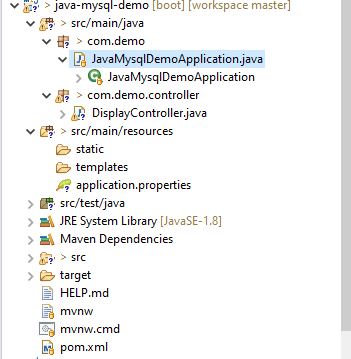
示例
为了理解上述概念,让我们用 Spring Boot 创建一个控制器类。Java 代码如下所示 −
package com.demo.controller;
import java.util.List;
import javax.persistence.EntityManager;
import javax.persistence.Query;
import org.springframework.beans.factory.annotation.Autowired;
import org.springframework.web.bind.annotation.GetMapping;
import org.springframework.web.bind.annotation.RequestMapping;
import org.springframework.web.bind.annotation.RestController;
@RestController
@RequestMapping("/users")
public class DisplayController {
   @Autowired
   EntityManager entityManager;
   @GetMapping("/getdata")
   public String getAll() {
      Query data= entityManager.createNativeQuery("select first_name from demo25");
      List<String> allData= data.getResultList();
      return allData.toString();
   }
}
示例
以下是 Java Spring Boot 的主类 −
package com.demo;
import org.springframework.boot.SpringApplication;
import org.springframework.boot.autoconfigure.SpringBootApplication;
@SpringBootApplication
public class JavaMysqlDemoApplication {
   public static void main(String[] args) {
      SpringApplication.run(JavaMysqlDemoApplication.class, args);
   }
}
这是实际的 Spring Boot application.properties。
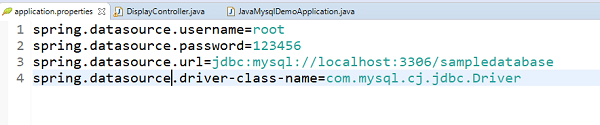
若要运行上述项目,请右键单击主类 − 使用“作为 Java 应用程序运行”。若要获取输出,可以使用以下 URL −
https://:yourPortNumber/users/getdata
这将生成以下输出 −
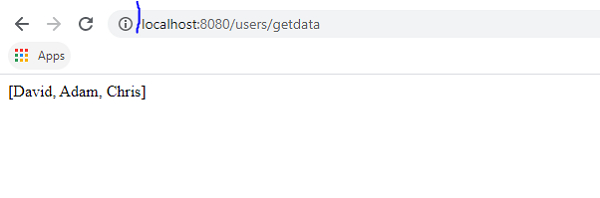
以下是在上文输出中出现的表。
让我们创建一个表 −
mysql> create table demo25
−> (
−> first_name varchar(20)
−> );
Query OK, 0 rows affected (0.72 sec)
借助 insert 命令向表中插入一些记录 −
mysql> insert into demo25 values('David');
Query OK, 1 row affected (0.10 sec)

mysql> insert into demo25 values('Adam');
Query OK, 1 row affected (0.13 sec)

mysql> insert into demo25 values('Chris');
Query OK, 1 row affected (0.10 sec)
使用 select 语句从表中显示记录 −
mysql> select *from demo25;
这将生成以下输出 −
+------------+
| first_name |
+------------+
| David      |
| Adam       |
| Chris      |
+------------+
3 rows in set (0.00 sec)

更新于: 2020 年 11 月 19 日
109 次浏览

广告