
 数据结构
数据结构 网络
网络 RDBMS
RDBMS 操作系统
操作系统 Java
Java MS Excel
 iOS
iOS HTML
HTML CSS
CSS Android
 Python
 C 编程
C 编程 C++
C++ C#
C# MongoDB
 MySQL
MySQL Javascript
 PHP
PHP 物理学
物理学 化学
化学 生物学
生物学 数学
数学 英语
英语 经济学
经济学 心理学
心理学 社会学
社会学 服装设计
服装设计 法律研究
法律研究JavaScript 中的 lastIndex 属性
在本教程中,我们将学习 JavaScript 中的 lastIndex 属性。此外,我们还将学习如何使用它来管理字符串中的匹配项。
lastIndex 属性是 JavaScript 中正则表达式对象的一个属性。它表示下一次搜索将在传递给正则表达式的字符串中开始的索引,或者简单来说,在字符串中开始下一次匹配的索引。当使用带有 exec()、compile() 等方法的正则表达式对象时,lastIndex 属性会自动更新为上次匹配后的索引。然后,它最终允许我们在字符串中执行后续搜索,从上次匹配结束的地方继续。
让我们借助一些示例来理解上述概念。
示例 1
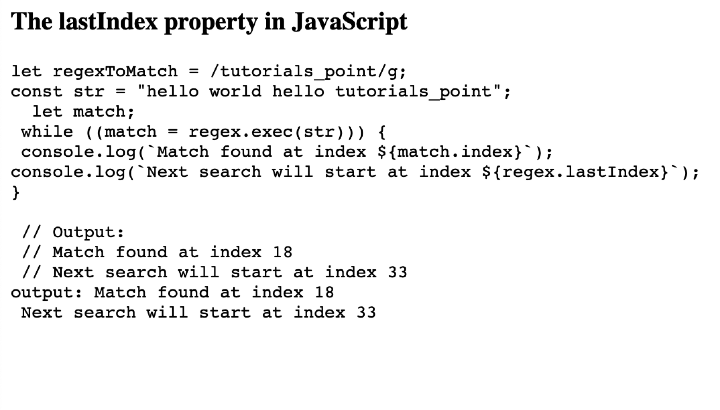
为了匹配整个字符串中的“tutorials_point”一词,我们将在这个示例中使用语法 /tutorials_point/g 创建一个正则表达式模式。然后,我们将使用带有 exec() 方法的 while 循环查找所有匹配项。在每次迭代中,我们将匹配项的索引和 lastIndex 的值记录到浏览器控制台。
文件名:index.html
<html lang="en">
<head>
   <title>The lastIndex property in JavaScript</title>
</head>
<body>
   <h3>The lastIndex property in JavaScript</h3>
   <pre id="code" class=”code”></pre>

   <script>
      const code = document.getElementById("code");

      const regex = /tutorials_point/g;
      const str = "hello world hello tutorials_point";

      let match;
      while ((match = regex.exec(str))) {
         console.log(`Match found at index ${match.index}`);
         console.log(`Next search will start at index ${regex.lastIndex}`);
      }

      code.innerHTML = `let regexToMatch = /tutorials_point/g;
      const str = "hello world hello tutorials_point";
      let match;
      while ((match = regex.exec(str))) {
         console.log(\`Match found at index \${match.index}\`);
         console.log(\`Next search will start at index \${regex.lastIndex}\`);
      } <br> <br> // Output: <br> // Match found at index 18 <br> // Next search will start at index 33 <br>`

      code.innerHTML += `output: Match found at index 18 <br> Next search will start at index 33`;
   </script>
</body>
</html>
输出
示例 2
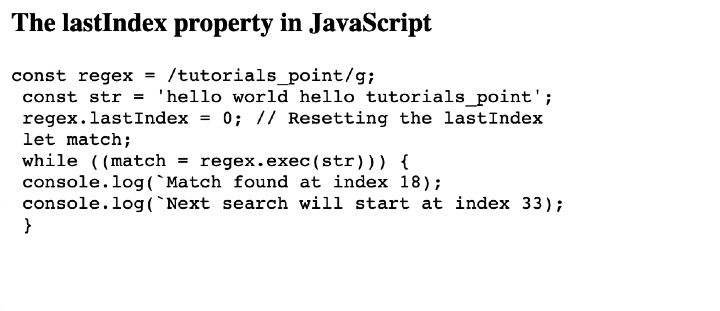
在这个示例中,在循环开始之前,将手动将正则表达式对象的 lastIndex 属性设置为 0。通过这样做,可以保证搜索将从字符串的开头开始,而独立于任何先前的匹配项或 lastIndex 可能保存的任何值。
文件名:index.html
<html lang="en">
<head>
   <title>The lastIndex property in JavaScript</title>
</head>
<body>
   <h3>The lastIndex property in JavaScript</h3>
   <pre id="code"></pre>

   <script>
      const code = document.getElementById("code");

      const regex = /tutorials_point/g;
      const str = "hello world hello tutorials_point";

      regex.lastIndex = 0; // Resetting the lastIndex

      let match;
      while ((match = regex.exec(str))) {
         console.log(`Match found at index ${match.index}`);
         console.log(`Next search will start at index ${regex.lastIndex}`);
      }

      code.innerHTML = `const regex = /tutorials_point/g; <br> const str = 'hello world hello tutorials_point'; <br> regex.lastIndex = 0; // Resetting the lastIndex <br> let match; <br> while ((match = regex.exec(str))) { <br> console.log(\`Match found at index 18); <br> console.log(\`Next search will start at index 33); <br> } `;
   </script>
</body>
</html>
输出
示例 3
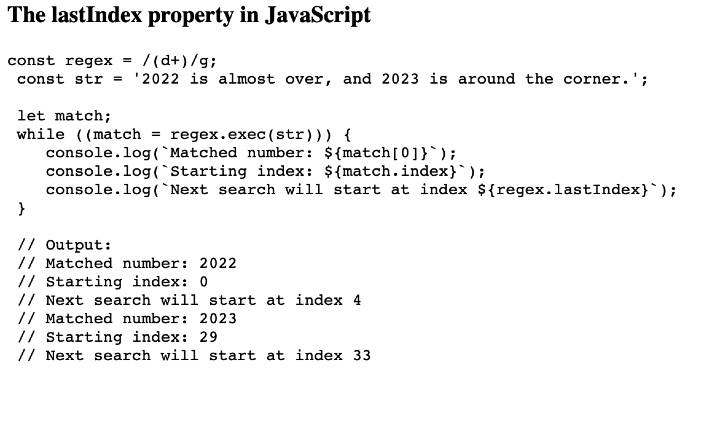
为了匹配任何数字字符串,我们将为本示例构建一个正则表达式模式 (d+)。为了构建捕获组,或匹配和捕获字符串中包含的一个或多个数字,(d+) 模式用括号括起来。我们将使用“g”标志执行全局搜索。这允许我们找到字符串中所有数字的出现。
文件名:index.html
<html lang="en">
<head>
   <title>The lastIndex property in JavaScript</title>
</head>
<body>
   <h3>The lastIndex property in JavaScript</h3>
   <pre id="code"></pre>

   <script>
      const code = document.getElementById("code");

      const regex = /(\d+)/g;
      const str = "2022 is almost over, and 2023 is around the corner.";

      let match;
      while ((match = regex.exec(str))) {
         console.log(`Matched number: ${match[0]}`);
         console.log(`Starting index: ${match.index}`);
         console.log(`Next search will start at index ${regex.lastIndex}`);
      }

      code.innerHTML = `const regex = /(\d+)/g; <br> const str = '2022 is almost over, and 2023 is around the corner.'; <br> <br> let match; <br> while ((match = regex.exec(str))) { <br>    console.log(\`Matched number: \${match[0]}\`); <br>    console.log(\`Starting index: \${match.index}\`); <br>    console.log(\`Next search will start at index \${regex.lastIndex}\`); <br> } <br> <br> // Output: <br> // Matched number: 2022 <br> // Starting index: 0 <br> // Next search will start at index 4 <br> // Matched number: 2023 <br> // Starting index: 29 <br> // Next search will start at index 33`;
   </script>
</body>
</html>
输出
结论
JavaScript 正则表达式对象中的 lastIndex 属性允许我们管理字符串中的匹配项,并提供从哪里开始连续轮次中字符串搜索的索引。它跟踪下一次搜索将从哪里开始的索引,并允许我们有效地执行连续搜索。我们学习了 JavaScript 正则表达式匹配中 lastIndex 的概念,并查看了一些解释相同内容的示例。

60 次查看
