
 数据结构
数据结构 网络
网络 关系数据库管理系统 (RDBMS)
 操作系统
操作系统 Java
Java MS Excel
 iOS
iOS HTML
HTML CSS
CSS Android
 Python
 C语言编程
C语言编程 C++
C++ C#
C# MongoDB
 MySQL
MySQL Javascript
 PHP
PHP 物理学
物理学 化学
化学 生物学
生物学 数学
数学 英语
英语 经济学
经济学 心理学
心理学 社会学
社会学 服装设计
服装设计 法学
法学使用Selenium Webdriver选择下拉菜单选项的不同方法有哪些?
使用Selenium webdriver选择下拉菜单选项的方法有很多。这可以通过Select类来实现。HTML代码中的下拉菜单由select标签表示。
下拉菜单中的选项由option标签表示。此外,为了使用下拉菜单,需要在代码中添加语句org.openqa.selenium.support.ui.Select。
从下拉菜单中选择选项的不同方法如下:
selectByIndex – 将下拉菜单中要选择的选项的索引作为参数传递。索引从0开始。
WebElement e = driver.findElement(By.className("opt"));
Select s = new Select(e);
s.selectByIndex(0);
selectByValue – 将下拉菜单中要选择的选项的value属性作为参数传递。下拉菜单中的选项应具有value属性才能使用此方法。
WebElement e = driver.findElement(By.className("opt"));
Select s = new Select(e);
s.selectByIndex("option 1");
selectByVisibleText – 将下拉菜单中要选择的选项的可视文本作为参数传递。
WebElement e = driver.findElement(By.className("opt"));
Select s = new Select(e);
s.selectByVisibleText("Selenium");
让我们尝试从下面的下拉菜单中选择一个选项:
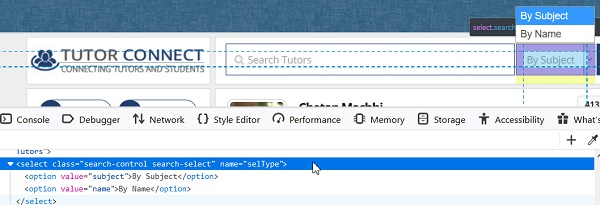
示例
使用selectByIndex的代码实现
import org.openqa.selenium.By;
import org.openqa.selenium.WebDriver;
import org.openqa.selenium.WebElement;
import org.openqa.selenium.firefox.FirefoxDriver;
import java.util.concurrent.TimeUnit;
import org.openqa.selenium.support.ui.Select
public class DrpSelectByIndex{
   public static void main(String[] args) {
      System.setProperty("webdriver.gecko.driver",
         "C:\Users\ghs6kor\Desktop\Java\geckodriver.exe");
      WebDriver driver = new FirefoxDriver();
      //implicit wait
      driver.manage().timeouts().implicitlyWait(5, TimeUnit.SECONDS);
      //URL launch
      driver.get("https://tutorialspoint.com/tutor_connect/index.php/");
      //identify dropdown
      WebElement n = driver.findElement(By.name("selType"));
      //select option by index
      Select s = new Select(n);
      s.selectByIndex(0);
      driver.quit();
   }
}
使用selectByValue的代码实现
import org.openqa.selenium.By;
import org.openqa.selenium.WebDriver;
import org.openqa.selenium.WebElement;
import org.openqa.selenium.firefox.FirefoxDriver;
import java.util.concurrent.TimeUnit;
import org.openqa.selenium.support.ui.Select
public class DrpSelectByValue{
   public static void main(String[] args) {
      System.setProperty("webdriver.gecko.driver",
         "C:\Users\ghs6kor\Desktop\Java\geckodriver.exe");
      WebDriver driver = new FirefoxDriver();
      //implicit wait
      driver.manage().timeouts().implicitlyWait(5, TimeUnit.SECONDS);
      //URL launch
      driver.get("https://tutorialspoint.com/tutor_connect/index.php/");
      //identify dropdown
      WebElement n = driver.findElement(By.name("selType"));
      //select option by value attribute of option
      Select s = new Select(n);
      s.selectByValue("subject");
      driver.quit();
   }
}
使用selectByVisibleText的代码实现
import org.openqa.selenium.By;
import org.openqa.selenium.WebDriver;
import org.openqa.selenium.WebElement;
import org.openqa.selenium.firefox.FirefoxDriver;
import java.util.concurrent.TimeUnit;
import org.openqa.selenium.support.ui.Select
public class DrpSelectByVisibleTxt{
   public static void main(String[] args) {
      System.setProperty("webdriver.gecko.driver",
         "C:\Users\ghs6kor\Desktop\Java\geckodriver.exe");
      WebDriver driver = new FirefoxDriver();
      //implicit wait
      driver.manage().timeouts().implicitlyWait(5, TimeUnit.SECONDS);
      //URL launch
      driver.get("https://tutorialspoint.com/tutor_connect/index.php/");
      //identify dropdown
      WebElement n = driver.findElement(By.name("selType"));
      //select option by value attribute of option
      Select s = new Select(n);
      s.selectByVisibleText("By Name");
      driver.quit();
   }
}

更新于:2021年4月6日
908 次浏览

广告