
 数据结构
数据结构 网络
网络 RDBMS
RDBMS 操作系统
操作系统 Java
Java MS Excel
 iOS
iOS HTML
HTML CSS
CSS Android
 Python
 C 编程
C 编程 C++
C++ C#
C# MongoDB
 MySQL
MySQL Javascript
 PHP
PHP 物理学
物理学 化学
化学 生物学
生物学 数学
数学 英语
英语 经济学
经济学 心理学
心理学 社会研究
社会研究 时装研究
时装研究 法律研究
法律研究如何使用 Java 中的 Selenium WebDriver 获取选定的选项?
我们可以获取 Selenium webdriver 下拉列表中的已选项。getFirstSelectedOption() 方法返回下拉列表中选定的选项。获取选项后,我们可以使用 getText() 方法获取文本。
让我们考虑以下下拉列表 大陆,并获取其选定项:-
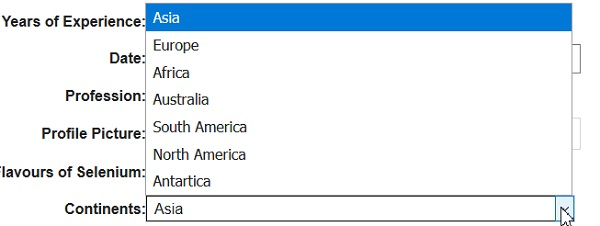
示例
import org.openqa.selenium.By;
import org.openqa.selenium.WebDriver;
import org.openqa.selenium.WebElement;
import org.openqa.selenium.chrome.ChromeDriver;
import java.util.concurrent.TimeUnit;
import org.openqa.selenium.support.ui.Select

public class SelecedItem{
   public static void main(String[] args) {
      System.setProperty("webdriver.chrome.driver","C:\Users\ghs6kor\Desktop\Java\chromedriver.exe");
      WebDriver driver = new ChromeDriver();
      String u =" https://tutorialspoint.com/selenium/selenium_automation_practice.htm"driver.get(u);
      driver.manage().timeouts().implicitlyWait(5, TimeUnit.SECONDS);
      // identify element
      WebElement t=driver.findElement(By.xpath("//*[@name='continents']"));
      //Select class for dropdown
      Select select = new Select(t);
      // select an item with text visible
      select.selectByVisibleText("Australia");
      // get selected option with getFirstSelectedOption() with its text
      WebElement o = select.getFirstSelectedOption();
      String selectedoption = o.getText();
      System.out.println("Selected element: " + selectedoption);
      driver.close();
   }
}
输出
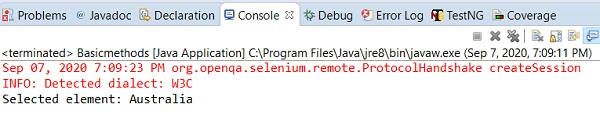

更新于: 2020-09-18
15K+ 次浏览

广告