
 数据结构
数据结构 网络
网络 RDBMS
RDBMS 操作系统
操作系统 Java
Java MS Excel
 iOS
iOS HTML
HTML CSS
CSS 安卓
安卓 Python
 C 编程
C 编程 C++
C++ C#
C# MongoDB
 MySQL
MySQL Javascript
 PHP
PHP 物理
物理 化学
化学 生物
生物 数学
数学 英语
英语 经济
经济 心理学
心理学 社会科学
社会科学 时尚研究
时尚研究 法律研究
法律研究如何获取 Selenium WebDriver 的响应状态代码?
我们可以用 Selenium webdriver 获取响应状态代码。执行测试时,我们可以验证从服务器获得的响应代码。一些常见HTTP响应代码如下:-
5XX 表示服务器端出现问题。
4XX 表示服务器资源不可识别。
3XX 表示请求已被重定向。
2XX 表示请求已成功执行。
创建 HttpURLConnection 类的实例以获得 HTTP 响应。要链接到一个 URL,请使用 openConnection 方法。然后,我们必须使用 setRequestMethod 方法并传入 HEAD 作为参数。
要建立连接,应该将 connect 方法应用于 HttpURLConnection 类的对象。最后,getResponseCode 方法给出响应代码。
语法
HttpURLConnection cont=
(HttpURLConnection)new URL("https://tutorialspoint.com/index.htm").
.openConnection();
cont.setRequestMethod("HEAD");
cont.connect();
int res = cont.getResponseCode();
示例
代码实现
import org.openqa.selenium.By;
import org.openqa.selenium.WebDriver;
import org.openqa.selenium.WebElement;
import org.openqa.selenium.chrome.ChromeDriver;
import java.util.concurrent.TimeUnit;
import java.io.IOException;
import java.net.HttpURLConnection;
import java.net.MalformedURLException;
import java.net.URL;
import java.net.URLConnection;
public class HttpResponseStatus{
   public static void main(String[] args) throws
   MalformedURLException, IOException {
      System.setProperty("webdriver.chrome.driver",
      "C:\Users\ghs6kor\Java\chromedriver.exe");
      WebDriver driver = new ChromeDriver();
      // wait of 5 seconds
      driver.manage().timeouts().implicitlyWait(8, TimeUnit.SECONDS);
      //url launch
      driver.get("https://tutorialspoint.com/index.htm");
      //URL connection
      HttpURLConnection cont=
      (HttpURLConnection)new URL("https://tutorialspoint.com/index.htm")
      .openConnection();
      // pass HEAD as parameter to setRequestMethod
      cont.setRequestMethod("HEAD");
      // obtain Response code
      cont.connect();
      int rs = cont.getResponseCode();
      System.out.println("Http response code: " + rs);
      //driver quit
      driver.quit();
   }
}
输出
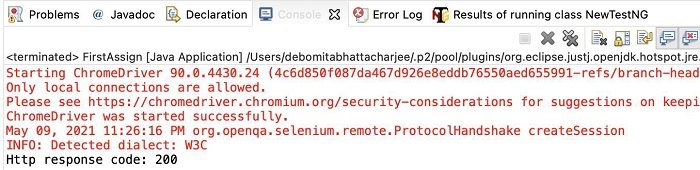

更新于:2021-6-29
3K+ 个浏览

广告