
 Data Structure
 Networking
 RDBMS
RDBMS Operating System
 Java
Java MS Excel
 iOS
iOS HTML
HTML CSS
CSS Android
 Python
 C Programming
 C++
C++ C#
C# MongoDB
 MySQL
MySQL Javascript
 PHP
PHP Physics
 Chemistry
 Biology
 Mathematics
 English
 Economics
 Psychology
 Social Studies
 Fashion Studies
 Legal Studies
如何使用 Selenium webdriver 处理模态对话框?
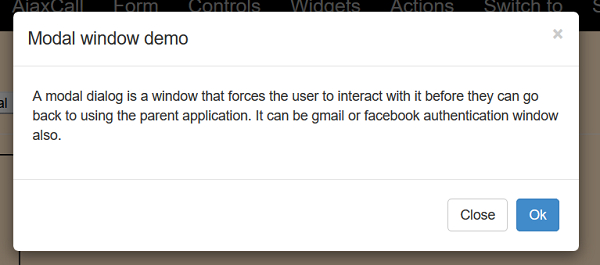
我们可以使用 Selenium 处理模态对话框。模态就像强制用户在返回实际页面之前对其进行访问的窗口。它也可以是一个身份验证窗口。
让我们使用以下模态对话框 −
示例
import org.openqa.selenium.By;
import org.openqa.selenium.WebDriver;
import org.openqa.selenium.WebElement;
import org.openqa.selenium.chrome.ChromeDriver;
public class ModDialog{
   public static void main(String[] args) {
      System.setProperty("webdriver.chrome.driver","C:\Users\ghs6kor\Desktop\Java\chromedriver.exe");
      WebDriver driver = new ChromeDriver();
      driver.get("http://www.uitestpractice.com/Students/Switchto");
      // identify element and click
      WebElement m = driver
      .findElement(By.xpath("//button[contains(text(), 'Launch modal')]"));
      // identify modal header and obtain text
      WebElement m=
      driver.findElement(By.xpath("//h4[@class='modal−title']"));
      System.out.println("Modal Dialog text: " + m.getText());
      // click on OK
      WebElement n= driver.findElement(By.xpath("//button[text()='Ok']"));
      n.click();
      driver.quit();
   }
}
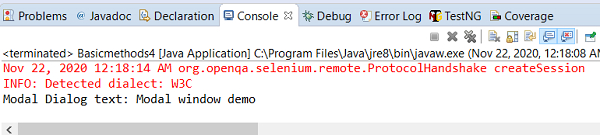
输出

更新于: 28-11-2020
4K+ 次浏览

广告