
 数据结构
数据结构 网络
网络 RDBMS
RDBMS 操作系统
操作系统 Java
Java MS Excel
 iOS
iOS HTML
HTML CSS
CSS Android
 Python
 C 编程
C 编程 C++
C++ C#
C# MongoDB
 MySQL
MySQL Javascript
 PHP
PHP 物理学
物理学 化学
化学 生物学
生物学 数学
数学 英语
英语 经济学
经济学 心理学
心理学 社会科学
社会科学 时尚研究
时尚研究 法律研究
法律研究使用 Java 通过 Selenium WebDriver 处理认证弹出窗口
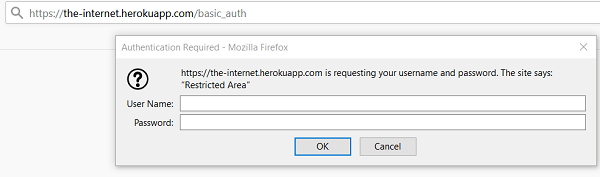
我们可以使用 Selenium 处理身份验证弹出窗口。为此,我们必须在 URL 中传递用户凭证。我们必须将用户名和密码添加到 URL。
语法
https://username:password@URL
https://admin:admin@the−nternet.herokuapp.com/basic_auth
Here, the admin is the username and password.
URL − www.the-internet.herokuapp.com/basic_auth
让我们接受并处理下面的身份验证弹出窗口。
示例
import org.openqa.selenium.By;
import org.openqa.selenium.WebDriver;
import org.openqa.selenium.WebElement;
import org.openqa.selenium.chrome.ChromeDriver;
public class AuthnPopup{
   public static void main(String[] args) {
      System.setProperty("webdriver.chrome.driver",
      "C:\Users\ghs6kor\Desktop\Java\chromedriver.exe");
      WebDriver driver = new ChromeDriver();
      String u = "admin";
      // adding username, password with URL
      String str = "https://" + u + ":" + u + "@" +
      "the-internet.herokuapp.com/basic_auth";
      driver.get(str);
      // identify and get text after authentication of popup
      String t = driver.findElement(By.cssSelector("p")).getText();
      System.out.println("Text is: " + t);
      driver.quit();
   }
}
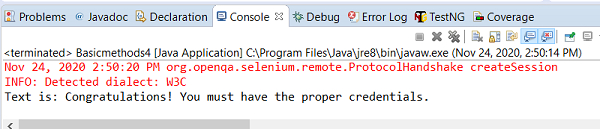
输出

更新于: 2020 年 11 月 30 日
4K+ 浏览

广告