
 Data Structure
 Networking
 RDBMS
RDBMS Operating System
 Java
Java MS Excel
 iOS
iOS HTML
HTML CSS
CSS Android
 Python
 C Programming
 C++
C++ C#
C# MongoDB
 MySQL
MySQL Javascript
 PHP
PHP Physics
 Chemistry
 Biology
 Mathematics
 English
 Economics
 Psychology
 Social Studies
 Fashion Studies
 Legal Studies
如何使用 Selenium Webdriver 在“显示通知”弹出窗口上单击“允许”?
我们可以在 Selenium webdriver 中单击“显示通知”弹出窗口上的“允许”。这些消息来自网站,通常称为网络推送通知。这可以用浏览器设置来处理。
这是借助ChromeOptions 类完成的。我们应该创建它的对象并对它应用addArguments 方法。然后将--disable-notifications 作为参数传递给该方法。
最后,应该将此信息发送到驱动程序对象。
语法
ChromeOptions p = new ChromeOptions();
p.addArguments("--disable-notifications");
让我们尝试处理页面上的以下通知。
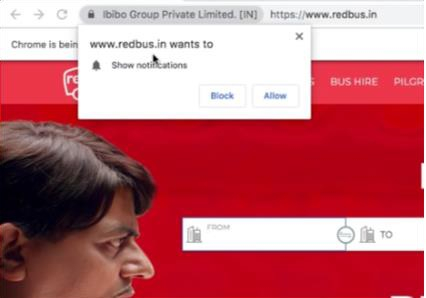
示例
代码实现。
import org.openqa.selenium.WebDriver;
import org.openqa.selenium.chrome.ChromeDriver;
import org.openqa.selenium.chrome.ChromeOptions;
import java.util.concurrent.TimeUnit;
public class BrowserNotification{
   public static void main(String[] args) {
      System.setProperty("webdriver.chrome.driver", "C:\Users\ghs6kor\Desktop\Java\chromedriver.exe");
      //ChromeOptions object
      ChromeOptions op = new ChromeOptions();
      //disable notification parameter
      op.addArguments("--disable-notifications");
      // configure options parameter to Chrome driver
      WebDriver driver = new ChromeDriver(op);
      driver.manage().timeouts().implicitlyWait(8, TimeUnit.SECONDS);
      driver.get("https://www.redbus.in/");
      driver.quit();
   }
}

更新于:2020 年 12 月 28 日
5 千 + 浏览量

广告