
 数据结构
数据结构 网络
网络 RDBMS
RDBMS 操作系统
操作系统 Java
Java MS Excel
 iOS
iOS HTML
HTML CSS
CSS Android
 Python
 C编程
C编程 C++
C++ C#
C# MongoDB
 MySQL
MySQL Javascript
 PHP
PHP 物理学
物理学 化学
化学 生物学
生物学 数学
数学 英语
英语 经济学
经济学 心理学
心理学 社会学
社会学 时尚研究
时尚研究 法律研究
法律研究编写Python程序以将数据框架导出到html文件
假设我们已经保存了pandas.csv文件并将其导出为Html格式
解决方案
为解决此问题,我们将按照以下步骤操作:
使用read_csv方法读取csv文件,如下所示:
df = pd.read_csv('pandas.csv')使用文件对象创建新的文件pandas.html并设置为写入模式,
f = open('pandas.html','w')声明result变量将数据框架转换为html文件格式,
result = df.to_html()
使用文件对象,从结果中写入所有数据。最后关闭文件对象,
f.write(result)
f.close()
示例
让我们看看下面的实现,以获得更好的理解:
import pandas as pd
df = pd.read_csv('pandas.csv')
print(df)
f = open('pandas.html','w')
result = df.to_html()
f.write(result)
f.close()
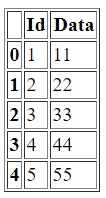
输出
pandas.html
<table border="1" class="dataframe">
   <thead>
      <tr style="text-align: right;">
         <th></th>
         <th>Id</th>
         <th>Data</th>
      </tr>
   </thead>
   <tbody>
      <tr>
         <th>0</th>
         <td>1</td>
         <td>11</td>
      </tr>
      <tr>
         <th>1</th>
         <td>2</td>
         <td>22</td>
      </tr>
      <tr>
         <th>2</th>
         <td>3</td>
         <td>33</td>
      </tr>
      <tr>
         <th>3</th>
         <td>4</td>
         <td>44</td>
      </tr>
      <tr>
         <th>4</th>
         <td>5</td>
         <td>55</td>
      </tr>
   </tbody>
</table>

更新于:2021年2月24日
1000+次浏览

广告