
 数据结构
数据结构 网络
网络 关系型数据库管理系统
 操作系统
操作系统 Java
Java MS Excel
 iOS
iOS HTML
HTML CSS
CSS Android
 Python
 C 编程语言
 C++
C++ C#
C# MongoDB
 MySQL
MySQL Javascript
 PHP
PHP 物理
物理 化学
化学 生物
生物 数学
数学 英语
英语 经济学
经济学 心理学
心理学 社会学
社会学 时尚学
时尚学 法律学
法律学CSS 高级选择器
CSS 高级选择器包括相邻选择器、属性选择器、直接子选择器、第 n 个子类型选择器等,还包括普通同级选择器,示例如下
h1 ~ h3
直接子选择器示例 -
div > span
以下代码显示了 CSS 中的高级选择器 -
示例
<html>
<head>
<style>
#red {
   color: red;
}
.green {
   background: green;
}
ul:nth-of-type(1) {
   background: rgb(0, 174, 255);
}
ul + h3 {
   border: 4px solid rgb(19, 0, 128);
}
a[href="https://www.wikipedia.org"] {
   font-size: 25px;
}
h1 ~ h3 {
   font-size: 40px;
}
div > span {
   background-color: DodgerBlue;
}
</style>
</head>
<body>
<h1>Advanced Selectors Example</h1>
<ul>
<li>Cow</li>
<li>Dog</li>
<li>Cat</li>
</ul>
<ul>
<li>Puma</li>
<li>Leopard</li>
<li>Cheetah</li>
</ul>
<h3>Animals</h3>
<div>
<span>Text sample</span>
<p>
Paragraph Text
<span>span text</span>
</p>
<p class="green">Paragraph Text</p>
<p id="red">Paragraph Text.</p>
<p class="green">Paragraph Text</p>
</div>
<a href="https://www.google.com">www.google.com</a>
<a href="https://www.wikipedia.org" target="_blank">www.wikipedia.org</a>
</body>
</html>
输出
以上代码将产生以下输出 -
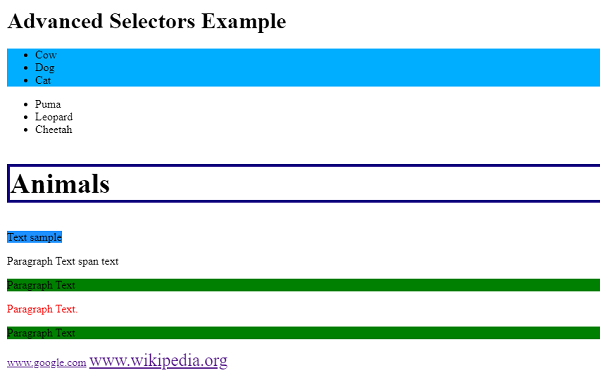

更新于: 11-5-2020
已浏览 614 次

广告