
- Apache POI PPT 教程
- Apache POI PPT - 主页
- Apache POI PPT - 概览
- Apache POI PPT - Java API 版本
- Apache POI PPT - 安装
- Apache POI PPT - 类和方法
- Apache POI PPT - 演示文稿
- Apache POI PPT - 幻灯片版式
- Apache POI PPT - 管理幻灯片
- Apache POI PPT - 图像
- Apache POI PPT - 创建超链接
- Apache POI PPT - 读取形状
- Apache POI PPT - 格式化文本
- Apache POI PPT - 合并
- Apache POI PPT - PPT 转图像
- Apache POI PPT 资源
- Apache POI PPT - 快速指南
- Apache POI PPT - 有用资源
- Apache POI PPT - 讨论
Apache POI PPT - 格式化文本
可以使用 XSLFTextRun 类的各种方法来格式化演示文稿中的文本。为此,必须通过如下所示选择一个幻灯片版式来创建一个 XSLFTextRun 类对象 −
//create the empty presentation
XMLSlideShow ppt = new XMLSlideShow();

//getting the slide master object
XSLFSlideMaster slideMaster = ppt.getSlideMasters().get(0);

//select a layout from specified list
XSLFSlideLayout slidelayout = slideMaster.getLayout(SlideLayout.TITLE_AND_CONTENT);

//creating a slide with title and content layout
XSLFSlide slide = ppt.createSlide(slidelayout);

//selection of title place holder
XSLFTextShape body = slide.getPlaceholder(1);

//clear the existing text in the slide
body.clearText();

//adding new paragraph
XSLFTextParagraph paragraph = body.addNewTextParagraph();

//creating text run object
XSLFTextRun run = paragraph.addNewTextRun();
可以使用 setFontSize() 设置演示文稿中文本的字体大小。
run.setFontColor(java.awt.Color.red);
run.setFontSize(24);
下面的代码片段说明了如何将不同的格式化样式(加粗、斜体、下划线、删除线)应用到演示文稿中的文本。
//change the text into bold format
run.setBold(true);

//change the text it to italic format
run.setItalic(true)

// strike through the text
run.setStrikethrough(true);

//underline the text
run.setUnderlined(true);
如需在段落之间插入换行符,请使用 XSLFTextParagraph 类中的 addLineBreak(),如下所示 −
paragraph.addLineBreak();
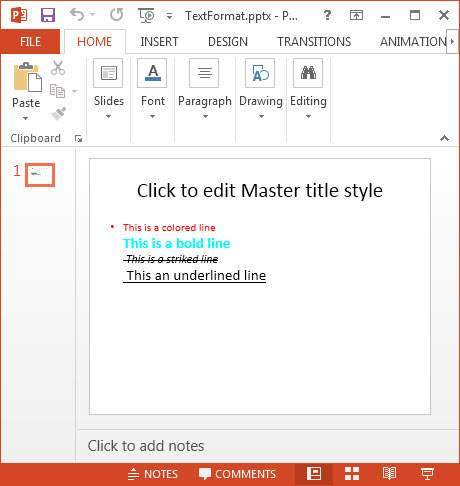
下面给出了使用上述所有方法格式化文本的完整程序 −
import java.io.FileOutputStream;
import java.io.IOException;

import org.apache.poi.xslf.usermodel.SlideLayout;
import org.apache.poi.xslf.usermodel.XMLSlideShow;
import org.apache.poi.xslf.usermodel.XSLFSlide;
import org.apache.poi.xslf.usermodel.XSLFSlideLayout;
import org.apache.poi.xslf.usermodel.XSLFSlideMaster;
import org.apache.poi.xslf.usermodel.XSLFTextParagraph;
import org.apache.poi.xslf.usermodel.XSLFTextRun;
import org.apache.poi.xslf.usermodel.XSLFTextShape;

public class TextFormating {
   public static void main(String args[]) throws IOException {
      //creating an empty presentation
      XMLSlideShow ppt = new XMLSlideShow();

      //getting the slide master object
      XSLFSlideMaster slideMaster = ppt.getSlideMasters().get(0);

      //select a layout from specified list
      XSLFSlideLayout slidelayout = slideMaster.getLayout(SlideLayout.TITLE_AND_CONTENT);

      //creating a slide with title and content layout
      XSLFSlide slide = ppt.createSlide(slidelayout);

      //selection of title place holder
      XSLFTextShape body = slide.getPlaceholder(1);

      //clear the existing text in the slide
      body.clearText();

      //adding new paragraph
      XSLFTextParagraph paragraph = body.addNewTextParagraph();

      //formatting line 1

      XSLFTextRun run1 = paragraph.addNewTextRun();
      run1.setText("This is a colored line");

      //setting color to the text
      run1.setFontColor(java.awt.Color.red);

      //setting font size to the text
      run1.setFontSize(24.0);

      //moving to the next line
      paragraph.addLineBreak();

      //formatting line 2

      XSLFTextRun run2 = paragraph.addNewTextRun();
      run2.setText("This is a bold line");
      run2.setFontColor(java.awt.Color.CYAN);

      //making the text bold
      run2.setBold(true);
      paragraph.addLineBreak();

      //formatting line 3

      XSLFTextRun run3 = paragraph.addNewTextRun();
      run3.setText(" This is a striked line");
      run3.setFontSize(12.0);

      //making the text italic
      run3.setItalic(true);

      //strike through the text
      run3.setStrikethrough(true);
      paragraph.addLineBreak();

      //formatting line 4

      XSLFTextRun run4 = paragraph.addNewTextRun();
      run4.setText(" This an underlined line");
      run4.setUnderlined(true);

      //underlining the text
      paragraph.addLineBreak();

      //creating a file object
      File file = new File(“TextFormat.pptx”);
      FileOutputStream out = new FileOutputStream(file);

      //saving the changes to a file
      ppt.write(out);
      out.close();
   }
}
将上述代码保存为 TextFormating.java,然后在命令提示符处进行编译和执行,如下所示 −
$javac TextFormating.java
$java TextFormating
代码会编译并执行,生成以下输出 −
Formatting completed successfully
格式化文本后的幻灯片如下所示 −
广告