- AWT 教程
- AWT - 首页
- AWT - 概述
- AWT - 环境
- AWT - 控件
- AWT - 事件处理
- AWT - 事件类
- AWT - 事件监听器
- AWT - 事件适配器
- AWT - 布局
- AWT - 容器
- AWT - 菜单
- AWT - 图形
- AWT 有用资源
- AWT - 快速指南
- AWT - 有用资源
- AWT - 讨论
AWT 字体类
介绍
Font 类表示字体,用于以可见方式呈现文本。
类声明
以下是java.awt.Font类的声明
public class Font
   extends Object
      implements Serializable
字段
以下是java.awt.geom.Arc2D类的字段
static int BOLD -- 粗体样式常量。
static int CENTER_BASELINE --在对中文、日文和韩文等表意文字进行文本布局时使用的基线。
static String DIALOG --逻辑字体“Dialog”的规范族名称的字符串常量。
static String DIALOG_INPUT --逻辑字体“DialogInput”的规范族名称的字符串常量。
static int HANGING_BASELINE --在对梵文和类似文字进行文本布局时使用的基线。
static int ITALIC -- 斜体样式常量。
static int LAYOUT_LEFT_TO_RIGHT -- 指示文本根据双向分析结果从左到右的 layoutGlyphVector 标志。
static int LAYOUT_NO_LIMIT_CONTEXT -- 指示不应该检查指示限制之后字符数组中文本的 layoutGlyphVector 标志。
static int LAYOUT_NO_START_CONTEXT -- 指示不应该检查指示起始之前字符数组中文本的 layoutGlyphVector 标志。
static int LAYOUT_RIGHT_TO_LEFT -- 指示文本根据双向分析结果从右到左的 layoutGlyphVector 标志。
static String MONOSPACED -- 逻辑字体“Monospaced”的规范族名称的字符串常量。
protected String name -- 此 Font 的逻辑名称,如传递给构造函数。
static int PLAIN --普通样式常量。
protected float pointSize -- 此 Font 的点大小(浮点数)。
static int ROMAN_BASELINE --在对大多数罗马文字进行文本布局时使用的基线。
static String SANS_SERIF -- 逻辑字体“SansSerif”的规范族名称的字符串常量。
static String SERIF -- 逻辑字体“Serif”的规范族名称的字符串常量。
protected int size --此 Font 的点大小(四舍五入为整数)。
protected int style -- 此 Font 的样式,如传递给构造函数。
static int TRUETYPE_FONT -- 标识类型为 TRUETYPE 的字体资源。
static int TYPE1_FONT -- 标识类型为 TYPE1 的字体资源。
类构造函数
| 序号 | 构造函数 & 描述 |
|---|---|
| 1 | protected Font() () 根据指定的字体创建一个新的 Font。 |
| 2 | Font(Map<? extends AttributedCharacterIterator.Attribute,?> attributes) 根据指定的字体创建一个新的 Font。 |
| 3 | Font(String name, int style, int size) 根据指定的字体创建一个新的 Font。 |
类方法
| 序号 | 方法 & 描述 |
|---|---|
| 1 | boolean canDisplay(char c) 检查此 Font 是否具有指定字符的字形。 |
| 2 | boolean canDisplay(int codePoint) 检查此 Font 是否具有指定字符的字形。 |
| 3 | int canDisplayUpTo(char[] text, int start, int limit) 指示此 Font 是否可以显示从 start 开始到 limit 结束的指定文本中的字符。 |
| 4 | int canDisplayUpTo(CharacterIterator iter, int start, int limit) 指示此 Font 是否可以显示从 start 开始到 limit 结束的 iter 指定的文本。 |
| 5 | int canDisplayUpTo(String str) 指示此 Font 是否可以显示指定的字符串。 |
| 6 | static Font createFont(int fontFormat, File fontFile) 使用指定的字体类型和指定的字体文件返回一个新的 Font。 |
| 7 | static Font createFont(int fontFormat, InputStream fontStream) 使用指定的字体类型和输入数据返回一个新的 Font。 |
| 8 | GlyphVector createGlyphVector(FontRenderContext frc, char[] chars) 通过基于此 Font 中的 Unicode cmap 将字符一对一映射到字形来创建 GlyphVector。 |
| 9 | GlyphVector createGlyphVector(FontRenderContext frc, CharacterIterator ci) 通过基于此 Font 中的 Unicode cmap 将指定的字符一对一映射到字形来创建 GlyphVector。 |
| 10 | GlyphVector createGlyphVector(FontRenderContext frc, int[] glyphCodes) 通过基于此 Font 中的 Unicode cmap 将字符一对一映射到字形来创建 GlyphVector。 |
| 11 | GlyphVector createGlyphVector(FontRenderContext frc, String str) 通过基于此 Font 中的 Unicode cmap 将字符一对一映射到字形来创建 GlyphVector。 |
| 12 | static Font decode(String str) 返回 str 参数描述的 Font。 |
| 13 | Font deriveFont(AffineTransform trans) 通过复制当前 Font 对象并对其应用新的变换来创建一个新的 Font 对象。 |
| 14 | Font deriveFont(float size) 通过复制当前 Font 对象并对其应用新的大小来创建一个新的 Font 对象。 |
| 15 | Font deriveFont(int style) 通过复制当前 Font 对象并对其应用新的样式来创建一个新的 Font 对象。 |
| 16 | Font deriveFont(int style, AffineTransform trans) 通过复制此 Font 对象并应用新的样式和变换来创建一个新的 Font 对象。 |
| 17 | Font deriveFont(int style, float size) 通过复制此 Font 对象并应用新的样式和大小来创建一个新的 Font 对象。 |
| 18 | Font deriveFont(Map<? extends AttributedCharacterIterator.Attribute,?> attributes) 通过复制当前 Font 对象并对其应用新的字体属性集来创建一个新的 Font 对象。 |
| 19 | boolean equals(Object obj) 将此 Font 对象与指定的 Object 进行比较。 |
| 20 | protected void finalize() 释放本机 Font 对象。 |
| 21 | Map<TextAttribute,?> getAttributes() 返回此 Font 中可用的字体属性映射。 |
| 22 | AttributedCharacterIterator.Attribute[] getAvailableAttributes() 返回此 Font 支持的所有属性的键。 |
| 23 | byte getBaselineFor(char c) 返回适合显示此字符的基线。 |
| 24 | String getFamily() 返回此 Font 的族名称。 |
| 25 | String getFamily(Locale l) 返回此 Font 的族名称,针对指定的区域设置进行本地化。 |
| 26 | static Font getFont(Map<? extends AttributedCharacterIterator.Attribute,?> attributes) 返回适合这些属性的 Font。 |
| 27 | static Font getFont(String nm) 从系统属性列表中返回 Font 对象。 |
| 28 | static Font getFont(String nm, Font font) 从系统属性列表中获取指定的 Font。 |
| 29 | String getFontName() 返回此 Font 的字体面名称。 |
| 30 | String getFontName(Locale l) 返回 Font 的字体面名称,针对指定的区域设置进行本地化。 |
| 31 | float getItalicAngle() 返回此 Font 的斜体角度。 |
| 32 | LineMetrics getLineMetrics(char[] chars, int beginIndex, int limit, FontRenderContext frc) 返回使用指定参数创建的 LineMetrics 对象。 |
| 33 | LineMetrics getLineMetrics(CharacterIterator ci, int beginIndex, int limit, FontRenderContext frc) 返回使用指定参数创建的 LineMetrics 对象。 |
| 34 | LineMetrics getLineMetrics(String str, FontRenderContext frc) 返回使用指定的字符串和 FontRenderContext 创建的 LineMetrics 对象。 |
| 35 | LineMetrics getLineMetrics(String str, int beginIndex, int limit, FontRenderContext frc) 返回使用指定参数创建的 LineMetrics 对象。 |
| 36 | Rectangle2D getMaxCharBounds(FontRenderContext frc) 返回在指定的 FontRenderContext 中定义的具有最大边界的字符的边界。 |
| 37 | int getMissingGlyphCode() 返回当此 Font 没有指定 Unicode 代码点的字形时使用的 glyphCode。 |
| 38 | String getName() 返回此 Font 的逻辑名称。 |
| 39 | int getNumGlyphs() 返回此 Font 中的字形数量。 |
| 40 | java.awt.peer.FontPeer getPeer() 已弃用。字体渲染现在与平台无关。 |
| 41 | String getPSName() 返回此 Font 的 PostScript 名称。 |
| 42 | int getSize() 返回此 Font 的点大小(四舍五入为整数)。 |
| 43 | float getSize2D() 返回此 Font 的点大小(浮点值)。 |
| 44 | Rectangle2D getStringBounds(char[] chars, int beginIndex, int limit, FontRenderContext frc) 返回在指定的 FontRenderContext 中指定字符数组的逻辑边界。 |
| 45 | Rectangle2D getStringBounds(CharacterIterator ci, int beginIndex, int limit, FontRenderContext frc) 返回在指定的 FontRenderContext 中指定的 CharacterIterator 中索引的字符的逻辑边界。 |
| 46 | Rectangle2D getStringBounds(String str, FontRenderContext frc) 返回在指定的 FontRenderContext 中指定字符串的逻辑边界。 |
| 47 | Rectangle2D getStringBounds(String str, int beginIndex, int limit, FontRenderContext frc) 返回在指定的 FontRenderContext 中指定字符串的逻辑边界。 |
| 48 | int getStyle() 返回此 Font 的样式。 |
| 49 | AffineTransform getTransform() 返回与此 Font 关联的变换的副本。 |
| 50 | int hashCode() 返回此 Font 的哈希码。 |
| 51 | boolean hasLayoutAttributes() 如果此 Font 包含需要额外布局处理的属性,则返回 true。 |
| 52 | boolean hasUniformLineMetrics() 检查此 Font 是否具有统一的行度量。 |
| 53 | boolean isBold() 指示此 Font 对象的样式是否为粗体 (BOLD)。 |
| 54 | boolean isItalic() 指示此 Font 对象的样式是否为斜体 (ITALIC)。 |
| 55 | boolean isPlain() 指示此 Font 对象的样式是否为普通 (PLAIN)。 |
| 56 | boolean isTransformed() 指示此 Font 对象是否具有影响其大小的变换(除了大小属性之外)。 |
| 57 | GlyphVector layoutGlyphVector(FontRenderContext frc, char[] text, int start, int limit, int flags) 返回一个新的 GlyphVector 对象,如果可能,执行文本的完整布局。 |
| 58 | String toString() 将此 Font 对象转换为字符串表示形式。 |
继承的方法
此类继承自以下类的方法
java.lang.Object
Font 示例
使用您选择的任何编辑器创建以下 Java 程序,例如在D:/ > AWT > com > tutorialspoint > gui >
AWTGraphicsDemo.javapackage com.tutorialspoint.gui;
import java.awt.*;
import java.awt.event.*;
import java.awt.geom.*;
public class AWTGraphicsDemo extends Frame {
public AWTGraphicsDemo(){
super("Java AWT Examples");
prepareGUI();
}
public static void main(String[] args){
AWTGraphicsDemo awtGraphicsDemo = new AWTGraphicsDemo();
awtGraphicsDemo.setVisible(true);
}
private void prepareGUI(){
setSize(400,400);
addWindowListener(new WindowAdapter() {
public void windowClosing(WindowEvent windowEvent){
System.exit(0);
}
});
}
@Override
public void paint(Graphics g) {
Graphics2D g2 = (Graphics2D)g;
Font plainFont = new Font("Serif", Font.PLAIN, 24);
g2.setFont(plainFont);
g2.drawString("Welcome to TutorialsPoint", 50, 70);
Font italicFont = new Font("Serif", Font.ITALIC, 24);
g2.setFont(italicFont);
g2.drawString("Welcome to TutorialsPoint", 50, 120);
Font boldFont = new Font("Serif", Font.BOLD, 24);
g2.setFont(boldFont);
g2.drawString("Welcome to TutorialsPoint", 50, 170);
Font boldItalicFont = new Font("Serif", Font.BOLD+Font.ITALIC, 24);
g2.setFont(boldItalicFont);
g2.drawString("Welcome to TutorialsPoint", 50, 220);
}
}
使用命令提示符编译程序。进入D:/ > AWT目录并输入以下命令。
D:\AWT>javac com\tutorialspoint\gui\AWTGraphicsDemo.java
如果没有任何错误出现,则表示编译成功。使用以下命令运行程序。
D:\AWT>java com.tutorialspoint.gui.AWTGraphicsDemo
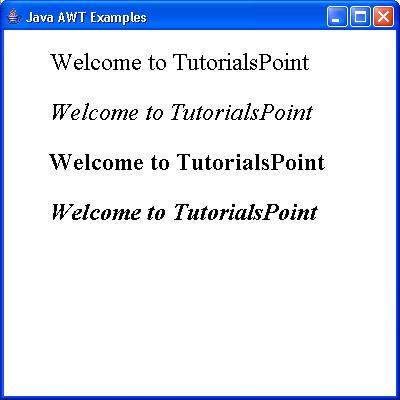
验证以下输出