- AWT 教程
- AWT - 首页
- AWT - 概述
- AWT - 环境
- AWT - 控件
- AWT - 事件处理
- AWT - 事件类
- AWT - 事件监听器
- AWT - 事件适配器
- AWT - 布局
- AWT - 容器
- AWT - 菜单
- AWT - 图形
- AWT 有用资源
- AWT - 快速指南
- AWT - 有用资源
- AWT - 讨论
AWT 窗口类
介绍
Window 类是一个顶级窗口,没有边框也没有菜单栏。它使用 BorderLayout 作为默认布局管理器。
类声明
以下是 java.awt.Window 类的声明
public class Window
   extends Container
      implements Accessible
类构造函数
| 序号 | 构造函数 & 描述 |
|---|---|
| 1 | Window(Frame owner) 构造一个新的、最初不可见的窗口,并指定 Frame 作为其所有者。 |
| 2 | Window(Window owner) 构造一个新的、最初不可见的窗口,并指定 Window 作为其所有者。 |
| 3 | Window(Window owner, GraphicsConfiguration gc) 构造一个新的、最初不可见的窗口,并指定所有者 Window 和屏幕设备的 GraphicsConfiguration。 |
类方法
| 序号 | 方法 & 描述 |
|---|---|
| 1 | void addNotify() 通过创建与本地屏幕资源的连接,使此 Window 可显示。 |
| 2 | void addPropertyChangeListener(PropertyChangeListener listener) 向监听器列表添加 PropertyChangeListener。 |
| 3 | void add Property ChangeListener(String property Name, Property Change Listener listener) 向特定属性的监听器列表添加 PropertyChangeListener。 |
| 4 | void addWindowFocusListener(WindowFocusListener l) 添加指定的窗口焦点监听器以接收来自此窗口的窗口事件。 |
| 5 | void addWindowListener(WindowListener l) 添加指定的窗口监听器以接收来自此窗口的窗口事件。 |
| 6 | void addWindowStateListener(WindowStateListener l) 添加指定的窗口状态监听器以接收来自此窗口的窗口事件。 |
| 7 | void applyResourceBundle(ResourceBundle rb) 已弃用。从 J2SE 1.4 开始,由 Component.applyComponentOrientation 替换。 |
| 8 | void applyResourceBundle(String rbName) 已弃用。从 J2SE 1.4 开始,由 Component.applyComponentOrientation 替换。 |
| 9 | void createBufferStrategy(int numBuffers) 为此组件创建用于多缓冲的新策略。 |
| 10 | void createBufferStrategy(int numBuffers, BufferCapabilities caps) 为此组件创建具有所需缓冲功能的多缓冲新策略。 |
| 11 | void dispose() 释放此 Window、其子组件及其所有拥有子级使用的所有本地屏幕资源。 |
| 12 | AccessibleContext getAccessibleContext() 获取与此 Window 关联的 AccessibleContext。 |
| 13 | BufferStrategy getBufferStrategy() 返回此组件使用的 BufferStrategy。 |
| 14 | boolean getFocusableWindowState() 返回此 Window 是否可以成为聚焦窗口,前提是它满足 isFocusableWindow 中概述的其他要求。 |
| 15 | Container getFocusCycleRootAncestor() 始终返回 null,因为 Window 没有祖先;它们代表 Component 层次结构的顶部。 |
| 16 | Component getFocusOwner() 如果此 Window 已聚焦,则返回具有焦点的此 Window 的子组件;否则返回 null。 |
| 17 | Set<AWTKeyStroke> getFocusTraversalKeys(int id) 获取此 Window 的焦点遍历键。 |
| 18 | GraphicsConfiguration getGraphicsConfiguration() 此方法返回此 Window 使用的 GraphicsConfiguration。 |
| 19 | List<Image> getIconImages() 返回要显示为此窗口图标的图像序列。 |
| 20 | InputContext getInputContext() 获取此窗口的输入上下文。 |
| 21 | <T extends EventListener> T[] getListeners(Class<T> listenerType) 返回当前在此 Window 上注册为 FooListeners 的所有对象的数组。 |
| 22 | Locale getLocale() 如果已设置语言环境,则获取与此窗口关联的 Locale 对象。 |
| 23 | Dialog.ModalExclusionType getModalExclusionType() 返回此窗口的模态排除类型。 |
| 24 | Component getMostRecentFocusOwner() 返回此 Window 的子组件,当此 Window 聚焦时,该子组件将接收焦点。 |
| 25 | Window[] getOwnedWindows() 返回一个包含此窗口当前拥有的所有窗口的数组。 |
| 26 | Window getOwner() 返回此窗口的所有者。 |
| 27 | static Window[] getOwnerlessWindows() 返回此应用程序创建的所有没有所有者的 Window 的数组。 |
| 28 | Toolkit getToolkit() 返回此框架的工具包。 |
| 29 | String getWarningString() 获取与此窗口一起显示的警告字符串。 |
| 30 | WindowFocusListener[] getWindowFocusListeners() 返回在此窗口上注册的所有窗口焦点监听器的数组。 |
| 31 | WindowListener[] getWindowListeners() 返回在此窗口上注册的所有窗口监听器的数组。 |
| 32 | static Window[] getWindows() 返回此应用程序创建的所有 Window(包括已拥有和未拥有)的数组。 |
| 33 | WindowStateListener[] getWindowStateListeners() 返回在此窗口上注册的所有窗口状态监听器的数组。 |
| 34 | void hide() 已弃用。从 JDK 版本 1.5 开始,由 setVisible(boolean) 替换。 |
| 35 | boolean isActive() 返回此 Window 是否处于活动状态。 |
| 36 | boolean isAlwaysOnTop() 返回此窗口是否始终位于其他窗口之上。 |
| 37 | boolean isAlwaysOnTopSupported() 返回此窗口是否支持始终位于顶部的模式。 |
| 38 | boolean isFocusableWindow() 返回此 Window 是否可以成为聚焦窗口,即此 Window 或其任何子组件是否可以成为焦点所有者。 |
| 39 | boolean isFocusCycleRoot() 始终返回 true,因为所有 Window 必须是焦点遍历循环的根。 |
| 40 | boolean isFocused() 返回此 Window 是否已聚焦。 |
| 41 | boolean isLocationByPlatform() 如果此 Window 下次可见时将显示在本地窗口系统的默认位置,则返回 true。 |
| 42 | boolean isShowing() 检查此 Window 是否显示在屏幕上。 |
| 43 | void pack() 导致此 Window 调整大小以适应其子组件的首选大小和布局。 |
| 44 | void paint(Graphics g) 绘制容器。 |
| 45 | boolean postEvent(Event e) 已弃用。从 JDK 版本 1.1 开始,由 dispatchEvent(AWTEvent) 替换。 |
| 46 | protected void processEvent(AWTEvent e) 处理此窗口上的事件。 |
| 47 | protected void processWindowEvent(WindowEvent e) 通过将发生的窗口事件分派给任何已注册的 WindowListener 对象来处理此窗口上发生的窗口事件。 |
| 48 | protected void processWindowFocusEvent(WindowEvent e) 通过将发生的窗口焦点事件分派给任何已注册的 WindowFocusListener 对象来处理此窗口上发生的窗口焦点事件。 |
| 49 | protected void processWindowStateEvent(WindowEvent e) 通过将发生的窗口状态事件分派给任何已注册的 WindowStateListener 对象来处理此窗口上发生的窗口状态事件。 |
| 50 | void removeNotify() 通过移除其与本地屏幕资源的连接,使此 Container 不可显示。 |
| 51 | void removeWindowFocusListener(WindowFocusListener l) 移除指定的窗口焦点监听器,使其不再接收来自此窗口的窗口事件。 |
| 52 | void removeWindowListener(WindowListener l) 移除指定的窗口监听器,使其不再接收来自此窗口的窗口事件。 |
| 53 | void removeWindowStateListener(WindowStateListener l) 移除指定的窗口状态监听器,使其不再接收来自此窗口的窗口事件。 |
| 54 | void reshape(int x, int y, int width, int height) 已弃用。从 JDK 版本 1.1 开始,由 setBounds(int, int, int, int) 替换。 |
| 55 | void setAlwaysOnTop(boolean alwaysOnTop) 设置此窗口是否应始终位于其他窗口之上。 |
| 56 | void setBounds(int x, int y, int width, int height) 移动并调整此组件的大小。 |
| 57 | void setBounds(Rectangle r) 移动并调整此组件的大小,使其符合新的边界矩形 r。 |
| 58 | void setCursor(Cursor cursor) 将光标图像设置为指定的光标。 |
| 59 | void setFocusableWindowState(boolean focusableWindowState) 设置此 Window 是否可以成为聚焦窗口,前提是它满足 isFocusableWindow 中概述的其他要求。 |
| 60 | void setFocusCycleRoot(boolean focusCycleRoot) 不执行任何操作,因为 Window 必须始终是焦点遍历循环的根。 |
| 61 | void setIconImage(Image image) 设置要显示为此窗口图标的图像。 |
| 62 | void setIconImages(List<? extends Image> icons) 设置要显示为此窗口图标的图像序列。 |
| 63 | void setLocationByPlatform(boolean locationByPlatform) 设置此 Window 是否应显示在本地窗口系统的默认位置,或者显示在 Window 下次可见时的当前位置(由 getLocation 返回)。 |
| 64 | void setLocationRelativeTo(Component c) 设置窗口相对于指定组件的位置。 |
| 65 | void setMinimumSize(Dimension minimumSize) 将此窗口的最小大小设置为常量值。 |
| 66 | void setModalExclusionType(Dialog.ModalExclusionType exclusionType) 指定此窗口的模态排除类型。 |
| 67 | void setSize(Dimension d) 调整此组件的大小,使其宽度为 d.width,高度为 d.height。 |
| 68 | void setSize(int width, int height) 调整此组件的大小,使其宽度为 width,高度为 height。 |
| 69 | void setVisible(boolean b) 根据参数 b 的值显示或隐藏此 Window。 |
| 70 | void show() 已弃用。从 JDK 版本 1.5 开始,由 setVisible(boolean) 替换。 |
| 71 | void toBack() 如果此 Window 可见,则将此 Window 发送到后面,如果它是聚焦或活动窗口,则可能会导致其失去焦点或激活。 |
| 72 | void toFront() 如果此 Window 可见,则将此 Window 放在最前面,并可能使其成为聚焦窗口。 |
继承的方法
此类继承自以下类的方法
java.awt.Window
java.awt.Container
java.awt.Component
java.lang.Object
Window 示例
使用您选择的任何编辑器创建以下 Java 程序,例如在 D:/ > AWT > com > tutorialspoint > gui > 中。
AwtContainerDemo.javapackage com.tutorialspoint.gui;
import java.awt.*;
import java.awt.event.*;
public class AwtContainerDemo {
private Frame mainFrame;
private Label headerLabel;
private Label statusLabel;
private Panel controlPanel;
private Label msglabel;
public AwtContainerDemo(){
prepareGUI();
}
public static void main(String[] args){
AwtContainerDemo awtContainerDemo = new AwtContainerDemo();
awtContainerDemo.showFrameDemo();
}
private void prepareGUI(){
mainFrame = new Frame("Java AWT Examples");
mainFrame.setSize(400,400);
mainFrame.setLayout(new GridLayout(3, 1));
mainFrame.addWindowListener(new WindowAdapter() {
public void windowClosing(WindowEvent windowEvent){
System.exit(0);
}
});
headerLabel = new Label();
headerLabel.setAlignment(Label.CENTER);
statusLabel = new Label();
statusLabel.setAlignment(Label.CENTER);
statusLabel.setSize(350,100);
msglabel = new Label();
msglabel.setAlignment(Label.CENTER);
msglabel.setText("Welcome to TutorialsPoint AWT Tutorial.");
controlPanel = new Panel();
controlPanel.setLayout(new FlowLayout());
mainFrame.add(headerLabel);
mainFrame.add(controlPanel);
mainFrame.add(statusLabel);
mainFrame.setVisible(true);
}
private void showWindowDemo(){
headerLabel.setText("Container in action: Window");
final MessageWindow window =
new MessageWindow(mainFrame,
"Welcome to TutorialsPoint AWT Tutorial.");
Button okButton = new Button("Open a Window");
okButton.addActionListener(new ActionListener() {
public void actionPerformed(ActionEvent e) {
window.setVisible(true);
statusLabel.setText("A Window shown to the user.");
}
});
controlPanel.add(okButton);
mainFrame.setVisible(true);
}
class MessageWindow extends Window{
private String message;
public MessageWindow(Frame parent, String message) {
super(parent);
this.message = message;
setSize(300, 300);
setLocationRelativeTo(parent);
setBackground(Color.gray);
}
public void paint(Graphics g) {
super.paint(g);
g.drawRect(0,0,getSize().width - 1,getSize().height - 1);
g.drawString(message,50,150);
}
}
}
使用命令提示符编译程序。转到 D:/ > AWT 并键入以下命令。
D:\AWT>javac com\tutorialspoint\gui\AwtContainerDemo.java
如果没有任何错误,则表示编译成功。使用以下命令运行程序。
D:\AWT>java com.tutorialspoint.gui.AwtContainerDemo
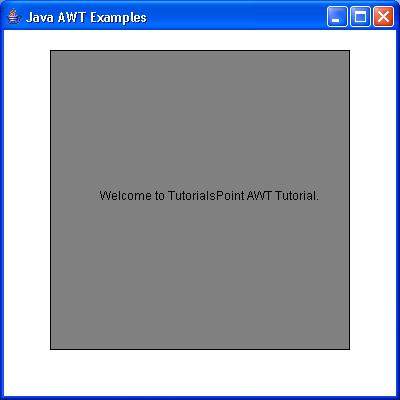
验证以下输出