
 数据结构
数据结构 网络
网络 关系型数据库管理系统
 操作系统
操作系统 Java
Java MS Excel
 iOS
iOS HTML
HTML CSS
CSS Android
 Python
 C 编程
C 编程 C++
C++ C#
C# MongoDB
 MySQL
MySQL Javascript
 PHP
PHP 物理学
物理学 化学
化学 生物学
生物学 数学
数学 英语
英语 经济学
经济学 心理学
心理学 社会研究
社会研究 时尚研究
时尚研究 法律研究
法律研究检查字符是否在 Arduino 中是字母数字
根据用例,您可能需要检查字符在 Arduino 中是否为字母数字。一个示例可以是验证密码字符串,在此类验证中,您只允许密码使用字母数字字符。或检查 SD 卡中的文件名以便存储在其中(有时候某些特殊字符不被允许在文件名中使用)。Arduino 有一个内置函数来检查给定字符是否为字母数字。如您所猜想的那样,该函数是isAlphaNumeric(),它将字符作为参数,并返回一个布尔值。
示例
void setup() {
   // put your setup code here, to run once:
   Serial.begin(9600);
   Serial.println();
   char c1 = 'a';
   char c2 = '1';
   char c3 = '%';

   if (isAlphaNumeric(c1)) {
      Serial.println("c1 is AlphaNumeric!");
   } else {
      Serial.println("c1 is NOT AlphaNumeric!");
   }

   if (isAlphaNumeric(c2)) {
      Serial.println("c2 is AlphaNumeric!");
   } else {
      Serial.println("c2 is NOT AlphaNumeric!");
   }

   if (isAlphaNumeric(c3)) {
      Serial.println("c3 is AlphaNumeric!");
   } else {
      Serial.println("c3 is NOT AlphaNumeric!");
   }
}

void loop() {
   // put your main code here, to run repeatedly:
}
输出
串口监视器输出如下所示 −
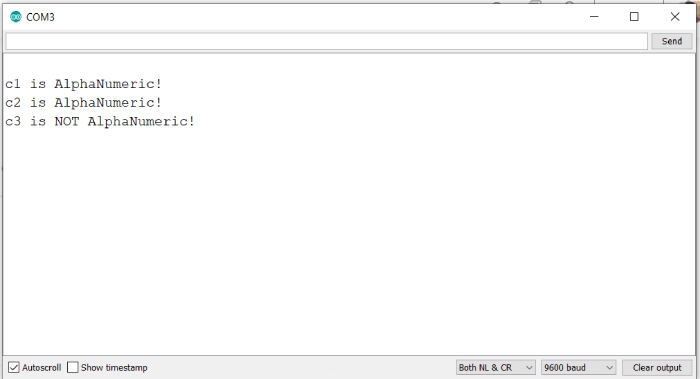
您可看出,此函数按预期工作,针对字母和数字返回真,但针对特殊字符不返回真。您可以尝试对其他字符执行此操作。

更新于:2021 年 5 月 31 日
647 次浏览量

广告