
 数据结构
数据结构 网络
网络 RDBMS
RDBMS 操作系统
操作系统 Java
Java MS Excel
 iOS
iOS HTML
HTML CSS
CSS Android
 Python
 C 编程
C 编程 C++
C++ C#
C# MongoDB
 MySQL
MySQL Javascript
 PHP
PHP 物理
物理 化学
化学 生物
生物 数学
数学 英语
英语 经济
经济 心理学
心理学 社会研究
社会研究 时尚研究
时尚研究 法律研究
法律研究使用 Tkinter 在 Python 中进行颜色游戏
对于开发 GUI 应用程序来说,tkinter 是一种非常流行且简单的工具。使用 tkinter 可以轻松开发 GUI 游戏。
这里我们也尝试开发一款颜色游戏。在这个游戏中,玩家必须输入屏幕上出现的单词的颜色,因此得分会增加 1,玩这个游戏的总时间为 30 秒,在这个游戏中使用的颜色有红色、蓝色、绿色、粉色、黑色、黄色、橙色、白色、紫色和棕色。界面将以不同的颜色显示不同颜色的名称。用户必须识别颜色并输入正确的颜色名称才能赢得游戏。
示例代码
import tkinter
import random
# list of colour.
my_colours = ['Red','Blue','Green','Pink','Black','Yellow','Orange','White','Purple','Brown']
my_score = 0
my_timeleft = 30
def my_startGame(event):
   if my_timeleft == 30:
      # start the countdown timer.
      my_countdown()
   my_nextColour()
def my_nextColour():
   global my_score
   global my_timeleft
   # if a game is currently in play
   if my_timeleft > 0:
      e.focus_set()
      if e.get().lower() == my_colours[1].lower():
         my_score += 1
      # clear the text entry box.
      e.delete(0, tkinter.END)
      random.shuffle(my_colours)
      label.config(fg = str(my_colours[1]), text = str(my_colours[0]))
      # update the score.
      my_scoreLabel.config(text = "Score: " + str(my_score))
# Countdown timer function
def my_countdown():
   global my_timeleft
   # if a game is in play
   if my_timeleft > 0:
      # decrement the timer.
      my_timeleft -= 1
      # update the time left label
      timeLabel.config(text = "Time left: "+ str(my_timeleft))
      # run the function again after 1 second.
      timeLabel.after(1000, my_countdown)
# Driver Code
root = tkinter.Tk()
root.title("COLORGAME")
root.geometry("375x200")
my_instructions = tkinter.Label(root, text = "Type in the color" "of the words, and not the word text!",
   font = ('Helvetica', 12))
my_instructions.pack()
my_scoreLabel = tkinter.Label(root, text = "Press enter to start",
   font = ('Helvetica', 12))
my_scoreLabel.pack()
my_timeLabel = tkinter.Label(root, text = "Time left: " +
   str(my_timeleft), font = ('Helvetica', 12))
my_timeLabel.pack()
label = tkinter.Label(root, font = ('Helvetica', 60))
label.pack()
e = tkinter.Entry(root)
root.bind('<Return>', my_startGame)
e.pack()
e.focus_set()
# start the GUI
root.mainloop()
输出
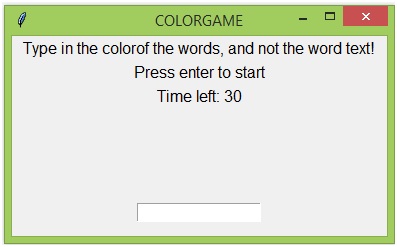
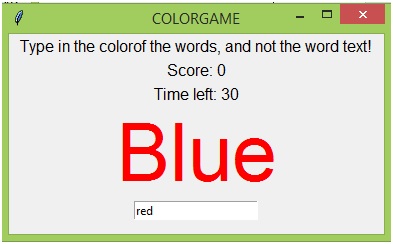

更新时间: 2019 年 7 月 30 日
1K+ 次浏览

广告