
- Concordion 教程
- Concordion - 首页
- Concordion - 概述
- Concordion - 环境设置
- Concordion - 第一个应用程序
- Concordion - set 命令
- assertEquals 命令
- Concordion - assertTrue 命令
- Concordion - assertFalse 命令
- Concordion - execute 命令
- Concordion - 返回对象
- Concordion - 返回Map
- 返回多值结果
- Concordion - 在表格上执行
- Concordion - 在列表上执行
- Concordion - verifyRows 命令
- Concordion - run 命令
- Concordion 有用资源
- Concordion - 快速指南
- Concordion - 有用资源
- Concordion - 讨论
Concordion - 返回Map
Concordion execute 命令可以用来获取行为结果,结果以 Map 的形式呈现,我们可以从中获取行为的多个输出。例如,考虑以下需求:
The full name Robert De is to be broken into its first name Robert and last name De.
这里我们需要一个 split 函数,它接受一个用户名并返回一个 Map 对象,该对象包含 firstName 和 lastName 作为键,并具有相应的价值,以便我们可以使用它们。
如果我们想为这样的 split 函数编写一个规范,该函数将接受一个用户名并输出一个结果对象,那么以下将是规范:
<p>The full name <span concordion:execute = "#result = split(#TEXT)">Robert
   De</span> is to be broken into first name <span
   concordion:assertEquals = "#result.firstName">Robert</span> and last name <span
   concordion:assertEquals = "#result.lastName">De</span>.</p>
当 Concordion 解析文档时,它将把特殊变量 #TEXT 的值设置为当前元素的值“Robert De”,并将其传递给 split 函数。然后,它将使用 execute 命令使用 #TEXT 作为参数执行 split() 方法,并将结果设置为 #result 变量,并使用结果映射打印 firstName 和 lastName 值作为输出。
示例
让我们准备一个可用的 Eclipse IDE,并按照以下步骤创建 Concordion 应用程序:
| 步骤 | 描述 |
|---|---|
| 1 | 创建一个名为 concordion 的项目,并在创建的项目中的 src 文件夹下创建一个包 com.tutorialspoint。 |
| 2 | 使用 添加外部 JAR 选项添加所需的 Concordion 库,如 Concordion - 第一个应用程序 章节中所述。 |
| 3 | 在 com.tutorialspoint 包下创建 Java 类 System。 |
| 4 | 在 specs.tutorialspoint 包下创建 Fixture 类 SystemFixture。 |
| 5 | 在 specs.tutorialspoint 包下创建规范 html 文件 System.html。 |
| 6 | 最后一步是创建所有 Java 文件和规范文件的内容,并按如下所述运行应用程序。 |
以下是 System.java 文件的内容:
package com.tutorialspoint;

import java.util.HashMap;
import java.util.Map;

public class System {
   public Map split(String userName){
      Map<String, String> result = new HashMap<String, String>();
      String[] words = userName.split(" ");
      result.put("firstName", words[0]);
      result.put("lastName", words[1]);
      return result;
   }
}
以下是 SystemFixture.java 文件的内容:
package specs.tutorialspoint;

import java.util.Map;
import com.tutorialspoint.Result;
import com.tutorialspoint.System;
import org.concordion.integration.junit4.ConcordionRunner;
import org.junit.runner.RunWith;

@RunWith(ConcordionRunner.class)

public class SystemFixture {
   System system = new System();
   public Map<String, String> split(String userName){
      return system.split(userName);
   }
}
以下是 System.html 文件的内容:
<html xmlns:concordion = "http://www.concordion.org/2007/concordion">
   <head>
      <link href = "../concordion.css" rel = "stylesheet" type = "text/css" />
   </head>

   <body>
      <h1>System Specifications</h1>
      <p>We are building specifications for our online order tracking application.</p>
      <p>Following is the requirement to split full name of a logged in user to its
         constituents by splitting name by whitespace:</p>

      <div class = "example">
         <h3>Example</h3>
         <p>The full name <span concordion:execute = "#result = split(#TEXT)">Robert
            De</span> is to be broken into first name <span
            concordion:assertEquals = "#result.firstName">Robert</span> and last name
            <span concordion:assertEquals = "#result.lastName">De</span>.</p>
      </div>

   </body>

</html>
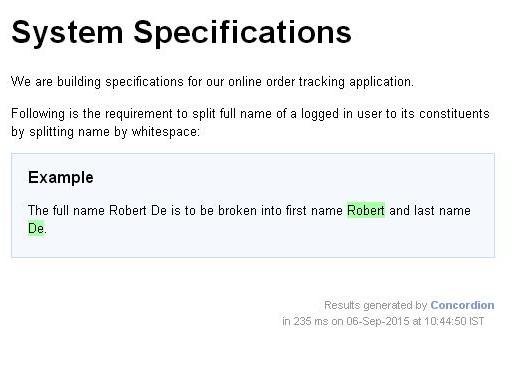
创建源文件和规范文件后,让我们将其作为 JUnit 测试运行。如果您的应用程序一切正常,则会产生以下结果:
C:\DOCUME~1\ADMINI~1\LOCALS~1\Temp\concordion\specs\tutorialspoint\System.html
Successes: 1, Failures: 0
System.html 是 Concordion 测试运行的输出。
广告