
 数据结构
数据结构 网络
网络 RDBMS
RDBMS 操作系统
操作系统 Java
Java MS Excel
 iOS
iOS HTML
HTML CSS
CSS Android
 Python
 C 编程
C 编程 C++
C++ C#
C# MongoDB
 MySQL
MySQL Javascript
 PHP
PHP 物理
物理 化学
化学 生物
生物 数学
数学 英语
英语 经济
经济 心理学
心理学 社会研究
社会研究 时装研究
时装研究 法律研究
法律研究在 tkinter 中创建一个包含 Entry 字段的弹出消息框
Tkinter 弹出窗口是顶级窗口界面,可以将窗口小部件和元素包装在主窗口中。可以使用按钮小部件之类的处理程序将其嵌入到任何主窗口中。可以使用Toplevel(root)构造函数创建弹出窗口。
示例
在这个示例中,我们将创建一个简单的应用程序,其中包含一个Label 窗口小部件和一个按钮,用于打开包含一个Entry 字段的弹出消息框。一旦弹出窗口被打开,它可以具有返回到主窗口的功能。
#Import the required library
from tkinter import*

#Create an instance of tkinter frame
win= Tk()

#Define geometry of the window
win.geometry("750x250")

#Define a function to close the popup window
def close_win(top):
   top.destroy()
def insert_val(e):
   e.insert(0, "Hello World!")

#Define a function to open the Popup Dialogue
def popupwin():
   #Create a Toplevel window
   top= Toplevel(win)
   top.geometry("750x250")

   #Create an Entry Widget in the Toplevel window
   entry= Entry(top, width= 25)
   entry.pack()

   #Create a Button to print something in the Entry widget
   Button(top,text= "Insert", command= lambda:insert_val(entry)).pack(pady= 5,side=TOP)
   #Create a Button Widget in the Toplevel Window
   button= Button(top, text="Ok", command=lambda:close_win(top))
   button.pack(pady=5, side= TOP)
#Create a Label
label= Label(win, text="Click the Button to Open the Popup Dialogue", font= ('Helvetica 15 bold'))
label.pack(pady=20)

#Create a Button
button= Button(win, text= "Click Me!", command= popupwin, font= ('Helvetica 14 bold'))
button.pack(pady=20)
win.mainloop()
输出
运行上述代码将显示一个窗口,其中包含一个按钮,用于打开弹出对话框。
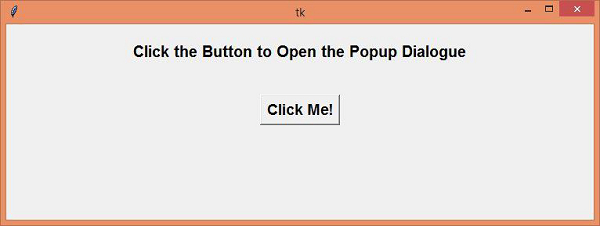
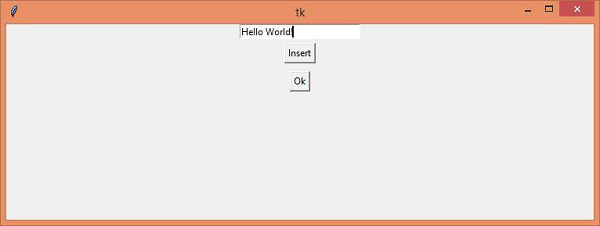
一旦我们点击按钮,它将打开弹出对话框。弹出对话框有两个按钮,每个按钮具有不同的目的。当我们点击“确定”按钮时,它将销毁弹出窗口并返回主窗口。

更新日期: 2021-04-15
6 千次 + 浏览

广告