
 数据结构
数据结构 网络
网络 关系型数据库管理系统
 操作系统
操作系统 Java
Java MS Excel
 iOS
iOS HTML
HTML CSS
CSS Android
 Python
 C 编程
C 编程 C++
C++ C#
C# MongoDB
 MySQL
MySQL Javascript
 PHP
PHP 物理学
物理学 化学
化学 生物学
生物学 数学
数学 英语
英语 经济学
经济学 心理学
心理学 社会学
社会学 时尚研究
时尚研究 法律研究
法律研究Arduino 中的 Cron 作业
Arduino 中的 **CronAlarms** 库帮助您在 Arduino 中设置 **cron 作业**。如果您不知道 **cron 作业**,它们是计划在固定时间间隔执行的任务。例如,每天午夜向服务器发送健康数据包。
要安装此库,请在库管理器中搜索 **CronAlarms**,并安装 Martin Laclaustra 的库。

安装完成后,转到 - **文件 → 示例 → CronAlarms**。
打开 **CronAlarms_example**。如果您查看示例,您会发现它们正在执行以下操作 -
使用 tm 结构(时间库)将时间设置为 2011 年 1 月 1 日星期六上午 8:29:00。
设置 6 个 Cron 警报,包括每日、每周、几秒钟间隔,甚至一次性触发的不重复警报。
实际上,一次性触发的不重复警报会禁用 2 秒的 cron。
在循环中,每秒打印当前时间。
**cron 创建语法** 为 -
CronID_t create(const char * cronstring, OnTick_t onTickHandler, bool isOneShot);
其中
**cronstring** 提供 cron 间隔,
**onTickHandler** 是在警报触发时将调用的函数,
**isOneShot** 确定警报是重复还是一次性间隔。
此函数返回一个 **cron ID**,该 ID 可用于在代码的其他地方引用警报,如 10 秒警报中所做的那样,使用 **Cron.free()** 禁用 2 秒警报。
//creating the 2-second repeating alarm and 10-second single-shot alarm

// timer for every 2 seconds
id = Cron.create("*/2 * * * * *", Repeats2, false);

// called once after 10 seconds
Cron.create("*/10 * * * * *", OnceOnly, true);

// 2-second alarm function
void Repeats2() {
   Serial.println("2 second timer");
}

//disabling 2-second alarm within the 10-second alarm
void OnceOnly() {
   Serial.println("This timer only triggers once, stop the 2 second timer");
   // use Cron.free(id) to disable a timer and recycle its memory.
   Cron.free(id);
   // optional, but safest to "forget" the ID after memory recycled
   id = dtINVALID_ALARM_ID;
   // you can also use Cron.disable() to turn the timer off, but keep
   // it in memory, to turn back on later with Alarm.enable().
}
创建 CronAlarm 最重要的部分是 cron 字符串。其语法为 -
"seconds minutes hours days_of_month month days_of_week"
对于这些中的任何一个,* 表示“所有值”。因此,
"0 30 8 * * *" → 表示每天 8:30:00 触发。
"30 30 8 * * 6" → 表示每个星期六(day_of_week = 6)8:30:30 触发。
表达式中的 / 表示间隔。
"*/15 * * * * *" → 表示每 15 秒。
如果在您的 Arduino 上运行此示例,串行监视器输出将为 -
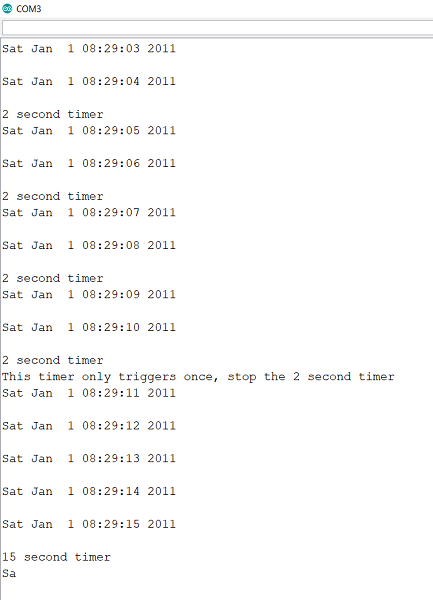
如您所见,警报按预期触发。

2K+ 次查看
