
 数据结构
数据结构 网络
网络 RDBMS
RDBMS 操作系统
操作系统 Java
Java MS Excel
 iOS
iOS HTML
HTML CSS
CSS Android
 Python
 C 编程
C 编程 C++
C++ C#
C# MongoDB
 MySQL
MySQL Javascript
 PHP
PHP 物理
物理 化学
化学 生物
生物 数学
数学 英语
英语 经济学
经济学 心理学
心理学 社会学
社会学 时尚研究
时尚研究 法律研究
法律研究禁用自动调整大小,以在 Java 中使 JTable 水平可滚动
要禁用自动调整大小,你需要使用 setAutoResizeMode() 方法。之后,将该表设为 AUTO_RESIZE_OFF。
假设我们的表格如下 −
String[][] rec = {
   { "1", "Virat", "840" },
   { "2", "David", "835" },
   { "3", "Shikhar", "656" },
   { "4", "Steve", "530" },
   { "5", "Kane", "515" },
   { "6", "Eion", "509" },
   { "7", "AB de Villiers", "498" },
   { "8", "Quinton", "470" },
   { "9", "Glenn", "410" },
   { "10", "Tom", "360" },
   { "11", "Johnny", "320" },
   { "12", "Shreyas", "280" },
};
String[] header = { "S.NO", "Player", "Runs" }; JTable table = new JTable(rec, header);
现在,禁用自动调整大小 −
table.setAutoResizeMode(JTable.AUTO_RESIZE_OFF);
以下是如何禁用自动调整大小以使 JTabel 水平可滚动的示例 −
示例
package my;
import java.awt.Color;
import javax.swing.BorderFactory;
import javax.swing.JFrame;
import javax.swing.JPanel;
import javax.swing.JScrollPane;
import javax.swing.JTable;
import javax.swing.border.TitledBorder;
public class SwingDemo {
   public static void main(String[] args) {
      JFrame frame = new JFrame();
      JPanel panel = new JPanel();
      panel.setBorder(BorderFactory.createTitledBorder(
         BorderFactory.createEtchedBorder(), "Total Runs", TitledBorder.CENTER, TitledBorder.TOP));
      String[][] rec = {
         { "1", "Virat", "840" },
         { "2", "David", "835" },
         { "3", "Shikhar", "656" },
         { "4", "Steve", "530" },
         { "5", "Kane", "515" },
         { "6", "Eion", "509" },
         { "7", "AB de Villiers", "498" },
         { "8", "Quinton", "470" },
         { "9", "Glenn", "410" },
         { "10", "Tom", "360" },
         { "11", "Johnny", "320" },
         { "12", "Shreyas", "280" },
      };
      String[] header = { "S.NO", "Player", "Runs" }; JTable table = new JTable(rec, header);
      table.setShowGrid(false);
      table.setShowHorizontalLines(true);
      table.setAutoResizeMode(JTable.AUTO_RESIZE_OFF);
      table.setGridColor(Color.orange);
      panel.add(new JScrollPane(table));
      frame.add(panel);
      frame.setSize(550, 400);
      frame.setVisible(true);
   }
}
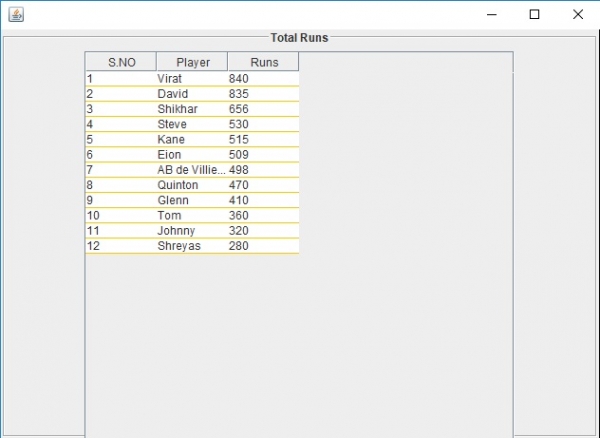
这将产生以下输出。此时自动调整大小已关闭 −
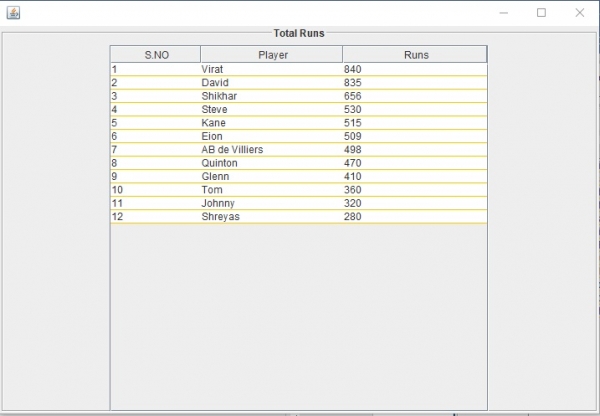
现在,你可以拖动并调整表格列的大小 −

更新于: 30-7-2019
709 次浏览

广告