
 数据结构
数据结构 网络
网络 RDBMS
RDBMS 操作系统
操作系统 Java
Java MS Excel
 iOS
iOS HTML
HTML CSS
CSS Android
 Python
 C 编程
C 编程 C++
C++ C#
C# MongoDB
 MySQL
MySQL Javascript
 PHP
PHP 物理学
物理学 化学
化学 生物学
生物学 数学
数学 英语
英语 经济学
经济学 心理学
心理学 社会研究
社会研究 时尚研究
时尚研究 法律研究
法律研究如何在 Java 中使 JTable 单选?
要在 Java 中使 JTable 单选,你需要将 selection 模式设置为 SINGLE_SELECTION。假设我们的表格如下所示 −
String[][] rec = {
   { "001", "Shirts", "40" },
   { "002", "Trousers", "250" },
   { "003", "Jeans", "25" },
   { "004", "Applicances", "90" },
   { "005", "Mobile Phones", "200" },
   { "006", "Hard Disk", "150" },
};
String[] header = { "ID", "Product", "Quantity" };
JTable table = new JTable(rec, header);
使用 setSelectionMode() 方法设置 selection 模式为单选 −
table.setSelectionMode(ListSelectionModel.SINGLE_SELECTION);
我们来看一个例子,如何在 Java 中为我们的表格设置相同内容 −
示例
package my;
import java.awt.Color;
import javax.swing.BorderFactory;
import javax.swing.JFrame;
import javax.swing.JPanel;
import javax.swing.JScrollPane;
import javax.swing.JTable;
import javax.swing.ListSelectionModel;
import javax.swing.border.TitledBorder;
public class SwingDemo {
   public static void main(String[] args) {
      JFrame frame = new JFrame();
      JPanel panel = new JPanel();
      panel.setBorder(BorderFactory.createTitledBorder(
         BorderFactory.createEtchedBorder(), "Stock", TitledBorder.CENTER, TitledBorder.TOP));
      String[][] rec = {
         { "001", "Shirts", "40" },
         { "002", "Trousers", "250" },
         { "003", "Jeans", "25" },
         { "004", "Applicances", "90" },
         { "005", "Mobile Phones", "200" },
         { "006", "Hard Disk", "150" },
      };
      String[] header = { "ID", "Product", "Quantity" };
      JTable table = new JTable(rec, header);
      table.setShowHorizontalLines(true);
      table.setGridColor(Color.blue);
      // make table single selectable
      table.setSelectionMode(ListSelectionModel.SINGLE_SELECTION);
      panel.add(new JScrollPane(table));
      frame.add(panel);
      frame.setSize(550, 400);
      frame.setVisible(true);
   }
}
输出
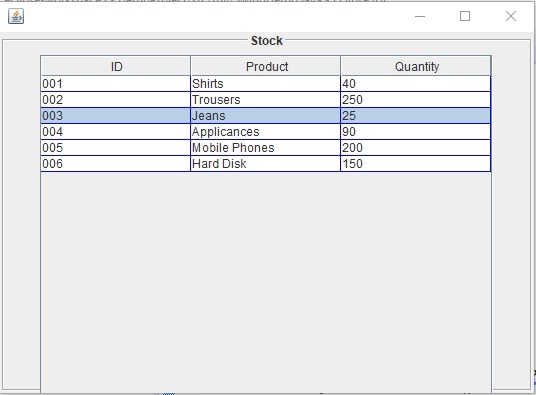

更新于: 30-Jul-2019
231 查看

广告