
 数据结构
数据结构 网络
网络 关系数据库管理系统 (RDBMS)
 操作系统
操作系统 Java
Java MS Excel
 iOS
iOS HTML
HTML CSS
CSS Android
 Python
 C 编程
C 编程 C++
C++ C#
C# MongoDB
 MySQL
MySQL Javascript
 PHP
PHP 物理学
物理学 化学
化学 生物学
生物学 数学
数学 英语
英语 经济学
经济学 心理学
心理学 社会研究
社会研究 时尚研究
时尚研究 法律研究
法律研究使用 Python 的 Turtle 绘制一辆汽车
Turtle 是一个 Python 模块,用于使用简单的命令创建图形、图像和动画。Turtle 对初学者来说是一个简单易用的工具,可以通过创建令人兴奋的视觉效果来学习编程。在本文中,我们将使用 Python 的 Turtle 绘制一辆汽车。
步骤 1:在 Python 中安装 Turtle
在深入研究代码之前,我们需要确保 Turtle 模块已安装在我们的 Python 环境中。使用 Python 包管理器安装 Turtle 模块。要安装 turtle 模块,请在终端中键入以下命令。
pip install turtle
步骤 2:导入 Turtle
安装 turtle 模块后,可以使用 Python 中的 import 命令导入 turtle。
import turtle
步骤 3:创建 turtle 对象
导入 Turtle 后,我们需要创建一个 Turtle 对象来进行绘制。我们可以通过调用 Turtle() 函数来实现 -
t = turtle.Turtle()
步骤 4:绘制汽车
创建 turtle 对象后,现在我们可以用它来创建汽车的车身。我们将前后移动 turtle 来创建汽车的顶部和底部,然后旋转它来创建侧面。然后我们可以绘制汽车的前轮、后轮和车窗。
# Draw the top of the car
t.penup()
t.goto(0, 50)
t.pendown()
t.goto(0, 100)

# Draw the bottom of the car
t.penup()
t.goto(0, 50)
t.pendown()
t.goto(75, 50)
t.goto(100, 75)

# Draw the sides of the car
t.penup()
t.goto(0, 100)
t.pendown()
t.goto(75, 100)
t.goto(100, 75)


# Draw the front wheel
t.penup()
t.goto(25, 25)
t.pendown()
t.circle(25)

# Draw the back wheel
t.penup()
t.goto(75, 25)
t.pendown()
t.circle(25)

# Draw the windows
t.penup()
t.goto(15, 100)
t.pendown()
t.goto(60, 100)
t.goto(75, 75)
t.goto(60, 50)
t.goto(15, 50)
t.goto(0, 75)
t.goto(15, 100)

# Draw the headlights
t.penup()
t.goto(90, 75)
t.dot(10)
步骤 5:添加颜色
我们可以通过向汽车添加颜色使其看起来更逼真。我们可以使用 fillcolor() 和 begin_fill() 方法用特定的颜色填充汽车。我们还可以使用 pencolor() 方法更改用于绘制汽车的笔的颜色。
t.fillcolor("red")
t.begin_fill()
# Draw the body of the car
# ...
t.end_fill()

t.fillcolor("black")
t.begin_fill()
# Draw the wheels of the car
# ...
t.end_fill()

t.pencolor("white")
# Draw the windows and headlights of the car
# ...
步骤 6:完成汽车
我们可以使用 hideturtle() 方法隐藏 turtle,并使用 done() 方法使窗口保持打开状态,直到用户关闭它。
t.hideturtle()
turtle.done()
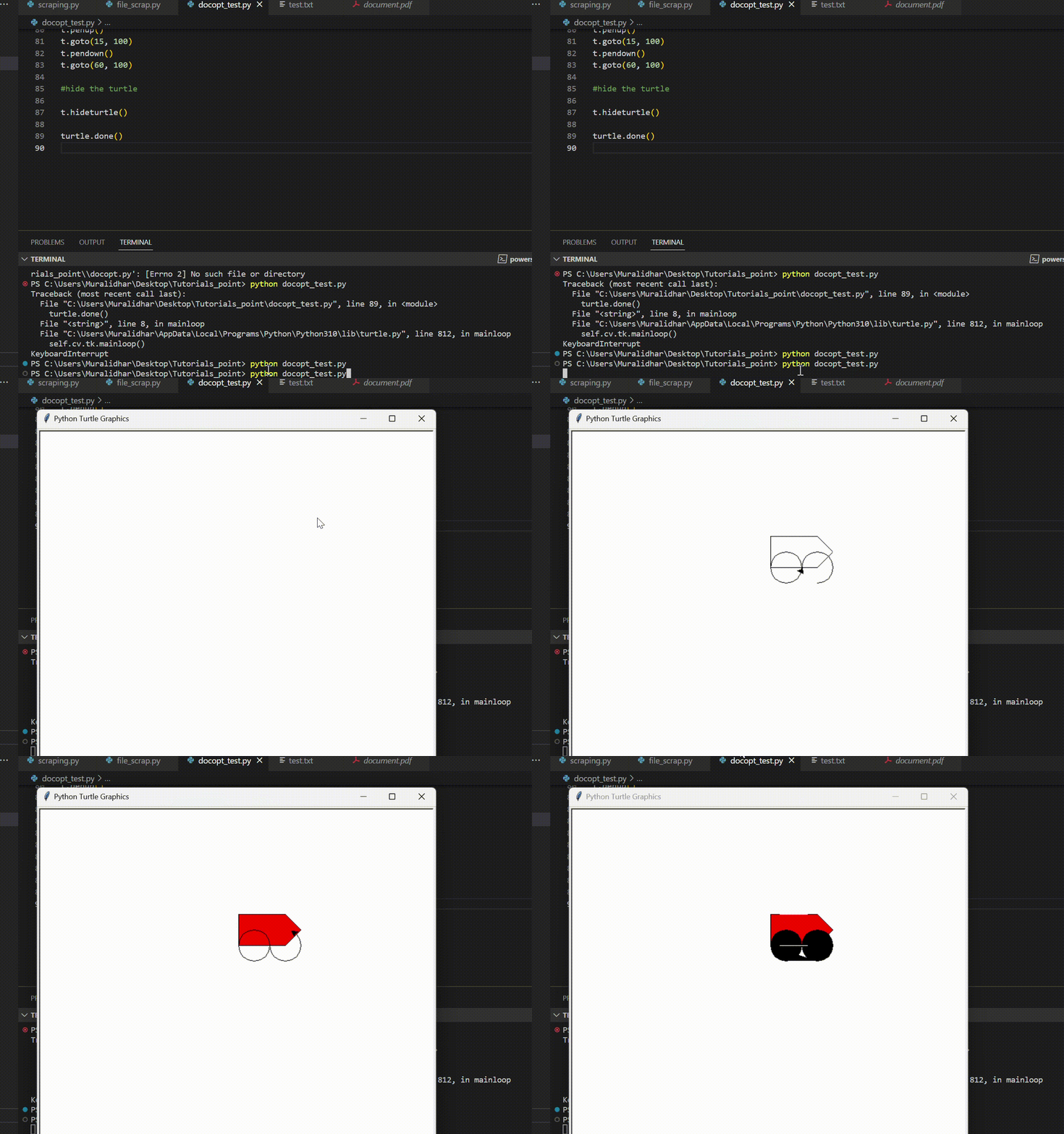
以下是使用 Python 的 Turtle 绘制汽车的完整代码
import turtle

# Create a Turtle object
t = turtle.Turtle()

# Draw the body of the car
t.penup()
t.goto(0, 50)
t.pendown()
t.goto(0, 100)
t.penup()
t.goto(0, 50)
t.pendown()
t.goto(75, 50)
t.goto(100, 75)
t.penup()
t.goto(0, 100)
t.pendown()
t.goto(75, 100)
t.goto(100, 75)

# Draw the wheels of the car
t.penup()
t.goto(25, 25)
t.pendown()
t.circle(25)
t.penup()
t.goto(75, 25)
t.pendown()
t.circle(25)

# Draw the windows and headlights of the car
t.penup()
t.goto(15, 100)
t.pendown()
t.goto(60, 100)
t.goto(75, 75)
t.goto(60, 50)
t.goto(15, 50)
t.goto(0, 75)
t.goto(15, 100)
t.penup()
t.goto(90, 75)
t.dot(10)

# Add color to the car
t.fillcolor("red")
t.begin_fill()
t.penup()
t.goto(0, 50)
t.pendown()
t.goto(0, 100)
t.goto(75, 100)
t.goto(100, 75)
t.goto(75, 50)
t.goto(0, 50)
t.end_fill()

t.fillcolor("black")
t.begin_fill()
t.penup()
t.goto(25, 25)
t.pendown()
t.circle(25)
t.penup()
t.goto(75, 25)
t.pendown()
t.circle(25)
t.end_fill()

t.pencolor("white")

# draw windows

t.penup()
t.goto(15, 50)
t.pendown()
t.goto(60, 50)
t.penup()
t.goto(15, 100)
t.pendown()
t.goto(60, 100)

#hide the turtle

t.hideturtle()

turtle.done()
输出
结论
Turtle 绘图是一种简单有趣的学习编程的方式,它是教授孩子们计算机科学的优秀工具。在本文中,我们向您展示了如何使用 Python 的 Turtle 绘制汽车。我们已经介绍了 Turtle 绘图的基本概念,例如创建 Turtle 对象、移动 turtle、绘制形状和添加颜色。有了这些知识,您可以使用 Python 的 Turtle 绘图创建更复杂和更有趣的图案。

4K+ 次浏览
