
 数据结构
数据结构 网络
网络 关系数据库管理系统 (RDBMS)
 操作系统
操作系统 Java
Java MS Excel
 iOS
iOS HTML
HTML CSS
CSS Android
 Python
 C 编程
C 编程 C++
C++ C#
C# MongoDB
 MySQL
MySQL Javascript
 PHP
PHP 物理学
物理学 化学
化学 生物学
生物学 数学
数学 英语
英语 经济学
经济学 心理学
心理学 社会研究
社会研究 时尚研究
时尚研究 法律研究
法律研究使用 Python 中的 Arcade 绘制弧线
Python 是一种广泛使用的编程语言。它拥有大量的库和工具,使其成为一种流行的语言。Arcade 是 Python 的一个库。这个库是一个多媒体库,提供图形工具来创建二维游戏、图形应用程序中使用的对象等等。在本文中,我们将使用 Python 中的 Arcade 库绘制弧线。我们将使用两种不同的方法来完成任务。让我们从了解 Arcade 库的基础知识开始。
Arcade 库
Arcade 库是为了为游戏和其他图形应用程序创建更吸引人的图形而开发的。较少的选项导致了一个不同的库,它成为一个现代的 Python 模块。由于它构建在 Pyglet(一个多媒体库)之上,因此该库提供了广泛的功能,为开发人员创建新系列的游戏和其他应用程序提供了简单的界面。
Arcade 库的功能
以下是 Arcade 库的主要功能:
该库提供了各种形状,例如线条、圆形、矩形等,可以使用不同的效果修改这些形状,并为普通形状增添美感。
您可以使用此库中的不同函数创建游戏并添加逼真的视图。
此库可以在多个平台上运行,即它具有跨平台兼容性。
由于存在精灵,此库简化了创建动画对象的路径。精灵是可以移动和交互的对象。
使用 Arcade 库绘制弧线
使用 Arcade 库绘制弧线有两种方法。让我们使用这两种方法来完成任务。由于 Arcade 是一个内置库,因此不需要安装在系统中。您只需在代码中导入它即可。
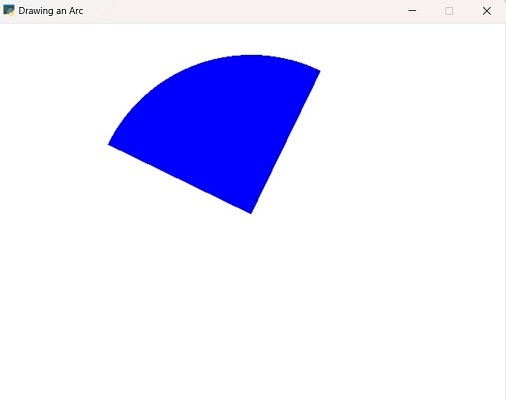
使用 draw_arc_filled() 方法
使用此方法绘制的弧线将是填充的。
我们必须从导入 Arcade 库开始代码。通过导入库,用户可以访问它的函数和方法。如果没有导入库,它将显示“NameError”,这意味着库未定义。
导入库后,我们将屏幕的尺寸定义为“SCR_WIDTH”和“SCR_HEIGHT”。使用“arcade.open_window()”函数创建一个窗口,并设置背景颜色。
要绘制弧线,我们需要定义某些点,例如中心点 (center_x, center_y)、半径、角度(起始角和结束角)和宽度。每个点都在代码中使用不同的函数定义。
定义完绘制弧线的所有参数后,下一步是使用这些参数绘制弧线。这是通过使用“on_draw()”函数完成的。这是 Arcade 库中一个预定义的函数,它由 arcade.run() 函数自动调用。
这里的 delta_time 参数表示自上次调用 on_draw() 函数以来经过的时间。此 delta_time 参数在用户之间生成一致性。这就是使用 Arcade 库绘制弧线的方法。
示例
让我们来看一个例子:
import arcade
# give dimensions of the screen
SCR_WIDTH = 640
SCR_HEIGHT = 480
# for creating window
window = arcade.open_window(SCR_WIDTH, SCR_HEIGHT, "Drawing an Arc")
arcade.set_background_color(arcade.color.WHITE)
# Define the center point of the arc
center_x = SCR_WIDTH // 2
center_y = SCR_HEIGHT // 2

# Define the radius of the arc
radius = 400
# Define the start and end angles of the arc in degrees
start_angle = 60
end_angle = 150
def on_draw(delta_time):
    # Clear the screen
    arcade.start_render()

    # Draw the arc
    arcade.draw_arc_filled(center_x, center_y, radius, radius, arcade.color.BLUE, start_angle, end_angle)

# Run the game loop
arcade.schedule(on_draw, 1 / 60)
arcade.run()
输出
使用 draw_arc_outline() 方法
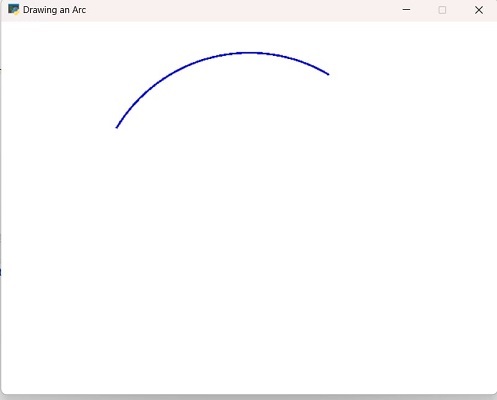
在此方法中,绘制的弧线将是轮廓弧线。前面方法中使用的所有参数在此方法中都相同,但例外在于弧线的 line_width。
示例
import arcade
# give dimensions of the screen
SCR_WIDTH = 640
SCR_HEIGHT = 480
# for creating window
window = arcade.open_window(SCR_WIDTH, SCR_HEIGHT, "Drawing an Arc")
arcade.set_background_color(arcade.color.WHITE)

# Define the center point of the arc
center_x = SCR_WIDTH // 2
center_y = SCR_HEIGHT // 2

# Define the radius of the arc
radius = 400

# Define the start and end angles of the arc in degrees
start_angle = 60
end_angle = 150

# Set the width of the arc
line_width = 5
def on_draw(delta_time):
    # Clear the screen
    arcade.start_render()

    # Draw the arc
    arcade.draw_arc_outline(center_x, center_y, radius, radius, arcade.color.BLUE, start_angle, end_angle, line_width)

# Run the game loop
arcade.schedule(on_draw, 1 / 60)
arcade.run()
输出
这两种方法都提供了创建弧线的不同方式。您可以通过探索 Arcade 库中存在的其他函数来为弧线添加更多功能。
绘制弧线时,您可能会遇到一些常见的错误。当您使用 **arcade.draw_arc()** 函数时,您会在其下传递多个参数。确保参数不错误且顺序正确。接下来,坐标在绘制任何对象时都起着重要作用。有时,库的过时版本可能会导致错误。
结论
在本文中,我们从 Arcade 库的基础知识开始。首先也是最重要的事情是了解库的基本概念。这有助于正确使用函数,因为每个函数都采用一些对创建对象很重要的参数。Arcade 库简化了创建二维对象的过程,并提供不同的方法和函数来完成任务。

浏览量 134 次
