
 数据结构
数据结构 网络
网络 关系数据库管理系统 (RDBMS)
 操作系统
操作系统 Java
Java MS Excel
 iOS
iOS HTML
HTML CSS
CSS Android
 Python
 C 语言编程
 C++
C++ C#
C# MongoDB
 MySQL
MySQL Javascript
 PHP
PHP 物理学
物理学 化学
化学 生物学
生物学 数学
数学 英语
英语 经济学
经济学 心理学
心理学 社会学
社会学 服装设计
服装设计 法律研究
法律研究如何在 OpenCV 中使用 Python 在图像上绘制多边形?
要在图像上绘制多边形,我们使用 `cv2.polylines()` 方法。我们可以在图像上绘制开放或封闭的多边形。绘制开放多边形时,首尾两点不会连接。
语法
`cv2.polylines()` 的语法如下:
cv2.polylines(src, [pts], isClosed, color, thickness)
参数
**src** - 要绘制多边形的输入图像。
**pts** - 点的数组列表。
**isClosed** - 设置为 `isClosed=True` 绘制封闭多边形,对于开放多边形,设置为 `isClosed=False`。
**color** - 线条的颜色。
**thickness** - 线条的粗细。默认粗细设置为 `thickness=1`。
步骤
您可以按照以下步骤在图像上绘制多边形:
导入所需的库。在以下所有 Python 示例中,所需的 Python 库是 **OpenCV** 和 **NumPy**。确保您已经安装了它们。
import cv2
import numpy as np
使用 `cv2.imread()` 方法读取输入图像。
img = cv2.imread('nature_waterfall.jpg')
定义点的二维数组并将其重新整形。
points = np.array([[155,320],[250,420],[345,50]])
pts = points.reshape(-1,1,2) # now shape [3,1,2]
在图像上绘制多边形,传递参数的所需值:`isClosed`、`color`、`thickness`。要绘制封闭多边形,请传递 `isClosed=True`;要绘制开放多边形,请设置 `isClosed=False`。
cv2.polylines(img, [pts1], isClosed=True, color=(255,0,0), thickness = 2)
显示绘制了多边形的图像。
cv2.imshow("Polylines", img_poly)
cv2.waitKey(0)
cv2.destroyAllWindows()
在以下示例中,我们将使用此图像作为 **输入文件**。

示例 1
在下面的 Python 程序中,我们在输入图像上绘制了一条蓝色封闭多边形。
# import required libraries
import cv2
import numpy as np

# load the input image
img = cv2.imread('nature_waterfall.jpg')

# define an array of three points on image to draw the polylines
# shape of point array [3,2]
points = np.array([[155,320],[250,420],[345,50]])

# reshape the point array to make it 3D
pts = points.reshape(-1,1,2) # now shape [3,1,2]

# draw polylines on the image, passing desired values of the arguments
img_poly = cv2.polylines(img, [pts], isClosed=True, color=(255,0,0), thickness = 2)

# display the image with drawn polylines
cv2.imshow("Polylines", img_poly)
cv2.waitKey(0)
cv2.destroyAllWindows()
输出
执行上述程序后,将生成以下 **输出** 窗口。
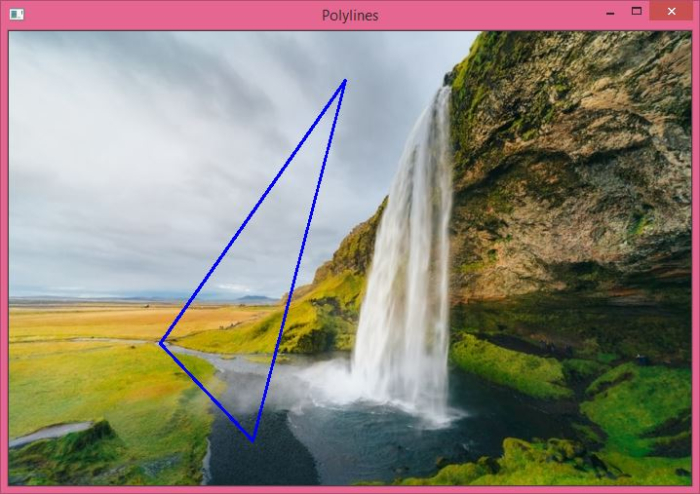
请注意,图像上绘制的多边形是封闭的。我们可以绘制一个未封闭的多边形。在这种情况下,首尾两点不会连接。请查看第二个示例,了解图像上绘制的两种类型的线条。
示例 2
在下面的 Python 程序中,我们在输入图像上绘制了三条多边形。第一条和第三条多边形是封闭的,而第二条多边形是开放的。
import cv2
import numpy as np
# read the input image
img = cv2.imread('nature_waterfall.jpg')

# define the array of points
points1 = np.array([[455,200],[155,420],[145,350]])
points2 = np.array([[200,120],[200,320],[405,350], [600,30]])
points3 = np.array([[100,20],[320,20],[45,350], [100,150]])

# reshape the points
pts1 = points1.reshape(-1,1,2)
pts2 = points2.reshape(-1,1,2)
pts3 = points3.reshape(-1,1,2)

# draw the polylines
cv2.polylines(img, [pts1], isClosed=True, color=(255,0,0), thickness = 2)
cv2.polylines(img, [pts2], isClosed=False, color=(0,255,0), thickness = 2)
cv2.polylines(img, [pts3], isClosed=True, color=(0,0,255), thickness = 2)

# display the image with drawn polylines
cv2.imshow("Polylines", img)
cv2.waitKey(0)
cv2.destroyAllWindows()
输出
执行上述程序后,将生成以下 **输出** 窗口。
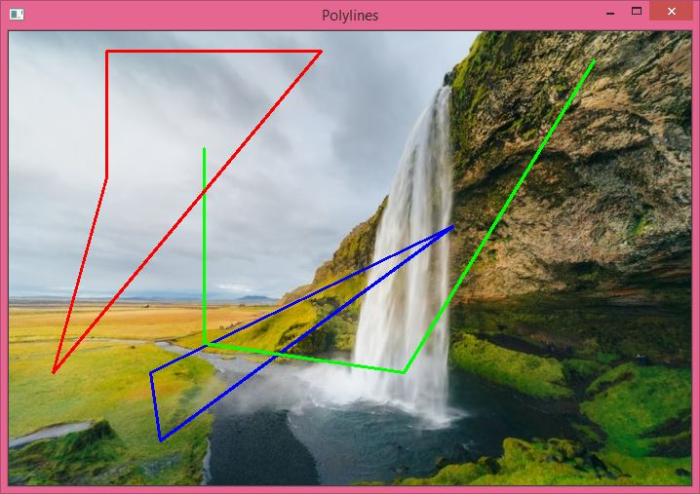
请注意,绿色多边形是开放的,而红色和蓝色多边形是封闭的。

5K+ 次浏览
