
 数据结构
数据结构 网络
网络 RDBMS
RDBMS 操作系统
操作系统 Java
Java MS Excel
 iOS
iOS HTML
HTML CSS
CSS Android
 Python
 C语言编程
C语言编程 C++
C++ C#
C# MongoDB
 MySQL
MySQL Javascript
 PHP
PHP 物理学
物理学 化学
化学 生物学
生物学 数学
数学 英语
英语 经济学
经济学 心理学
心理学 社会学
社会学 服装设计
服装设计 法律学
法律学DTH传感器编程
DHT11 和 DHT22 传感器是可以连接到面包板上的微控制器的传感器,可以测量某个位置的湿度和温度。这些传感器之间的区别在于 DHT22 更昂贵,具有更好的温度读数范围,并且更精确。这些传感器可以连接到 ESP32 或 Arduino 等微控制器,并且可以由程序读取其值。本文使用两个不同的示例,演示了使用 ESP32 的 DHT11 和 DHT22 传感器的使用方法。电路是使用 ESP32 微控制器和 DHT 传感器在实际和 Wokwi 模拟器上制作的,并且使用 Arduino 软件编写了测量温度或湿度的程序。
让我们通过几个示例来探索这些文章。
示例 1 - 使用 DHT11 传感器测量某个位置的温度和湿度
示例 2 - 使用 Wokwi 模拟器和 LCD 显示 DHT22 传感器读数。
将 DHT11 与 ESP32 连接
按照以下说明连接引脚,制作电路 -
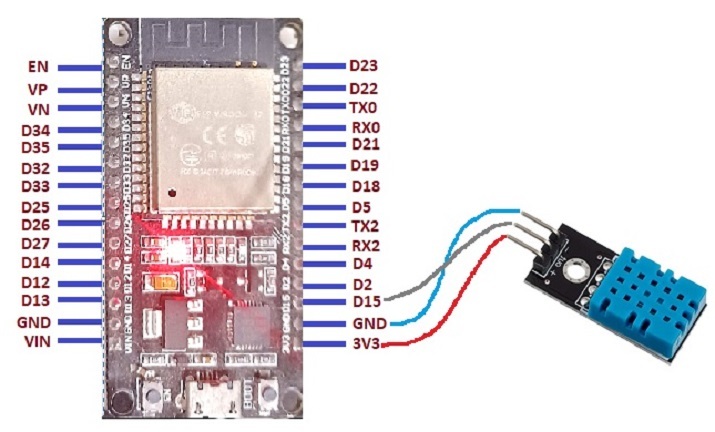
图 1:显示 DHT11 与 ESP32 的引脚连接
示例 1:使用 DHT11 传感器测量某个位置的温度和湿度
DHT11 传感器用于测量温度和湿度。此处的 C 语言程序使用“DHT.h”进行 ESP32 和 DHT11 传感器之间的通信。结果可以使用串口监视器查看。
电路设计步骤和编码
步骤 1 - 首先将 ESP32 微控制器放置在面包板上。
步骤 2 - 接下来,将 DHT11 传感器插入面包板。
步骤 3 - 将 DHT11 传感器的 Vin 连接到 ESP32 的 3V3/Vin 引脚。将 DHT11 传感器的 GND 连接到 ESP32 的 GND 引脚。将 DHT11 传感器的 Data 引脚连接到 ESP32 的 D15 引脚。
步骤 4 - 使用 Arduino 编写 C 程序以测量温度。
步骤 5 - 使用 USB 数据线将 ESP32 连接到计算机。
步骤 6 - 编译并将代码传输到 ESP32,并在串口监视器上检查结果。
代码
// Read the temperature and humidity of the place using DHT11 sensor
#include "DHT.h"
// connected to ESP32 pin 15
#define DHT_PIN 15
#define DHT_TYPE DHT11

// making the DHT sensor object
DHT dhtt(DHT_PIN, DHT_TYPE);
void setup() {
   //set the baud rate
   Serial.begin(9600);
   Serial.println("Using the DHT sensor!");
   // start the sensor for temperature and humidity
   dhtt.begin();
}
void loop() {
   //read the humidity value
   float hum = dhtt.readHumidity();
   //read the temperature value
   float tem = dhtt.readTemperature();
   // if unable to get reading correctly
   if (isnan(hum) || isnan(tem)) {
      Serial.println("Failed to read from DHT sensor!");
      return;
   }
   // print Humidity
   Serial.print("Humidity: ");
   Serial.print(hum);
   Serial.print(",");
   // print Temperature
   Serial.print("Temperature: ");
   Serial.println(tem);
   delay(2000);
}
查看结果
代码编译并传输/上传到 ESP32 后,可以在串口监视器中看到结果。
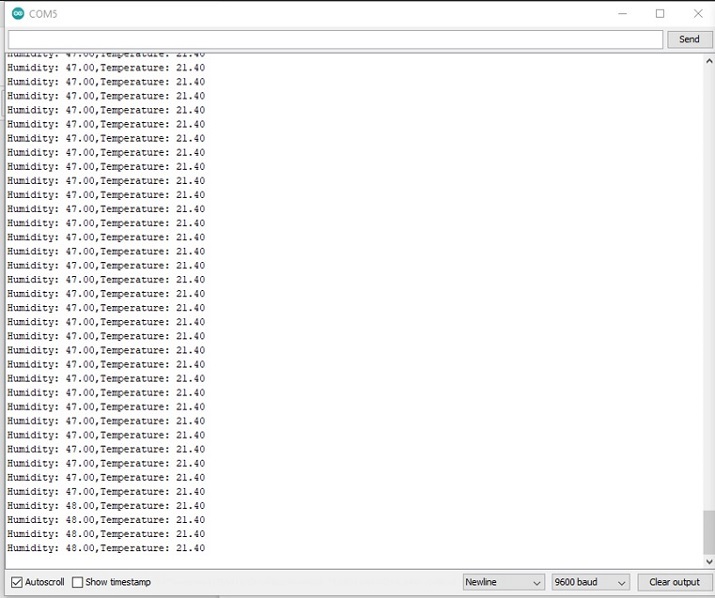
图:显示使用串口监视器读取的温度和湿度结果
示例 2:使用 Wokwi 模拟器和 LCD 显示屏显示 DHT22 传感器读数
这里,DHT22 传感器用于测量温度和湿度。此处使用 Wokwi 模拟器编写了 C 语言程序。它使用“DHT.h”进行 DHT22 和 ESP32 之间的通信,以及“LiquidCrystal_I2C.h”用于使用 LCD。结果可以使用 Wokwi 模拟器查看。
电路设计步骤和编码
步骤 1 - 首先登录 Wokwi。现在开始一个新的 ESP32 项目。
步骤 2 - 点击加号添加组件,并选择 DHT22 和 LED 显示屏。接下来,将 DHT22 传感器连接到 ESP32。
步骤 3 - 将 DHT22 传感器的 Vin 连接到 ESP32 的 3V3/Vin 引脚。将 DHT22 传感器的 GND 连接到 ESP32 的 GND 引脚。将 DHT22 传感器的 Data 引脚连接到 ESP32 的 D15 引脚。
步骤 4 - 点击加号添加组件,并选择一个 16x2 LCD(16 列 2 行),并将此显示设备与 ESP32 连接。
步骤 5 - 使用 Wokwi 模拟器编写 C 程序,并使用 libraries.txt 选项卡添加所需的库。
步骤 6 - 按下播放按钮编译代码,并在 LCD 显示屏上检查结果。
代码
//The DHT library
#include <DHT.h>
//The LCD library
#include <LiquidCrystal_I2C.h>
// connected to ESP32 pin 15
#define DHT_PIN 15

//Here DHT22 Type is used
#define DHT_TYPE DHT22

// making the DHT sensor object
DHT dhtt(DHT_PIN, DHT_TYPE);

float tem ;
float hum;

//making the myLcd object
LiquidCrystal_I2C myLcd(0x27, 16, 2);

void setup(){
   //set the baud rate
   Serial.begin(9600);
   Serial.println("Using the DHT sensor!");
   // start the sensor for temperature and humidity
   dhtt.begin();
   //initialise the lcd
   myLcd.init();
   //clear the lcd
   myLcd.clear();
   //set the position to start the print
   myLcd.setCursor(2, 0);
   //print message
   myLcd.print("DHT Sensor!");
   delay(500);
}
void loop() {
   //read the temperature value
   tem = dhtt.readTemperature();
   //read the humidity value
   hum = dhtt.readHumidity();
   delay(1000);
   myLcd.clear();
   myLcd.setCursor(1, 0);
   //print the temperature value
   myLcd.print("Temperature: "+ String(tem));
   myLcd.setCursor(1, 1);
   //print the humidity value
   myLcd.print("Humidity: "+ String(hum));
   delay(1000);
}
查看结果 - 示例 2
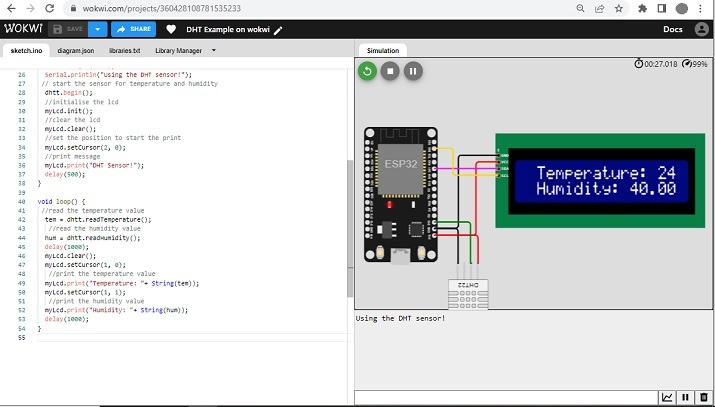
图 3:显示使用 Wokwi 读取 DHT22 的结果。
本文使用两个不同的示例,介绍了使用 DHT11 传感器/DHT22 与 ESP32 的方法。在第一个示例中,DHT11 传感器用于通过制作实际电路来测量温度和湿度。在第二个示例中,DHT22 传感器用于使用 Wokwi 模拟器在 LCD 显示屏上测量温度和湿度。

1K+ 浏览量
