
- 物联网ESP32教程
- 首页
- 物联网简要概述
- ESP32介绍
- 在Arduino IDE中安装ESP32开发板
- 设置RTOS用于双核和多线程操作
- ESP32与MPU6050接口
- ESP32与模拟传感器接口
- ESP32参数设置
- ESP32 SPIFFS存储(芯片自带的迷你SD卡)
- ESP32与OLED显示屏接口
- ESP32上的WiFi
- 使用HTTP通过WiFi传输数据
- 使用HTTPS通过WiFi传输数据
- 使用MQTT通过WiFi传输数据
- 通过蓝牙传输数据
- 使用NTP客户端获取当前时间
- 执行ESP32固件的(OTA)更新
- ESP32的应用
- 您作为开发人员的下一步
- ESP32物联网实用资源
- 快速指南
- 实用资源
- 讨论
使用HTTP通过WiFi传输数据
HTTP(超文本传输协议)是最常见的通信形式之一,使用ESP32,我们可以使用HTTP请求与任何Web服务器交互。让我们在本节中了解如何操作。
关于HTTP请求的简要说明
HTTP请求发生在客户端和服务器之间。顾名思义,服务器根据请求向客户端“提供”信息。Web服务器通常提供网页。例如,当您在互联网浏览器中输入https://www.linkedin.com/login时,您的PC或笔记本电脑充当客户端,并向托管linkedin.com的服务器请求与/login地址对应的页面。您将收到一个HTML页面作为返回,然后由您的浏览器显示。
HTTP遵循请求-响应模型,这意味着通信始终由客户端发起。服务器不能无缘无故地与任何客户端对话,也不能与任何客户端启动通信。通信必须始终由客户端以请求的形式发起,服务器只能响应该请求。服务器的响应包含状态代码(记得404吗?这是一个状态代码),以及(如果适用)请求的内容。所有状态代码的列表可以在这里找到 这里。
那么,服务器如何识别HTTP请求呢?通过请求的结构。HTTP请求遵循一个固定的结构,该结构包含三个部分
请求行后跟回车换行符(CRLF = \r\n)
零个或多个标题行,后跟CRLF和一个空行,再次后跟CRLF
可选正文
典型的HTTP请求如下所示
POST / HTTP/1.1         //Request line, containing request method (POST in this case)
Host: www.example.com   //Headers
                        //Empty line between headers
key1=value1&key2=value2   //Body
服务器响应如下所示:
HTTP/1.1 200 OK                     //Response line; 200 is the status code
Date: Mon, 23 May 2005 22:38:34 GMT //Headers
Content-Type: text/html; charset=UTF-8
Content-Length: 155
Last-Modified: Wed, 08 Jan 2003 23:11:55 GMT
Server: Apache/1.3.3.7 (Unix) (Red-Hat/Linux)
ETag: "3f80f−1b6−3e1cb03b"
Accept-Ranges: bytes
Connection: close
                                    //Empty line between headers and body
<html>
  <head>
    <title>An Example Page</title>
  </head>
  <body>
    <p>Hello World, this is a very simple HTML document.</p>
  </body>
</html>
事实上,TutorialsPoint本身上有一个关于HTTP请求结构的非常好的教程。它还向您介绍了各种请求方法(GET、POST、PUT等)。在本节中,我们将关注GET和POST方法。
GET请求将所有参数都以请求URL中键值对的形式包含在内。例如,如果使用GET而不是POST发送上面的相同示例请求,它将如下所示:
GET /test/demo_form.php?key1=value1&key2=value2 HTTP/1.1   //Request line
Host: www.example.com                                     //Headers
                                                          //No need for a body
POST请求(正如您现在可能已经猜到的那样)将参数包含在正文中,而不是URL中。GET和POST之间还有其他一些区别,您可以在这里阅读。但关键是,您将使用POST与服务器共享敏感信息,例如密码。
代码演练
在本节中,我们将从头开始编写我们的HTTP请求。有一些库(如httpClient)专门用于处理ESP32 HTTP请求,这些库负责构建HTTP请求,但我们将自己构建请求。这给我们带来了更大的灵活性。在本教程中,我们将限制使用ESP32客户端模式。ESP32也可以使用HTTP服务器模式,但这留给您去探索。
我们将使用httpbin.org作为我们的服务器。它基本上是为测试您的HTTP请求而构建的。您可以使用此服务器测试GET、POST和各种其他方法。参见 这里。
代码可以在 GitHub 上找到
我们首先包含WiFi库。
#include <WiFi.h>
接下来,我们将定义一些常量。对于HTTP,使用的端口是80。这是标准的。类似地,我们对HTTPS使用443,对FTP使用21,对DNS使用53,等等。这些是保留的端口号。
const char* ssid = "YOUR_SSID";
const char* password = "YOUR_PASSWORD";

const char* server = "httpbin.org";
const int port = 80;
最后,我们创建我们的WiFiClient对象。
WiFiClient client
在setup中,我们只需使用提供的凭据以station模式连接到WiFi。
void setup() {
   Serial.begin(115200);
   WiFi.mode(WIFI_STA);          //The WiFi is in station mode. The other is the softAP mode
   WiFi.begin(ssid, password);
   while (WiFi.status() != WL_CONNECTED) {
      delay(500);
      Serial.print(".");
   }
   Serial.println("");  Serial.print("WiFi connected to: "); Serial.println(ssid);  Serial.println("IP address: ");  Serial.println(WiFi.localIP());
   delay(2000);
}
loop在这里变得很重要。HTTP请求就在那里执行。我们首先读取ESP32的芯片ID。我们将把它作为参数与我们的姓名一起发送给服务器。我们将使用这些参数构建HTTP请求的主体。
void loop() {
   int  conn;
   int chip_id = ESP.getEfuseMac();;
   Serial.printf("  Flash Chip id = %08X\t", chip_id);
   Serial.println();
   Serial.println();
   String body = "ChipId=" + String(chip_id) + "&SentBy=" + "your_name";
   int body_len = body.length();
注意SentBy字段之前的&。&在HTTP请求中用作不同键值对的分隔符。接下来,我们连接到服务器。
Serial.println(".....");
Serial.println(); Serial.print("For sending parameters, connecting to ");      Serial.println(server);
conn = client.connect(server, port);
POST请求
如果我们的连接成功,client.connect()将返回1。我们在发出请求之前检查这一点。
if (conn == 1)  {
   Serial.println(); Serial.print("Sending Parameters...");
   //Request
   client.println("POST /post HTTP/1.1");
   //Headers
   client.print("Host: "); client.println(server);
   client.println("Content-Type: application/x−www−form−urlencoded");
   client.print("Content-Length: "); client.println(body_len);
   client.println("Connection: Close");
   client.println();
   //Body
   client.println(body);
   client.println();

   //Wait for server response
   while (client.available() == 0);

   //Print Server Response
   while (client.available()) {
      char c = client.read();
      Serial.write(c);
   }
} else {
   client.stop();
   Serial.println("Connection Failed");
}
如您所见,我们使用client.print()或client.println()发送我们的请求行。请求、标头和正文通过注释清楚地表明。在请求行中,POST /post HTTP/1.1等效于POST http://httpbin.org/post HTTP/1.1。由于我们已经在client.connect(server,port)中提到了服务器,因此/post指的是服务器/post URL。
特别是对于POST请求,Content-Length标头非常重要。如果没有它,许多服务器会假设内容长度为0,这意味着没有正文。Content-Type已保留为application/x−www−form−urlencoded,因为我们的正文表示表单数据。在典型的表单提交中,您将拥有像Name、Address等键以及相应的值。您可以拥有其他几种内容类型。有关完整列表,请参阅 这里。
Connection: Close标头告诉服务器在处理请求后关闭连接。如果您希望在请求处理后保持连接,则可以替代地发送Connection: Keep-Alive。
这些只是我们可以包含的一些标头。HTTP标头的完整列表可以在 这里 找到。
现在,httpbin.org/post URL通常只是回显我们的正文。一个示例响应如下所示:
HTTP/1.1 200 OK
Date: Sat, 21 Nov 2020 16:25:47 GMT
Content−Type: application/json
Content−Length: 402
Connection: close
Server: gunicorn/19.9.0
Access−Control−Allow−Origin: *
Access−Control−Allow−Credentials: true
{
   "args": {},
   "data": "",
   "files": {},
   "form": {
      "ChipId": "1780326616",
      "SentBy": "Yash"
   },
   "headers": {
      "Content−Length": "34",
      "Content−Type": "application/x−www−form−urlencoded",
      "Host": "httpbin.org",
      "X-Amzn−Trace−Id": "Root=1−5fb93f8b−574bfb57002c108a1d7958bb"
   },
   "json": null,
   "origin": "183.87.63.113",
   "url": "http://httpbin.org/post"
}
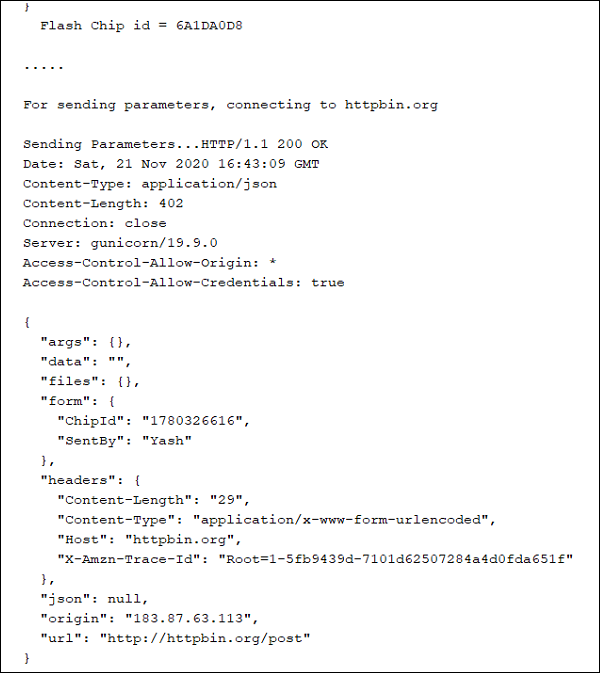
如您所见,“form”字段中回显了POST正文的内容。您应该在串口监视器上看到类似于上面的内容。另请注意URL字段。它清楚地表明请求行中的/post地址被解释为http://httpbin.org/post。
最后,我们将等待5秒钟,然后结束循环,从而再次发出请求。
  delay(5000);
}
GET请求
此时,您可能想知道,将此POST请求转换为GET请求需要进行哪些更改。实际上,这很简单。首先,您将调用/get地址而不是/post。然后,您将在问号(?)后将正文的内容附加到URL。最后,您将方法替换为GET。此外,不再需要Content-Length和Content−Type标头,因为您的正文为空。因此,您的请求块将如下所示:
if (conn == 1) {
   String path = String("/get") + String("?") +body;
   Serial.println(); Serial.print("Sending Parameters...");
   //Request
   client.println("GET "+path+" HTTP/1.1");
   //Headers
   client.print("Host: "); client.println(server);
   client.println("Connection: Close");
   client.println();
   //No Body

   //Wait for server response
   while (client.available() == 0);

   //Print Server Response
   while (client.available()) {
      char c = client.read();
      Serial.write(c);
   }
} else {
   client.stop();
   Serial.println("Connection Failed");
}
相应的响应将如下所示:
HTTP/1.1 200 OK
Date: Tue, 17 Nov 2020 18:05:34 GMT
Content-Type: application/json
Content-Length: 497
Connection: close
Server: gunicorn/19.9.0
Access-Control−Allow−Origin: *
Access-Control-Allow-Credentials: true

{
   "args": {
      "ChipID": "3F:A0:A1:77:0D:84",
      "SentBy": "Yash"
   },
   "headers": {
      "Accept": "*/*",
      "Accept-Encoding": "deflate, gzip",
      "Host": "httpbin.org",
      "User-Agent": "Mozilla/5.0 (Windows NT 10.0; Win64; x64) AppleWebKit/537.36 (KHTML, like Gecko) Chrome/86.0.4240.198 Safari/537.36",
      "X−Amzn−Trace−Id": "Root=1−5fb410ee−3630963b0b7980c959c34038"
   },
   "origin": "206.189.180.4",
   "url": "https://httpbin.org/get?ChipID=3F:A0:A1:77:0D:84&SentBy=Yash"
}
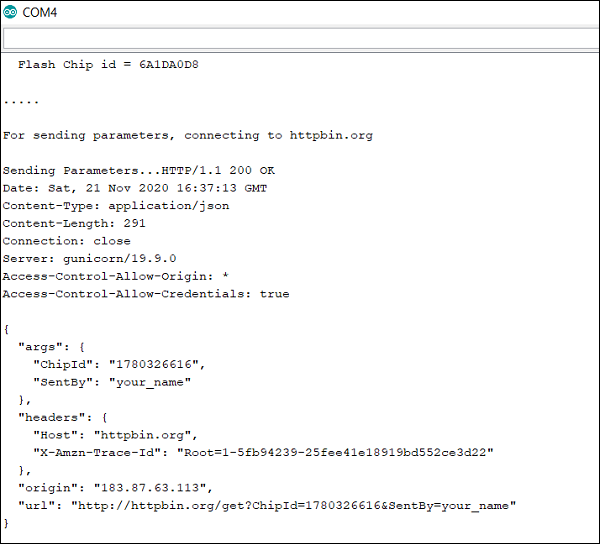
如您所见,发送到服务器的参数现在返回在args字段中,因为它们作为URL中的参数发送。
恭喜!!您已成功使用ESP32发送HTTP请求。