
 数据结构
数据结构 网络
网络 关系数据库管理系统 (RDBMS)
 操作系统
操作系统 Java
Java MS Excel
 iOS
iOS HTML
HTML CSS
CSS Android
 Python
 C语言编程
C语言编程 C++
C++ C#
C# MongoDB
 MySQL
MySQL Javascript
 PHP
PHP 物理学
物理学 化学
化学 生物学
生物学 数学
数学 英语
英语 经济学
经济学 心理学
心理学 社会学
社会学 服装学
服装学 法学
法学Android中创建不可变列表的工厂方法?
本例演示了在Android中使用工厂方法创建不可变列表。
步骤1 - 在Android Studio中创建一个新项目,转到文件⇒新建项目,并填写所有必需的详细信息以创建新项目。
步骤2 - 将以下代码添加到res/layout/activity_main.xml。
<?xml version="1.0" encoding="utf-8"?>
<LinearLayout xmlns:android="http://schemas.android.com/apk/res/android"
   xmlns:tools="http://schemas.android.com/tools"
   android:layout_width="match_parent"
   android:layout_height="match_parent"
   android:orientation="vertical"
   android:gravity="center_horizontal"
   android:layout_marginTop="100dp"
   tools:context=".MainActivity">
   <ListView
      android:id="@+id/list"
      android:layout_width="wrap_content"
      android:layout_height="wrap_content">
   </ListView>
</LinearLayout>
在上面的代码中,我们使用了listview来添加不可变列表。
步骤3 - 将以下代码添加到src/MainActivity.java
package com.example.myapplication;

import android.os.Bundle;
import android.support.v7.app.AppCompatActivity;
import android.widget.ArrayAdapter;
import android.widget.ListView;
import android.widget.TextView;

import java.util.ArrayList;
import java.util.Arrays;
import java.util.Collections;
import java.util.HashSet;
import java.util.List;
import java.util.Set;

public class MainActivity extends AppCompatActivity {
   ListView list;
   String[] mobileArray = {"Android","IPhone","WindowsMobile","Blackberry", "WebOS","Ubuntu","Windows7","Max OS X"};
   @Override
   protected void onCreate(Bundle savedInstanceState) {
      super.onCreate(savedInstanceState);
      setContentView(R.layout.activity_main);
      list = findViewById(R.id.list);
      List<String> list1 = new ArrayList<>(Arrays.asList(mobileArray));
      List<String> readOnlylist = Collections.unmodifiableList(list1);
      String[] array = new String[readOnlylist.size()];
      ArrayAdapter adapter = new ArrayAdapter<String>(this,
      android.R.layout.simple_list_item_1, readOnlylist.toArray(array));
      list.setAdapter(adapter);
   }
}
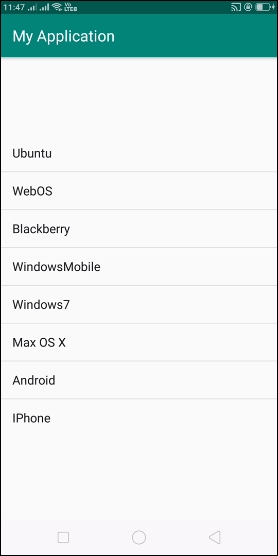
让我们尝试运行您的应用程序。我假设您已将实际的Android移动设备连接到您的计算机。要从Android Studio运行应用程序,请打开项目的其中一个活动文件,然后单击运行  工具栏中的图标。选择您的移动设备作为选项,然后检查您的移动设备,它将显示您的默认屏幕 –
点击 这里 下载项目代码

更新于:2020年6月26日
浏览量:153

广告