
 数据结构
数据结构 网络
网络 关系型数据库管理系统
 操作系统
操作系统 Java
Java MS Excel
 iOS
iOS HTML
HTML CSS
CSS Android
 Python
 C 编程
C 编程 C++
C++ C#
C# MongoDB
 MySQL
MySQL Javascript
 PHP
PHP 物理学
物理学 化学
化学 生物学
生物学 数学
数学 英语
英语 经济学
经济学 心理学
心理学 社会学
社会学 服装设计
服装设计 法律研究
法律研究Gecko 驱动程序,使用 Selenium 从下拉列表中选择值
我们可以借助 geckodriver.exe 可执行文件在 Firefox(版本>47)中使用 Selenium webdriver 脚本。首先,我们必须从以下链接下载此文件:
https://github.com/mozilla/geckodriver/releases
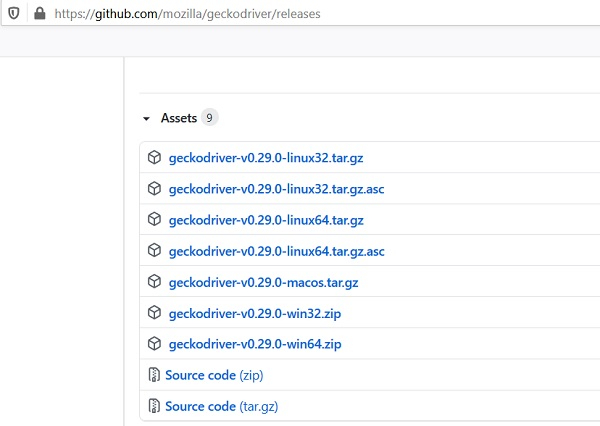
导航到上述 URL 后,我们必须根据当前使用的操作系统(Windows、Linux 或 Mac)单击一个链接。下载完成后,将创建一个 zip 文件。我们必须解压缩 zip 文件并将 geckodriver.exe 文件存储在所需位置。
然后,我们必须使用 System.setProperty 方法配置 geckodriver.exe 文件的路径,并同时创建 FirefoxDriver 类的对象。
要从下拉列表中选择一个值,我们必须使用 Select 类。html 代码中的下拉列表由
Select 类中有多种方法可用于从下拉列表中选择选项:
selectByIndex – 将下拉列表要选择的选项的索引作为参数传递给此方法。索引从 0 开始。
WebElement e = driver.findElement(By.id("slc"));
Select s = new Select(e);
s.selectByIndex(0);
selectByValue – 将下拉列表要选择的选项的 value 属性作为参数传递给此方法。下拉列表中的选项应具有 value 属性,以便可以使用此方法。
WebElement e = driver.findElement(By.id("slc"));
Select s = new Select(e);
s.selectByValue("option 1");
selectByVisibleText – 将下拉列表要选择的选项的可视文本作为参数传递给此方法。
WebElement e = driver.findElement(By.id("slc"));
Select s = new Select(e);
s.selectByVisibleText("Selenium");
让我们来看一个下拉列表及其 html 代码的示例:
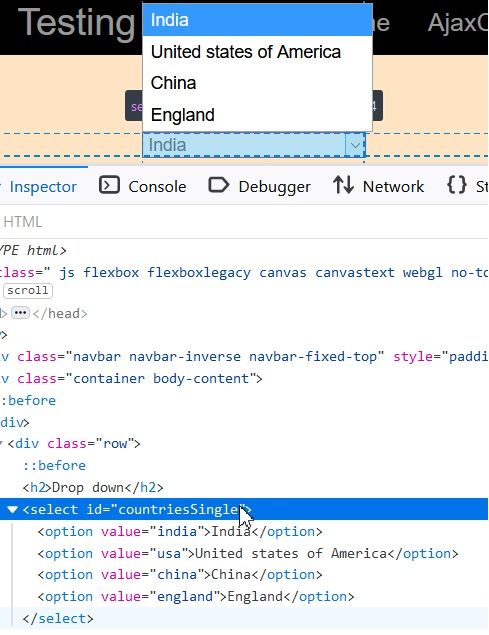
示例
import org.openqa.selenium.By;
import org.openqa.selenium.WebDriver;
import org.openqa.selenium.WebElement;
import org.openqa.selenium.firefox.FirefoxDriver;
import java.util.concurrent.TimeUnit;
import org.openqa.selenium.support.ui.Select
public class DrpDwnValue{
   public static void main(String[] args) {
      System.setProperty("webdriver.gecko.driver", "C:\Users\ghs6kor\Desktop\Java\geckodriver.exe");
      WebDriver driver = new FirefoxDriver();
      //implicit wait
      driver.manage().timeouts().implicitlyWait(5, TimeUnit.SECONDS);
      //URL launch
      driver.get("http://www.uitestpractice.com/Students/Select");
      //identify dropdown
      WebElement m = driver.findElement(By.id("countriesSingle"));

      //select option by index
      Select s = new Select(m);
      s.selectByIndex(0);
      //get option selected
      String st = s.getFirstSelectedOption().getText();
      System.out.println("Option selected by Index: " + st);
      //select option by value
      s.selectByValue("england");
      //get option selected
      String r = s.getFirstSelectedOption().getText();
      System.out.println("Option selected by Value: " + r);
      //select option by visible text
      s.selectByVisibleText("United states of America");
      //get option selected
      String l = s.getFirstSelectedOption().getText();
      System.out.println("Option selected by Visible Text: " + l);
      driver.quit();
   }
}
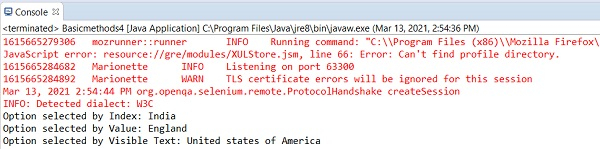
输出

更新于: 2021-04-03
411 次查看

广告