
 数据结构
数据结构 网络
网络 关系数据库管理系统
 操作系统
操作系统 Java
Java MS Excel
 iOS
iOS HTML
HTML CSS
CSS Android
 Python
 C 编程
C 编程 C++
C++ C#
C# MongoDB
 MySQL
MySQL Javascript
 PHP
PHP 物理学
物理学 化学
化学 生物学
生物学 数学
数学 英语
英语 经济学
经济学 心理学
心理学 社会学
社会学 服装设计
服装设计 法律研究
法律研究使用 Python 生成验证码
PIL 的一个修改版本,称为 pillow 库,可用于在 Python 图像库中生成基于文本的 **验证码**(全自动区分计算机和人类的图灵测试)。
验证码类型
验证码有不同的类型,其中一些如下所示。
-
基于文本的验证码:提供一系列字符,并带有扭曲的特征和随机噪声,使字符识别变得困难。
-
基于图像的验证码:向人类提供图像,并扭曲特征以使计算机难以识别图像。
-
基于音频的验证码:向人类提供口语字符或剪辑的音频录制,他们需要将其正确输入到系统中。
-
行为验证码:使机器人难以复制/自动化。
生成基于文本的验证码
通过使用 **'pillow'** 库,我们可以生成基于文本的验证码,它允许我们在 Python 中创建和操作图像。所包含的步骤如下。
-
创建空白图像
-
生成随机验证码文本
-
定义字体、文本大小和位置
-
生成并保存验证码
创建空白图像
初始化图像参数(宽度、高度和长度)(以像素为单位)。**'Image.new('RGB', (width, height), 'white')'** 创建一个具有给定参数的空白图像,而 **'ImageDraw.Draw(image)'** 允许我们在创建的图像上绘制内容,例如文本或噪声。
def generate_captcha(width, height, length):
    image = Image.new('RGB', (width, height), 'white')
    draw = ImageDraw.Draw(image)
生成随机文本
从下面的示例中,**'random.choices()'** 函数生成一个随机字符列表,而 **'.join()'** 函数将此字符列表连接成单个字符串。
captcha_text = ''.join(random.choices(string.ascii_uppercase + string.digits, k=length))
计算文本大小和位置
**'draw.text size (captcha_text, font)'** 将计算验证码文本的宽度和高度(以像素为单位),而变量 **'text_x'** 和 **'text_y'** 确定文本的位置。
font = ImageFont.truetype('arial.ttf', 72)
 t_width, t_height = draw.textsize(captcha_text, font)
    text_x = (width - t_width) / 2
    text_y = (height - t_height) / 2
生成并保存验证码
用于 **验证码** 的文本存储在 **'captcha_text'** 中,以便在用户提交输入时进行验证。
  return image, captcha_text

# Define CAPTCHA parameters
width = 700  # Width of the CAPTCHA image
height = 350  # Height of the CAPTCHA image
length = 6   # Length of the CAPTCHA text

captcha_image, captcha_text = generate_captcha(width, height, length)
captcha_image.save('captcha.png')
示例
from PIL import Image, ImageDraw, ImageFont
import random
import string

def generate_captcha(width, height, length):
    # Create a blank image with a white background
    image = Image.new('RGB', (width, height), 'white')
    draw = ImageDraw.Draw(image)

    # Generate random CAPTCHA text
    captcha_text = ''.join(random.choices(string.ascii_uppercase + string.digits, k=length))

    # Define the font and its size
    font = ImageFont.truetype('arial.ttf', 72)

    # Calculate the text size and position it in the center
    t_width, t_height = draw.textsize(captcha_text, font)
    text_x = (width - t_width) / 2
    text_y = (height - t_height) / 2

    # Draw the text on the image
    draw.text((text_x, text_y), captcha_text, font=font, fill='black')

    # Add noise to the image
    for x in range(width):
        for y in range(height):
            if random.random() < 0.1:  # Adjust noise level
                draw.point((x, y), fill='black')

    # Return the generated CAPTCHA image and the corresponding text
    return image, captcha_text

# Define CAPTCHA parameters
width = 700
height = 350
length = 6

# Generate and save the CAPTCHA image
captcha_image, captcha_text = generate_captcha(width, height, length)
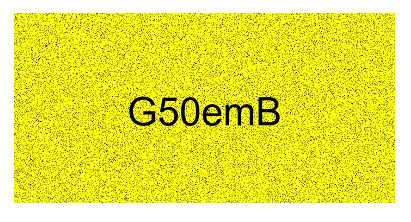
captcha_image.save('captcha.png')
输出

更新于: 2024-11-13
2K+ 次查看

广告