
 数据结构
数据结构 网络
网络 关系型数据库管理系统
 操作系统
操作系统 Java
Java MS Excel
 iOS
iOS HTML
HTML CSS
CSS Android
 Python
 C语言编程
C语言编程 C++
C++ C#
C# MongoDB
 MySQL
MySQL Javascript
 PHP
PHP 物理学
物理学 化学
化学 生物学
生物学 数学
数学 英语
英语 经济学
经济学 心理学
心理学 社会学
社会学 时尚研究
时尚研究 法律研究
法律研究使用Arduino获取温度和湿度传感器数据
在本教程中,我们将连接 Arduino DHT-22 温度和湿度传感器,并在串口监视器上打印获取的温度和湿度值。
电路图
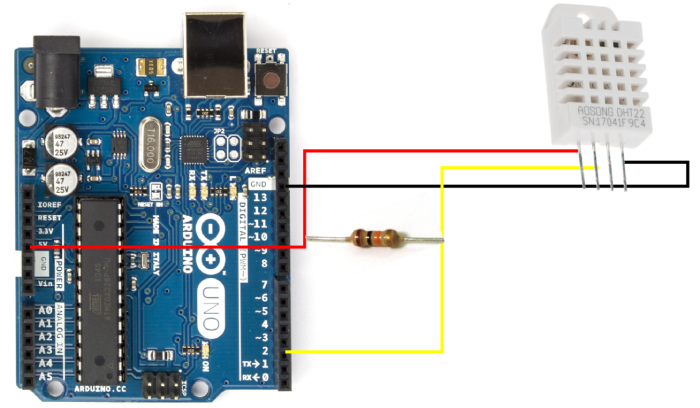
当 DHT-22 面朝您时,从左侧数第一个引脚是 VCC 引脚,连接到 5V;下一个引脚是 DATA 引脚,连接到 Arduino Uno 的 2 号引脚。第三个引脚不连接。第四个引脚 GND 连接到 Arduino 的 GND。一个 10K 电阻需要连接在 DHT22 的 DATA 引脚和 Vcc 引脚之间,如上图所示。
所需库
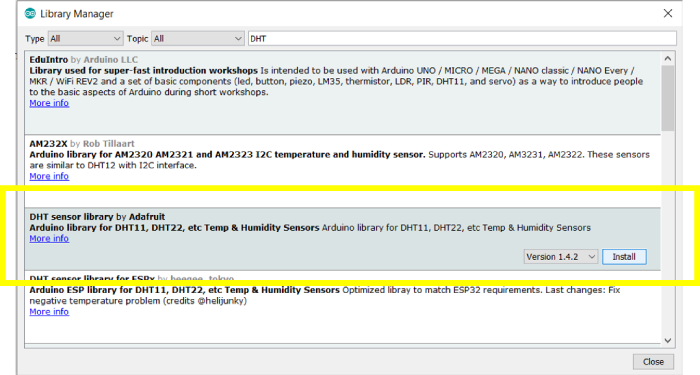
Adafruit 的 DHT 传感器库将需要用于连接 Arduino Uno 和 OLED 显示屏 -
转到工具 → 管理库,搜索此库,然后单击安装。
代码演练
我们将演练 DHT 传感器库附带的一个示例代码。转到文件 → 示例 → DHT 传感器库 → DHTtester

或者,可以在 GitHub 上访问此代码:https://github.com/adafruit/DHTsensor-library/blob/master/examples/DHTtester/DHTtester.ino
如您所见,我们首先包含 DHT 库。
#include "DHT.h"
接下来,我们定义连接到 DHT 传感器的数字引脚(在本例中为 Arduino 的 2 号引脚)。我们还定义了我们正在使用的 DHT 传感器类型(DHT22)
#define DHTPIN 2
#define DHTTYPE DHT22
接下来,我们使用之前定义的 DHTPIN 和 DHTTYPE 定义 DHT 对象
DHT dht(DHTPIN, DHTTYPE);
在 setup 中,我们初始化 Serial 和 dht,使用 dht.begin()。
void setup() {
   Serial.begin(9600);
   Serial.println(F("DHTxx test!"));

   dht.begin();
}
在循环中,我们首先添加 2 秒的延迟。这使得两次读取之间有一定的时间间隔。接下来,我们使用 .readHumidity() 和 .readTemperature() 函数读取湿度和温度。.readTemperature() 函数接收一个布尔参数,当设置为 true 时,返回华氏温度(默认情况下返回摄氏温度)。
如果 3 次读取中的任何一次为 NaN,我们将返回(您也可以在这里编写 continue)。最后,我们使用读取的温度和湿度值计算体感温度。您可以此处阅读更多关于体感温度的信息。
最后,我们打印所有读取/计算的值。
void loop() {
   // Wait a few seconds between measurements.
   delay(2000);

   // Reading temperature or humidity takes about 250 milliseconds!
   // Sensor readings may also be up to 2 seconds 'old' (its a very slow sensor)
   float h = dht.readHumidity();
   // Read temperature as Celsius (the default)
   float t = dht.readTemperature();
   // Read temperature as Fahrenheit (isFahrenheit = true)
   float f = dht.readTemperature(true);

   // Check if any reads failed and exit early (to try again).
   if (isnan(h) || isnan(t) || isnan(f)) {
      Serial.println(F("Failed to read from DHT sensor!"));
      return;
   }

   // Compute heat index in Fahrenheit (the default)
   float hif = dht.computeHeatIndex(f, h);
   // Compute heat index in Celsius (isFahreheit = false)
   float hic = dht.computeHeatIndex(t, h, false);

   Serial.print(F("Humidity: "));
   Serial.print(h);
   Serial.print(F("% Temperature: "));
   Serial.print(t);
   Serial.print(F("°C "));
   Serial.print(f);
   Serial.print(F("°F Heat index: "));
   Serial.print(hic);
   Serial.print(F("°C "));
   Serial.print(hif);
   Serial.println(F("°F"));
}
将此代码上传到您的 Arduino,您将能够在串口监视器上观察温度和湿度值。

421 次查看
