
 数据结构
数据结构 网络
网络 RDBMS
RDBMS 操作系统
操作系统 Java
Java MS Excel
 iOS
iOS HTML
HTML CSS
CSS Android
 Python
 C 编程
C 编程 C++
C++ C#
C# MongoDB
 MySQL
MySQL Javascript
 PHP
PHP 物理
物理 化学
化学 生物
生物 数学
数学 英语
英语 经济学
经济学 心理学
心理学 社会科学
社会科学 时尚研究
时尚研究 法学
法学如何在 Tkinter.Listbox 中获取某项的索引?
我们使用 Tkinter Listbox 窗口小部件创建项目列表。列表框中的每个项目都有一些索引,这些索引按顺序垂直分配给它们。
假设我们要获取列表框中单击项目的索引。然后,我们必须首先创建一个按钮,该按钮将使用list.curselection()方法捕获项目的当前选择,然后,我们将使用 get() 方法打印索引。
示例
# Import the required libraries
from tkinter import *

# Create an instance of tkinter frame or window
win = Tk()

# Set the size of the window
win.geometry("700x350")

# Create a Listbox widget
lb = Listbox(win, width=100, height=10, font=('Times 13'), selectbackground="black")
lb.pack()

# Define a function to edit the listbox ite
def save():
   for item in lb.curselection():
      print("You have selected " + str(item+1))

# Add items in the Listbox
lb.insert("end", "A", "B", "C", "D", "E", "F")

# Add a Button To Edit and Delete the Listbox Item
Button(win, text="Save", command=save).pack()

win.mainloop()
输出
如果我们运行以上代码,它将显示一个包含字母列表 (A-F) 的窗口。
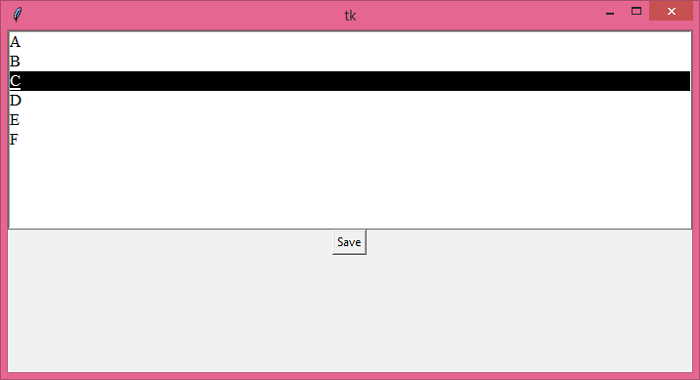
从列表中选择一个项目并单击 “保存” 按钮,以获取在控制台中打印的所选项目的索引。
You have selected 3

更新日期:19-Jun-2021
4K+ 浏览量

广告