
 数据结构
数据结构 网络
网络 RDBMS
RDBMS 操作系统
操作系统 Java
Java MS Excel
 iOS
iOS HTML
HTML CSS
CSS Android
 Python
 C 语言编程
 C++
C++ C#
C# MongoDB
 MySQL
MySQL Javascript
 PHP
PHP 物理学
物理学 化学
化学 生物学
生物学 数学
数学 英语
英语 经济学
经济学 心理学
心理学 社会学
社会学 服装设计
服装设计 法律研究
法律研究如何使用 JavaScript 访问表格中的元素?
要使用 JavaScript 访问表格中的 <tr> 元素,您可以首先使用 document.getElementById() 或 document.getElementsByTagName() 方法访问表格元素。然后,您可以使用表格的 childNodes 属性访问表格内的 <tr> 元素。
我们将重点关注在鼠标悬停在当前行(我们当前所在的行)时更改其背景颜色,并在鼠标移开时将其背景颜色恢复为正常。
示例
因此,假设我们有以下 HTML 代码来渲染一个表格。
<!DOCTYPE html>
<html>
<head>
   <title>
   	Access tr element
   </title>
   <style type="text/css">
   	th,
   	td {
   		padding: 8px;
   		text-align: left;
   		border-bottom: 1px solid #ccc;
   	}
   </style>
</head>
<body>
   <table id="my_table">
      <tr>
         <th>Player</th>
         <th>Country</th>
         <th>Role</th>
      </tr>
      <tr>
   	   <td>Virat Kohli</td>
   	   <td>India</td>
   	   <td>Middle Order Batsman</td>
      </tr>
     	<tr>
         <td>Steve Smith</td>
         <td>Australia</td>
         <td>Middle Order Batsman</td>
      </tr>
      <tr>
         <td>Jofra Archer</td>
         <td>England</td>
         <td>Opening Fast Bowler</td>
      </tr>
      <tr>
         <td>Rashid Khan</td>
         <td>Afghanistan</td>
         <td>Spin All-Rounder</td>
      </tr>
   </table>
</body>
</html>
这是表格最初的样子 -
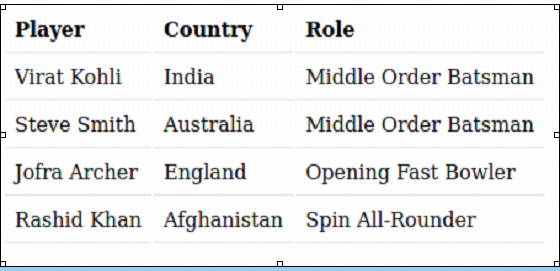
我们的任务是在我们悬停到的行上添加一个较深的背景,并在鼠标离开该行后移除该背景。
方法
由于我们需要处理和应用特定的样式到 <tr>(表格行),而不是整个表格,我们将尝试以某种方式选择表格的行。
我们将使用 **document.getElementByTagName** 函数来选择所有 <tr>(表格行)。
然后在循环遍历行时,我们将向其附加事件监听器,以监听悬停事件。
最后,在事件监听器内部,我们将编写更改颜色的逻辑。
示例
因此,最终代码将如下所示 -
<!DOCTYPE html>
<html>
<head>
   <title>
   	Hello World
   </title>
   <style type="text/css">
   	th,
   	td {
   		padding: 8px;
   		text-align: left;
   		border-bottom: 1px solid #ddd;
   	}
   </style>
</head>
<body>
   <table id="my_table">
   	<tr>
   		<th>Player</th>
   		<th>Country</th>
   		<th>Role</th>
   	</tr>
   	<tr>
   		<td>Virat Kohli</td>
   		<td>India</td>
   		<td>Middle Order Batsman</td>
   	</tr>
   	<tr>
   		<td>Steve Smith</td>
   		<td>Australia</td>
   		<td>Middle Order Batsman</td>
   	</tr>
   	<tr>
   		<td>Jofra Archer</td>
   		<td>England</td>
   		<td>Opening Fast Bowler</td>
   	</tr>
   	<tr>
   		<td>Rashid Khan</td>
   		<td>Afghanistan</td>
   		<td>Spin All-Rounder</td>
   	</tr>
   </table>
	<script>
      const tableRows = document.getElementsByTagName('tr');
      // starting from 1 instead of 0
      // because we don’t want to apply the styling to header
      for (let curr = 1; curr < tableRows.length; curr++) {
         tableRows[curr].addEventListener('mouseover', function(e){
            console.log("over");
            tableRows[curr].style.backgroundColor = '#aaa';
         });
            tableRows[curr].addEventListener('mouseleave', function(e){
               console.log("leave");
               tableRows[curr].style.backgroundColor = '';
         });
      }
	</script>
</body>
</html>
代码理解
此 HTML 代码创建一个表格,其中包含一个标题行和四个数据行。
该表格具有基本的样式,以向单元格添加填充和边框。
JavaScript 代码向每个数据行添加事件监听器,当鼠标悬停在其上时更改行的背景颜色,并在鼠标离开时将其更改回默认颜色。
当鼠标分别进入和离开行时,控制台也将记录“over”和“leave”。

更新于: 2023年2月6日
11K+ 次浏览

广告