
 数据结构
数据结构 网络
网络 关系型数据库管理系统
 操作系统
操作系统 Java
Java MS Excel
 iOS
iOS HTML
HTML CSS
CSS Android
 Python
 C 编程
C 编程 C++
C++ C#
C# MongoDB
 MySQL
MySQL Javascript
 PHP
PHP 物理
物理 化学
化学 生物
生物 数学
数学 英语
英语 经济
经济 心理学
心理学 社会学
社会学 时尚研究
时尚研究 法律研究
法律研究如何在你的网页中添加背景音乐?
要在网页上添加背景音乐,可以使用 <embed>…</embed> 元素。同时使用 autoplay 属性。这样就可以让音乐在页面加载时在背景中播放。
以一种在网页上隐藏播放器的方式设置宽度和高度。loop 属性被用来指定音频是否会重新开始。将音乐文件添加到服务器,并在src 属性中提及链接。
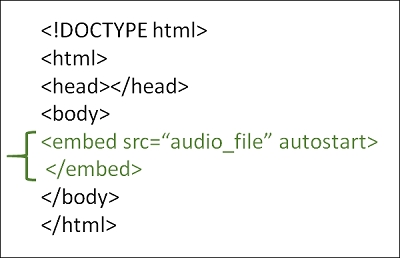
示例
你可以尝试运行以下代码,在你的网页中添加背景音乐
<!DOCTYPE html>
<html>
   <head>
      <title>HTML background music</title>
   </head>
   <body>
      <p>The music is running in the background.</p>
      <p>(Song: Kalimba which is provided as a Sample Music in Windows)</p>
      <embed src="/html/Kalimba.mp3" loop="true" autostart="true" width="2" height="0">
   </body>
</html>

更新时间: 13-9月-2023
34K+ 访问量

广告