
 数据结构
数据结构 网络
网络 RDBMS
RDBMS 操作系统
操作系统 Java
Java MS Excel
 iOS
iOS HTML
HTML CSS
CSS Android
 Python
 C 编程
C 编程 C++
C++ C #
C # MongoDB
 MySQL
MySQL Javascript
 PHP
PHP 物理
物理 化学
化学 生物
生物 数学
数学 英语
英语 经济学
经济学 心理学
心理学 社会学
社会学 时尚研究
时尚研究 法律研究
法律研究如何在 Tkinter 窗口小组件的一侧添加填充?
假设我们要在特定窗口小组件的一侧(顶部/底部或左侧/右侧)添加填充。使用 Tkinter 的pack()和grid()方法,我们可以实现此目的。
在 pack() 方法中,我们必须为“padx”和“pady”定义值。另一方面,网格方法只要求两个元组,即 x 和 y,以便在 X 轴或 Y 轴的任意一边添加填充。
示例
#import the required library
from tkinter import *

#Create an instance of window or frame
win= Tk()
win.geometry("700x400")

#Create two buttons
#Add padding in x and y axis

b1= Button(win, text= "Button1", font=('Poppins bold', 15))
b1.pack(padx=10)

b2= Button(win, text= "Button2", font=('Poppins bold', 15))
b2.pack(pady=50)

b3= Button(win, text= "Button3", font= ('Poppins bold', 15))
b3.pack(padx=50, pady=50)

#Keep running the window
win.mainloop()
输出
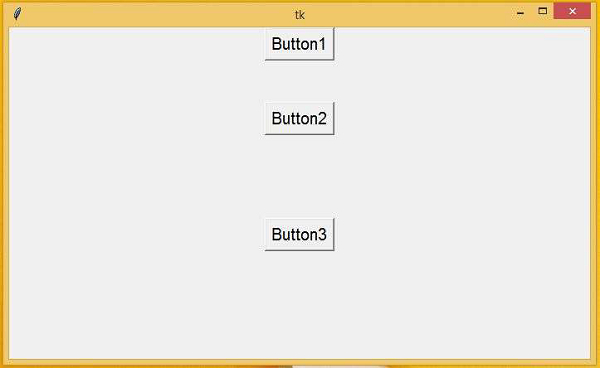
运行以上代码将创建一个窗口,其中包含三个按钮,这些按钮将在 X、Y 或两个轴的任意一侧拥有一些填充。

更新于:2021 年 3 月 4 日
7K+ 次浏览

广告