
 数据结构
数据结构 网络
网络 RDBMS
RDBMS 操作系统
操作系统 Java
Java MS Excel
 iOS
iOS HTML
HTML CSS
CSS Android
 Python
 C 编程
C 编程 C++
C++ C#
C# MongoDB
 MySQL
MySQL Javascript
 PHP
PHP 物理
物理 化学
化学 生物
生物 数学
数学 英语
英语 经济学
经济学 心理学
心理学 社会研究
社会研究 时装研究
时装研究 法律研究
法律研究如何将 Tkinter 文本小部件设为只读?
在 Tkinter 中,有时,我们可能希望禁用文本小部件。要实现这一点,我们可以将文本配置设为 DISABLED。这将会冻结文本小部件并使其变为只读。
在这个示例中,我们将创建一个文本小部件和一个按钮,它将允许用户立即禁用或冻结文本小部件。
示例
#Import the library
from tkinter import *

#Create an instance of window
win= Tk()

#Set the geometry of the window
win.geometry("700x400")

def disable_button():
   text.config(state= DISABLED)

#Label
Label(win,text="Type Something",font=('Helvetica bold', 25),
fg="green").pack(pady=20)

#Create a Text widget
text= Text(win, height= 10,width= 40)
text.pack()

#Create a Disable Button
Button(win, text= "Disable", command= disable_button,fg= "white",
bg="black", width= 20).pack(pady=20)

win.mainloop()
输出
运行以上代码将创建一个文本小部件和一个按钮,它可以用禁用或冻结小部件。
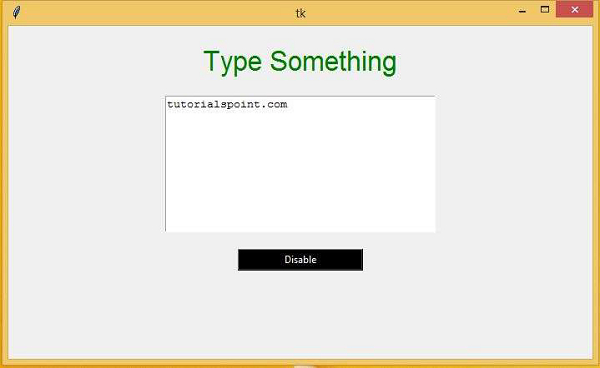
当你点击“禁用”按钮之后,文本小部件将被禁用,你将无法在其中输入任何其他内容。

更新日期: 06-Mar-2021
8K+ 次浏览

广告