
 数据结构
数据结构 网络
网络 RDBMS
RDBMS 操作系统
操作系统 Java
Java MS Excel
 iOS
iOS HTML
HTML CSS
CSS Android
 Python
 C 编程
C 编程 C++
C++ C#
C# MongoDB
 MySQL
MySQL Javascript
 PHP
PHP 物理
物理 化学
化学 生物
生物 数学
数学 英语
英语 经济学
经济学 心理学
心理学 社会学
社会学 时尚学
时尚学 法律学
法律学如何删除 Tkinter 文本部件中的全部内容?
Tkinter 文本部件接受并支持多行用户输入。我们可以指定文本部件的其他属性,例如宽度、高度、背景、边框宽度以及其他属性。
假设我们想删除给定文本部件中的所有内容,那么我们可以使用delete("1.0", END) 函数。
示例
在此示例中,我们将使用 Python 中的random 模块插入一些随机文本,并使用 delete() 方法擦除。
#Import the required Libraries
from tkinter import *
from tkinter import ttk
import random

#Create an instance of Tkinter frame
win = Tk()

#Set the geometry of Tkinter Frame
win.geometry("750x250")

#Define functions to insert/erase the text
def insert_text():
   text.insert(INSERT,chr(random.randint(ord('a'),ord('z'))))

def erase_text():
   text.delete("1.0",END)

#Create a Text widget
text= Text(win, width=50, height= 5)
text.focus_set()
text.pack()

#Add a bottom widgets
button1= ttk.Button(win, text= "Insert",command= insert_text)
button1.pack(side=TOP)
button2= ttk.Button(win, text= "Erase",command= erase_text)
button2.pack(side=TOP)
#Create a Button widget
win.mainloop()
输出
运行以上代码,将显示一个包含文本部件和用于删除其全部内容的按钮的窗口。
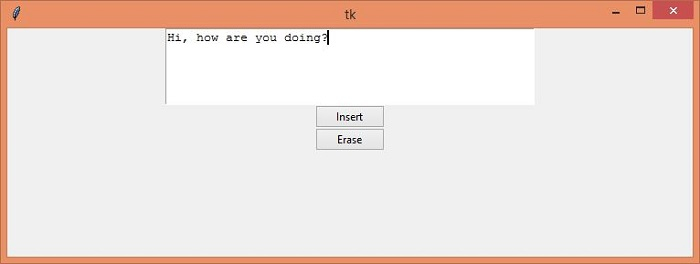
现在,单击“插入”按钮以在文本框中插入一些随机字符。一旦在文本框中插入字符,我们可以通过单击“删除”按钮来删除所有内容。

更新于: 04-May-2021
297 次浏览

Advertisement