
 数据结构
数据结构 网络
网络 RDBMS
RDBMS 操作系统
操作系统 Java
Java MS Excel
 iOS
iOS HTML
HTML CSS
CSS Android
 Python
 C编程
C编程 C++
C++ C#
C# MongoDB
 MySQL
MySQL Javascript
 PHP
PHP 物理
物理 化学
化学 生物
生物 数学
数学 英语
英语 经济学
经济学 心理学
心理学 社会学
社会学 时装研究
时装研究 法律研究
法律研究如何调整JavaFX中Text节点中的行间距?
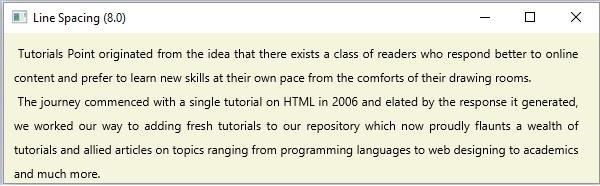
javafx.scene.text.Text类的行间距属性指定文本(节点)各行之间的行间距(垂直)。
可以使用setLineSpacing()方法为此属性设置值。此方法接受一个布尔值作为参数,并设置行之间指定的空间(垂直)。
示例
import java.io.FileInputStream;
import java.io.FileNotFoundException;
import java.io.InputStream;
import java.util.Scanner;
import javafx.application.Application;
import javafx.scene.Group;
import javafx.scene.Scene;
import javafx.scene.paint.Color;
import javafx.stage.Stage;
import javafx.scene.text.Text;
import javafx.scene.text.TextAlignment;
public class TextSpacing extends Application {
   public void start(Stage stage) throws FileNotFoundException {
      //Reading the contents of a text file.
      InputStream inputStream = new FileInputStream("D:\sample_text.txt");
      Scanner sc = new Scanner(inputStream);
      StringBuffer sb = new StringBuffer();
      while(sc.hasNext()) {
         sb.append(" "+sc.nextLine()+"\n");
      }
      //Creating a text object
      Text text = new Text(10.0, 25.0, sb.toString());
      //Wrapping the text
      text.setWrappingWidth(565);
      //Setting the alignment
      text.setTextAlignment(TextAlignment.JUSTIFY);
      //Setting the space
      text.setLineSpacing(2.0);
      //Setting the stage
      Group root = new Group(text);
      Scene scene = new Scene(root, 595, 150, Color.BEIGE);
      stage.setTitle("Line Spacing (2.0)");
      stage.setScene(scene);
      stage.show();
   }
   public static void main(String args[]){
      launch(args);
   }
}
sample.txt
假设以下内容是sample.txt文件的内容 −
Tutorials Point originated from the idea that there exists a class of readers who respond better
to online content and prefer to learn new skills at their own pace from the comforts of their drawing rooms.
The journey commenced with a single tutorial on HTML in 2006 and elated by the response it generated,
we worked our way to adding fresh tutorials to our repository which now proudly flaunts a wealth of
tutorials and allied articles on topics ranging from programming languages to web designing to academics
and much more.
输出
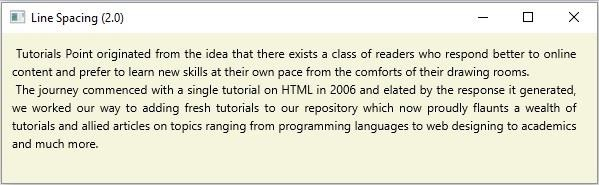 同样,如果将行间距设置为8.0,则会出现以下输出 −

更新于: 14-Apr-2020
1K + 次浏览

广告