
 Data Structure
 Networking
 RDBMS
RDBMS Operating System
 Java
Java MS Excel
 iOS
iOS HTML
HTML CSS
CSS Android
 Python
 C Programming
 C++
C++ C#
C# MongoDB
 MySQL
MySQL Javascript
 PHP
PHP Physics
 Chemistry
 Biology
 Mathematics
 English
 Economics
 Psychology
 Social Studies
 Fashion Studies
 Legal Studies
如何将 ttk 的复选按钮左对齐?
如需将复选按钮左对齐,可以使用 anchor 参数,并将 anchor 参数设置为 "w"(西)。我们以一个示例了解如何操作。
步骤 -
导入 Tkinter 库,并创建一个 Tkinter 框架实例。
使用 geometry 方法设置框架的大小。
创建一个 LabelFrame,以便将复选按钮收集在一个组中。
接下来,在 LabelFrame 内创建一个复选按钮,并将其 anchor 设置为西。anchor='w'。
同样,创建另外三个复选按钮,并将其 anchor 设置为西。这样会将所有复选按钮左对齐。
最后,运行应用程序窗口的 mainloop。
示例
from tkinter import *

root = Tk()
root.geometry("700x350")

# Create a LabelFrame
frame = LabelFrame(root, text="Select the Subjects", padx=20, pady=20)
frame.pack(pady=20, padx=10)

# Create four checkbuttons inside the frame
C1 = Checkbutton(frame, text="Mathematics", width=200, anchor="w").pack()

C2 = Checkbutton(frame, text = "Physics", width=200, anchor="w").pack()

C3 = Checkbutton(frame, text = "Chemistry", width=200, anchor="w").pack()

C4 = Checkbutton(frame, text = "Biology", width=200, anchor="w").pack()

root.mainloop()
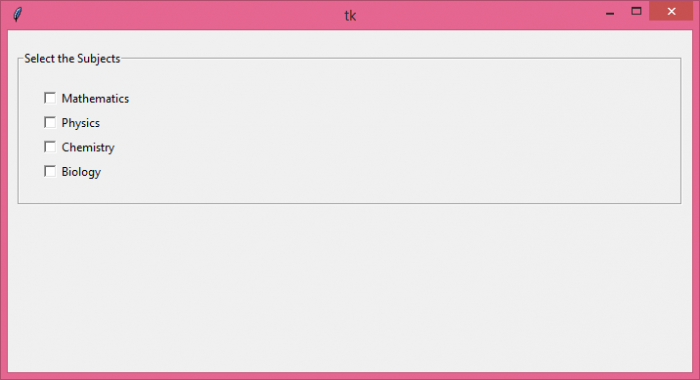
输出
执行后,将生成以下输出 -

更新时间:2021 年 10 月 26 日
4K+ 浏览

广告