
 数据结构
数据结构 网络
网络 关系型数据库管理系统
 操作系统
操作系统 Java
Java MS Excel
 iOS
iOS HTML
HTML CSS
CSS Android
 Python
 C 编程
C 编程 C++
C++ C#
C# MongoDB
 MySQL
MySQL Javascript
 PHP
PHP 物理学
物理学 化学
化学 生物学
生物学 数学
数学 英语
英语 经济学
经济学 心理学
心理学 社会学
社会学 时尚研究
时尚研究 法律研究
法律研究如何在 PyTorch 中应用 2D 卷积操作?
我们可以使用 **torch.nn.Conv2d()** 模块对由多个输入平面组成的输入图像应用 2D 卷积操作。它在卷积神经网络 (CNN) 中实现为一层。2D 卷积层的输入必须为 **[N,C,H,W]** 大小,其中 **N** 是批次大小,C 是通道数,H 和 W 是输入张量的 高度和宽度。
通常,2D 卷积操作应用于图像张量。对于 RGB 图像,通道数为 3。卷积操作的主要特征是滤波器或内核大小和步长。此模块支持 **TensorFloat32**。
语法
torch.nn.Conv2d(in_channels, out_channels, kernel_size)
参数
- **in_channels** – 输入图像中的通道数。
- **out_channels** – 卷积操作产生的通道数。
- **kernel_size** – 卷积核的大小。
除了以上三个参数外,还有一些可选参数,例如 **stride、padding、dilation** 等。我们将在以下示例中详细介绍这些参数的示例。
步骤
您可以使用以下步骤应用 2D 卷积操作:
- 导入所需的库。在以下所有示例中,所需的 Python 库是 **torch**。请确保您已安装它。要在图像上应用 2D 卷积操作,我们还需要 **torchvision** 和 **Pillow**。
import torch
import torchvision
from PIL import Image
定义 **输入** 张量或读取输入图像。如果输入是图像,则我们首先将其转换为 torch 张量。
定义 **in_channels、out_channels、kernel_size** 和其他参数。
接下来,通过将上述定义的参数传递给 **torch.nn.Conv2d()** 来定义卷积操作 conv。
conv = nn.Conv2d(in_channels, out_channels, kernel_size)
- 将卷积操作 conv 应用于输入张量或图像张量。
output = conv(input)
- 接下来打印卷积操作后的张量。如果输入是图像张量,则要可视化图像,我们首先将卷积操作后获得的张量转换为 PIL 图像,然后可视化图像。
让我们举几个例子,以便更好地理解。
输入图像
我们将在示例 2 中使用以下图像作为输入文件。

示例 1
在下面的 Python 示例中,我们对输入张量执行 2D 卷积操作。我们应用了 **kernel_size、stride、padding** 和 **dilation** 的不同组合。
# Python 3 program to perform 2D convolution operation
import torch
import torch.nn as nn

'''torch.nn.Conv2d(in_channels, out_channels, kernel_size, stride=1, padding=0)
'''
in_channels = 2
out_channels = 3
kernel_size = 2
conv = nn.Conv2d(in_channels, out_channels, kernel_size)

# conv = nn.Conv2d(2, 3, 2)

'''input of size [N,C,H, W]
N==>batch size,
C==> number of channels,
H==> height of input planes in pixels,
W==> width in pixels.
'''

# define the input with below info
N=2
C=2
H=4
W=4
input = torch.empty(N,C,H,W).random_(256)
print("Input Tensor:", input)
print("Input Size:",input.size())

# Perform convolution operation
output = conv(input)
print("Output Tensor:", output)
print("Output Size:",output.size())

# With square kernels (2,2) and equal stride
conv = nn.Conv2d(2, 3, 2, stride=2)
output = conv(input)
print("Output Size:",output.size())

# non-square kernels and unequal stride and with padding
conv = nn.Conv2d(2, 3, (2, 3), stride=(2, 1), padding=(2, 1))
output = conv(input)
print("Output Size:",output.size())

# non-square kernels and unequal stride and with padding and dilation
conv = nn.Conv2d(2, 3, (2, 3), stride=(2, 1), padding=(2, 1),
dilation=(2, 1))
output = conv(input)
print("Output Size:",output.size())
输出
Input Tensor:
   tensor([[[[218., 190., 62., 113.],
      [244., 63., 207., 220.],
      [238., 110., 29., 131.],
      [ 65., 249., 183., 188.]],

      [[122., 250., 28., 126.],
      [ 10., 42., 4., 145.],
      [ 1., 122., 165., 189.],
      [ 59., 100., 1., 187.]]],

      [[[213., 18., 186., 162.],
      [121., 10., 107., 123.],
      [ 32., 129., 5., 227.],
      [ 76., 4., 196., 246.]],

      [[ 41., 191., 64., 195.],
      [146., 163., 39., 177.],
      [121., 84., 223., 144.],
      [ 44., 182., 25., 15.]]]])
Input Size: torch.Size([2, 2, 4, 4])
Output Tensor:
   tensor([[[[ 200.8638, 67.4519, 109.4424],
      [ 100.6047, 58.4399, 95.3557],
      [ 89.4536, 105.6236, 138.5873]],

      [[ -71.7612, -69.3269, 14.8537],
      [ -48.7640, -111.0042, -163.9681],
      [ -60.4490, 0.4771, -34.4785]],

      [[ -74.8413, -156.2264, -51.3553],
      [ -47.2120, -25.1986, -65.1617],
      [-109.8461, -68.7073, -47.6045]]],

      [[[ 90.5058, 51.1314, 138.2387],
      [ 62.8581, 62.5389, 56.5713],
      [ 78.0566, 57.6294, 143.0357]],

      [[-154.6399, -100.9079, -108.6138],
      [ -99.6024, -120.7665, -112.6453],
      [-107.5664, -76.9361, 17.8084]],

      [[ 23.9299, -95.5887, -51.7418],
      [ -46.8106, 15.3651, -66.4384],
      [ 2.1374, -65.6986, -144.9656]]]],
   grad_fn=<MkldnnConvolutionBackward>)
Output Size: torch.Size([2, 3, 3, 3])
Output Size: torch.Size([2, 3, 2, 2])
Output Size: torch.Size([2, 3, 4, 4])
Output Size: torch.Size([2, 3, 3, 4])
Explore our latest online courses and learn new skills at your own pace. Enroll and become a certified expert to boost your career.
示例 2
在下面的 Python 示例中,我们对输入图像执行 2D 卷积操作。要应用 2D 卷积,我们首先将图像转换为 torch 张量,并在卷积后再次将其转换为 PIL 图像以进行可视化。
# Python program to perform 2D convolution operation on an image
# Import the required libraries
import torch
import torchvision
from PIL import Image
import torchvision.transforms as T

# Read input image
img = Image.open('dogncat.jpg')

# convert the input image to torch tensor
img = T.ToTensor()(img)
print("Input image size:", img.size()) # size = [3, 466, 700]

# unsqueeze the image to make it 4D tensor
img = img.unsqueeze(0) # image size = [1, 3, 466, 700]
# define convolution layer
# conv = nn.Conv2d(in_channels, out_channels, kernel_size)
conv = torch.nn.Conv2d(3, 3, 2)

# apply convolution operation on image
img = conv(img)

# squeeze image to make it 3D
img = img.squeeze(0) #now size is again [3, 466, 700]

# convert image to PIL image
img = T.ToPILImage()(img)

# display the image after convolution
img.show()
**注意** - 由于初始化的权重在不同的运行中可能不同,因此您可能会在卷积操作后获得不同的输出图像。
输出
Input image size: torch.Size([3, 525, 700])
Output image size: torch.Size([3, 524, 699])
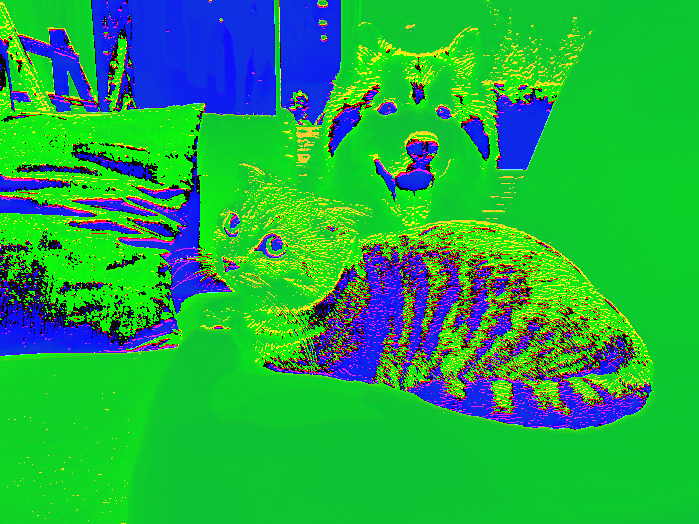
请注意,由于 **权重** 和 **偏差** 的初始化,您可能会在每次运行后看到获得的图像发生一些变化。

7K+ 浏览量
